Phishing-Resistant MFA: The Gold Standard of Authentication

Not all 2FA is created equal. Authenticator app codes and SMS can be relayed in real-time by phishing attacks. Hardware keys and passkeys are cryptographically immune to phishing. Here's what makes the difference.

Phishing-resistant MFA comparison — FIDO2 hardware key vs TOTP code phishing
1The Problem

Why Authenticator App Codes Can Still Be Phished

Despite being far more secure than SMS codes, TOTP authenticator app codes have a fundamental vulnerability: they are human-readable codes that you type into a web form. Any code that a human must read and type can potentially be captured and replayed by an attacker during the same authentication session. The attack is called a real-time phishing relay or adversary-in-the-middle (AiTM) attack, and automated toolkits like Evilginx2 and Modlishka make it disturbingly easy to execute.

In a TOTP phishing relay attack, the attacker sets up a reverse proxy that sits between the victim and the legitimate service. The victim visits the phishing URL (which looks identical to the real service), enters their username and password, and then enters their 6-digit authenticator code. The attacker's reverse proxy forwards all of this to the real service in real-time, establishes an authenticated session, and captures the session cookie. The victim sees either a fake error or is redirected to the real service — by which point the attacker already has full session access. This entire exchange happens within the TOTP code's 30-second validity window.

Push notification MFA can be defeated by the MFA fatigue attack described earlier, but even without fatigue attacks, sophisticated AiTM proxies can relay push approvals in a similar manner. The critical insight is that any MFA mechanism that involves a human-readable or human-transmittable code — something you look at and type, or something you tap to approve on to Spot and Avoid Attacks on Your Phone">your phone screen — is theoretically susceptible to relay attacks. The only MFA mechanisms that are immune are those where the authentication is performed cryptographically by the device itself, verified against the specific website domain, without any human-readable intermediate step.

  • TOTP vulnerability: 6-digit codes are human-readable and can be relayed within 30 seconds
  • AiTM attack: Reverse proxy captures and relays credentials + TOTP in real-time
  • Evilginx / Modlishka: Commercial-grade phishing toolkits make AiTM attacks accessible to non-experts
  • Session cookie theft: Even after MFA, the attacker captures the session cookie for ongoing access
  • Push notification: Can be defeated by MFA fatigue (repeated requests) or AiTM relay
  • Key insight: Human-transmittable codes are inherently susceptible — cryptographic binding is required
See other common 2FA mistakes including phishing vulnerabilities →
AiTM phishing relay attack relaying TOTP codes in real-time
2What Phishing-Resistance Means

The Property That Makes FIDO2 Immune to Phishing

Phishing-resistant MFA is defined by a specific cryptographic property: the authentication is bound to the exact origin (domain) of the service being accessed, and this binding is enforced by the authenticator itself rather than by user vigilance. With FIDO2 (the standard used by hardware keys and passkeys), when you register with a service, the authenticator records the service's exact domain. At every subsequent authentication, the authenticator cryptographically verifies that the request is coming from that exact domain before performing the signing operation.

If a phishing site at g00gle.com (with zeros instead of "o"s) attempts to authenticate you using your Google passkey or hardware key, the authenticator checks its registration records, finds no match for g00gle.com, and refuses to authenticate. This is not a user interface check that can be bypassed by a convincing fake — it is a cryptographic operation that the device performs based on the exact bytes of the domain string, and it cannot be overridden or spoofed. No relay attack can work against FIDO2 because the authentication response is cryptographically specific to the exact domain and the specific challenge issued by that domain in that specific session.

The US government's Cybersecurity and Infrastructure Security Agency (CISA) published guidance specifically recommending phishing-resistant MFA — defined as FIDO2/WebAuthn hardware keys and passkeys — as the standard for federal agencies and critical infrastructure. CISA explicitly warned that TOTP codes, SMS codes, and push notifications do not meet the phishing-resistant definition, despite being better than no MFA. This guidance has been widely adopted by security professionals as the standard for high-risk environments, and is increasingly referenced in enterprise security policies globally.

  • Origin binding: FIDO2 authentication is cryptographically bound to the exact domain of the service
  • Device-enforced: The authenticator checks the domain — not the user, who can be deceived
  • Phishing impossible: Even a pixel-perfect fake login page cannot receive a valid FIDO2 authentication
  • Relay impossible: The response is specific to the challenge — cannot be relayed from a different session
  • CISA standard: US government guidance defines phishing-resistant MFA as FIDO2/WebAuthn only
  • Not phishing-resistant: TOTP, SMS, email codes, and push notifications are all excluded
See the technical details of FIDO2 domain binding in action →
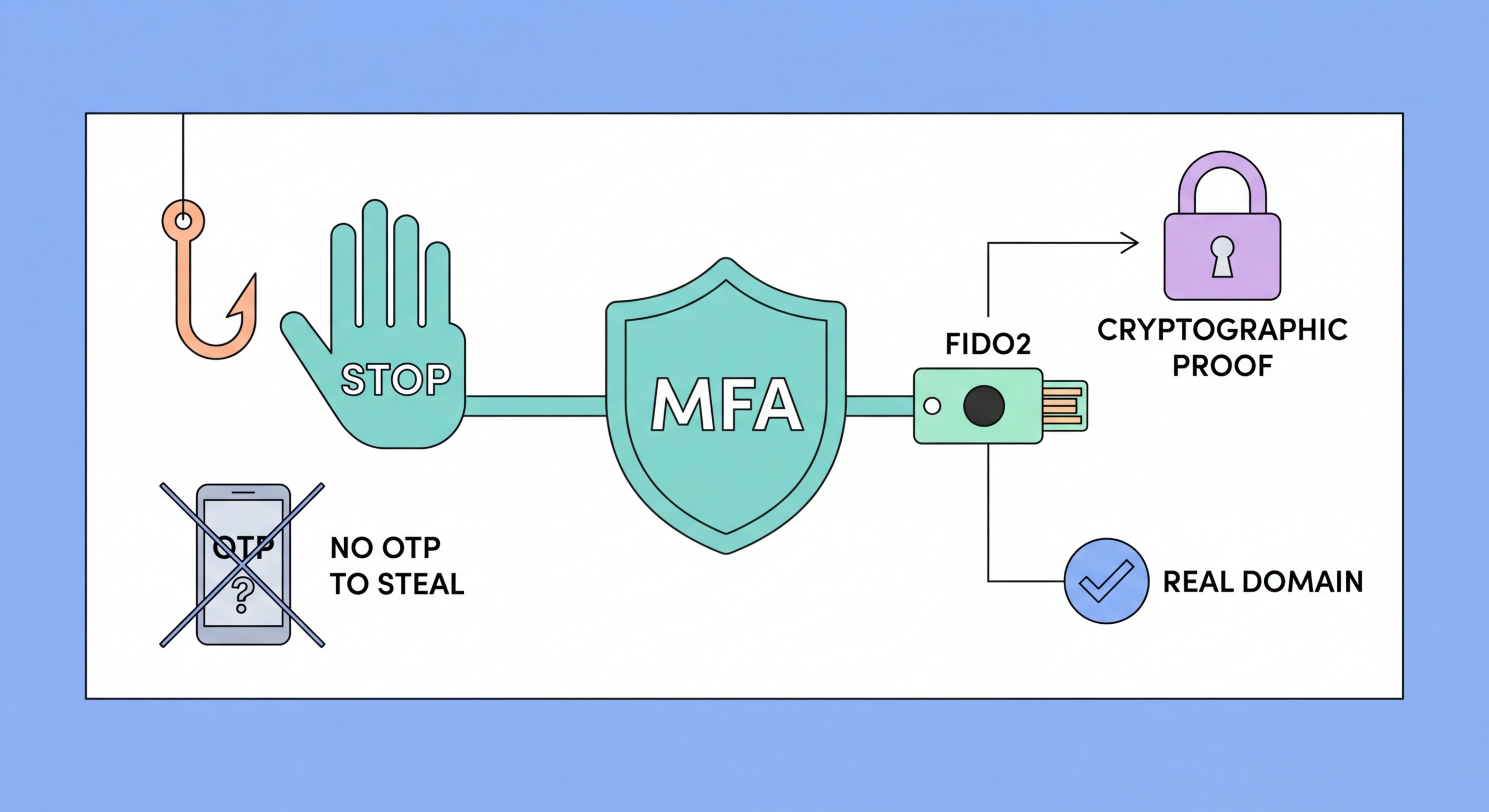
FIDO2 domain binding makes hardware keys phishing-resistant
3The Solutions

Hardware Keys and Passkeys: The Two Phishing-Resistant Options

Hardware security keys like YubiKey are the most established phishing-resistant MFA option. They implement FIDO2 through a dedicated secure hardware element that stores private keys in tamper-resistant silicon. The physical tap requirement (pressing the key's contact sensor to complete authentication) provides user presence verification that prevents fully automated attacks even if someone physically has your key. Hardware keys are durable, long-lasting, require no charging or connectivity, and have proven their effectiveness at scale — Google's internal deployment eliminated all phishing-based account compromises for its 85,000+ employees.

Passkeys implement the same FIDO2 cryptographic principles as hardware keys but use the device's built-in secure hardware (Secure Enclave on Apple devices, Trusted Platform Module on Windows devices, and equivalent on Android). The private key is protected by your biometric authentication — Face ID, Touch ID, or fingerprint — rather than a physical touch contact. Passkeys have a usability advantage over hardware keys: they are built into the devices you already own, synced across your devices via iCloud Keychain or Google Password Manager, and require only a face scan or fingerprint rather than carrying an additional physical item.

The trade-off between hardware keys and passkeys is primarily about portability versus ubiquity. A hardware key works consistently on any compatible device — your laptop, your partner's computer, a work machine — as long as you have the physical key. Passkeys are most convenient on your own registered devices but may require your phone for authentication on other people's devices (via QR code-based cross-device authentication). For most Hong Kong users, passkeys on their iPhone or Android are the most practical path to phishing-resistant authentication; hardware keys are the right choice for users who access important accounts from many different devices or who need authentication to work without their phone.

  • Hardware keys: Physical device, no battery needed, works on any compatible device with physical possession
  • Passkeys: Built into your devices, biometric-protected, synced across your Apple/Google ecosystem
  • Google deployment: 85,000+ employees using hardware keys — zero successful phishing incidents
  • Cross-device auth: Passkeys on your phone can authenticate on other devices via Bluetooth QR code
  • HK convenience: For iPhone users, Apple passkeys via Face ID offer seamless phishing-resistant auth
  • Both are FIDO2: Hardware keys and passkeys provide identical cryptographic phishing resistance
Read the complete guide to passkeys →
Hardware key and passkey as the two phishing-resistant MFA options
4Deployment Guide

How to Adopt Phishing-Resistant MFA: A Practical Path

For individual Hong Kong users, the practical path to phishing-resistant MFA starts with passkeys wherever they are available. Create a passkey for your Google account, your Apple ID, Microsoft account, and any other service that now supports them. This takes 30 seconds per service and immediately delivers FIDO2-level phishing resistance for those accounts. Where passkeys are not yet available, continue using an authenticator app — it is still significantly better than SMS. Consider a hardware key for accounts where passkeys are not available but phishing resistance is important (certain crypto exchanges, enterprise access portals, developer accounts on GitHub).

For Hong Kong businesses, the US government's CISA guidance provides a clear roadmap: prioritise phishing-resistant MFA for privileged accounts first (administrators, executives, finance team), then expand to all users for critical systems (email, VPN, cloud collaboration). The fastest path to phishing-resistant MFA for a Microsoft 365 or Google Workspace organisation is to enable passkeys: configure the identity platform to accept FIDO2 authentication, then guide users through passkey registration on their devices — a process that takes about five minutes per user. Hardware keys are appropriate for users who access corporate resources from multiple unregistered devices.

A staged approach balances security improvement with operational change management. Stage 1: Enforce any MFA (authenticator app minimum) for all accounts — eliminate the no-2FA gap. Stage 2: Prohibit SMS 2FA for sensitive systems — remove the weakest method from high-value accounts. Stage 3: Enable and encourage passkeys for consumer accounts — begin the transition toward phishing-resistant authentication. Stage 4: Require phishing-resistant MFA (hardware key or passkey) for administrator access and highest-risk accounts. This staged approach delivers meaningful security improvements at each step without requiring a disruptive all-or-nothing transition.

  • Start with passkeys: Create passkeys for Google, Apple, and Microsoft accounts right now — 30 seconds each
  • Hardware keys for gaps: Where passkeys aren't available, use YubiKey for FIDO2 phishing resistance
  • Business Stage 1: Enforce any MFA for all accounts — eliminate password-only access
  • Business Stage 2: Prohibit SMS 2FA for sensitive systems — TOTP minimum
  • Business Stage 3: Enable passkeys across Microsoft 365 or Google Workspace
  • Business Stage 4: Require phishing-resistant MFA for admin and highest-risk access
See the complete MFA implementation guide for HK businesses →
Deploying phishing-resistant MFA for individuals and businesses in Hong Kong

Move Beyond Standard 2FA to Phishing-Resistant Authentication

Hardware keys and passkeys are available today. Start creating passkeys on your key accounts and consider a YubiKey for accounts where passkeys aren't yet supported.

Related VPN Articles