Evil Twin WiFi Attacks: The Fake Hotspot Threat

An evil twin attack creates a fake WiFi network indistinguishable from the real one. You connect thinking you're on a legitimate hotspot — but all your traffic flows through an attacker's device. Here's how it works and how to defend against it.

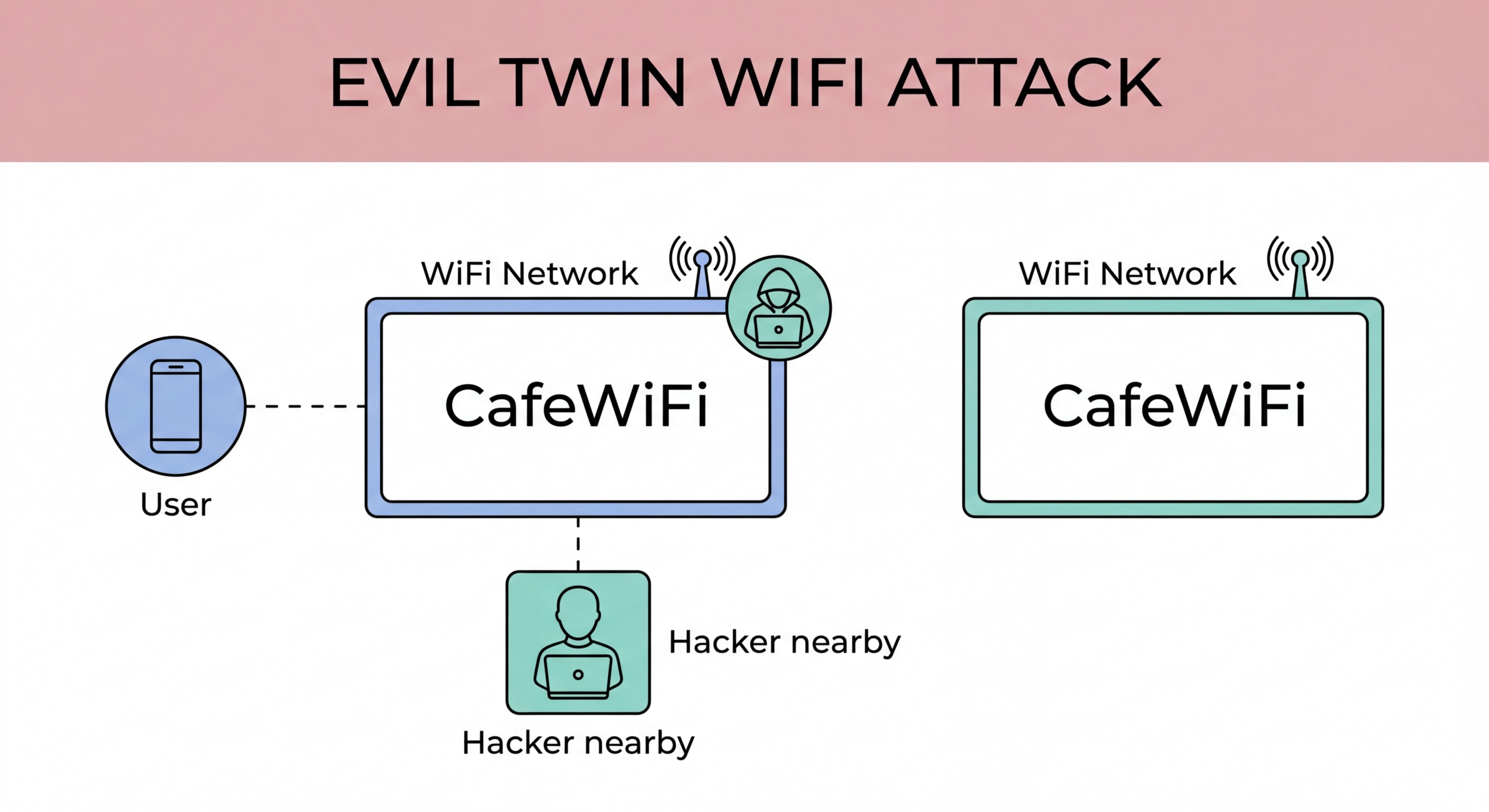
Evil twin WiFi attack showing fake access point next to legitimate network with identical SSID
1How It Works

How an Evil Twin Attack Is Set Up and Executed

An evil twin attack requires the attacker to create a WiFi access point broadcasting the same SSID (network name) as a legitimate network. The attacker does thHong Kong?">is using a laptop with a WiFi adapter set to access point mode, or a purpose-built device like a WiFi Pineapple — a commercially available penetration testing device that automates evil twin attacks. The attacker connects to the internet via a separate connection (wired, cellular, or a second WiFi network) and routes all victim traffic through their device, providing internet access while capturing everything in transit.

The success of an evil twin attack depends on signal strength. When multiple access points broadcast the same SSID, a device will typically connect to the one with the strongest signal. In a busy MTR station, a hotel lobby, or an airport terminal, an attacker with a high-gain antenna can often overpower the legitimate network's signal, causing nearby devices to connect to the evil twin instead. Devices that have previously connected to that SSID — who have it saved in their "remembered networks" list — may connect automatically without any user action, as soon as they detect the familiar network name in range.

Once a victim connects to the evil twin, the attacker controls their entire internet connection. They can serve a convincing captive portal login page identical to the hotel's or coffee shop's real portal, collecting whatever credentials or personal information users submit. They can perform SSL stripping to defeat HTTPS protection and read all unencrypted or downgraded traffic. They can inject malicious scripts into HTTP websites to steal cookies from authenticated sessions. The attack is completely transparent to the victim — internet access works normally, and there is no visible indication that traffic is being intercepted.

  • Setup: Laptop or WiFi Pineapple creates AP with identical SSID to legitimate network
  • Signal strength: Higher-power attacker antenna outcompetes legitimate network signal
  • Auto-connect risk: Saved networks connect automatically to strongest matching SSID
  • Captive portal cloning: Fake login portal collects user credentials and registration data
  • Full traffic control: All victim traffic flows through attacker's device
  • No visible signs: Internet works normally — victim sees no indication of attack
See how MITM attacks are executed once the evil twin connection is made →
Evil twin attack setup with rogue access point overriding legitimate network
2HK Risk Locations

Where Evil Twin Attacks Are Most Likely in Hong Kong

Evil twin attacks are most likely in locations where a high volume of users expect free WiFi, where the legitimate SSID is widely known, and where there is sufficient foot traffic to justify the attacker's investment of time and equipment. In for Business Travellers: Protecting Corporate Data in Hong Kong">Hong Kong, the primary high-risk locations are: Hong Kong International Airport (HKIA), MTR stations and interchanges, major shopping malls (IFC, Times Square, Harbour City), hotel lobbies and business centres, and popular tourist areas like Causeway Bay and Mongkok.

HKIA is a particularly high-value target because it concentrates international travellers who are accessing services across many jurisdictions and who may be carrying substantial financial resources and valuable business data. The "Airport_Free_WiFi" SSID is widely known, making it trivial to create an evil twin. International travellers are also less familiar with the specific network characteristics at HKIA and may be more likely to connect to an unfamiliar variation of the expected network name.

The WiFi.HK SSID, used across thousands of Hong Kong hotspots, is the most-mimicked SSID for evil twin attacks in the city because its recognition is universal. Anyone expecting free WiFi in Hong Kong knows to look for "WiFi.HK." An attacker operating an evil twin under this SSID in any busy location can reasonably expect auto-connections from devices of people who have previously used WiFi.HK anywhere across the city — without any action from the victim. This passive harvesting of auto-connected victims requires no social engineering and no user interaction at all.

  • HKIA: Highest value target — international travellers with financial and business data
  • MTR interchanges: High volume, familiar "WiFi.HK" SSID, many auto-connect devices
  • Major malls: IFC, Times Square, Harbour City — long dwell times and connected shoppers
  • Hotel lobbies: Known network names and concentrated business travellers
  • WiFi.HK mimicry: Universal recognition makes it the most commonly mimicked SSID in Hong Kong
  • Conference venues: Event WiFi SSIDs are easily replicated for targeted attacks at business events
See specific airport WiFi security advice for HKIA travellers →
High-risk locations for evil twin attacks in Hong Kong — airport mall MTR
3Detection

How to Detect an Evil Twin Network

Detecting an evil twin is difficult because they are designed to be undetectable. However, several signals can raise suspicion. If your device shows two networks with the same SSID when you scan for WiFi, one of them may be an evil twin — though multiple legitimate access points with the same SSID are also normal for large venues. If you connect to a known network and receive a new captive portal login request when you previously connected without one (or with a different portal), this warrants suspicion. A new portal claiming to be from a location or service you are not at is a strong indicator.

The BSSID (the hardware MAC address of the access point) is a reliable discriminator, but most users do not have easy access to BSSID information. On iPhone, you can see the connected access point's BSSID in Settings → WiFi → tap the "i" next to the connected network. On Android, network detail views similarly show the BSSID. If you have previously connected to the legitimate network and noted its BSSID, comparing the current BSSID against your record can confirm whether you are on the right network. In practice, few users collect this information proactively.

Browser-level signals may also hint at an evil twin. If websites you visit start showing unexpected content, SSL certificate warnings for sites you use regularly, or HTTP rather than HTTPS in the address bar for sites that should always use HTTPS — these may indicate active interference with your connections. These signals are not definitive (network issues can cause similar symptoms), but combined with location context (you are in a high-risk area) and unexplained connectivity changes, they warrant disconnection and switching to mobile data. The safest response to any suspicion of an evil twin is to immediately disconnect and use cellular data instead.

  • Duplicate SSIDs: Two networks with same name in WiFi scan — possible evil twin (also normal for large venues)
  • Unexpected portal: New or different captive portal on a previously known network
  • BSSID check: Compare access point hardware address against previously recorded legitimate BSSID
  • Certificate warnings: SSL warnings on normally-trusted HTTPS sites indicate traffic interception
  • HTTP downgrade: Sites that should be HTTPS appearing as HTTP — possible SSL stripping
  • Trust your instincts: If anything seems off, disconnect and switch to mobile data
Understand what HTTPS certificate warnings mean on public WiFi →
How to detect evil twin WiFi networks — BSSID comparison and browser signals
4Prevention

How to Prevent Evil Twin Attacks

The most effective prevention measures operate at multiple levels. At the connection level: disable automatic WiFi connection for all public networks. Go through your saved WiFi networks and delete or disable auto-join for any public SSID (WiFi.HK, airport networks, hotel networks from past stays). This prevents your device from automatically connecting to evil twin networks without your awareness. When you need to connect to a public network, do it intentionally and verify the network name carefully by asking venue staff for the exact SSID and looking for official signage.

At the traffic level: use a VPN that auto-connects when you join any untrusted network. A well-configured VPN app (NordVPN, ExpressVPN, Mullvad, ProtonVPN all offer this feature) will automatically activate when you connect to a WiFi network not on your trusted list (home, office). This means that even if you inadvertently connect to an evil twin, all your traffic is encrypted end-to-end before it reaches the evil twin network — the attacker captures only encrypted data that provides no usable information.

Consider the specific risk profile of each location. Not every public WiFi encounter warrants the same level of caution — streaming podcasts on a domestic MTR commute is a different risk profile from accessing work email on unknown hotel WiFi in an unfamiliar city. Apply your strongest protections — VPN always active, mobile data for sensitive tasks, no auto-connect saved for any public networks — in high-risk environments. Educate your family members about these risks, particularly children and elderly relatives who may habitually connect to any available free WiFi without considering security implications.

  • Delete public saved networks: Remove WiFi.HK, hotel, and airport networks from your saved connections
  • Disable auto-join: Turn off auto-join for any remaining public network entries
  • VPN auto-connect: Configure VPN to activate automatically on untrusted networks
  • Verify SSIDs: Ask staff for the correct network name — don't guess from the strongest signal
  • Mobile data preference: Use mobile data in high-risk locations rather than public WiFi
  • Educate family: Share safe WiFi habits with children and elderly relatives who may be less cautious
See the complete list of safe practices for public WiFi in HK →
Evil twin prevention measures — VPN auto-connect and disable auto-join

Don't Let Fake Networks Steal Your Data

Disable auto-join for public networks and always use a VPN. These two steps make evil twin attacks ineffective regardless of where you connect.

Related VPN Articles