SIM Swap Attacks: How to Protect Your Phone Number

SIM swapping is one of the most effective ways to bypass SMS-based 2FA. Criminals use social engineering to transfer your phone number — and with it, all your SMS authentication codes. Here's how to stop them.

SIM swap attack illustration showing phone number being transferred to attacker's device
1How It Works

How a SIM Swap Attack Is Executed

A SIM swap attack begins with reconnaissance. Before contacting your mobile carrier, the attacker gathers personal information about you — date of birth, home address, HKID number if obtainable, account holder name, the last four digits of your credit card (sometimes visible in data breaches), and any account PINs or passwords associated with your carrier account. This information is collected from social media profiles, purchased data breach databases, phishing emails you may have responded to, or through preliminary phone calls to low-level carrier staff.

With sufficient personal information, the attacker contacts your carrier's customer service — by phone, online chat, or in person at a store — and claims to be you. They say they have a new SIM card and need to Transfer Your Authenticator App to a New Phone">to transfer your number to it, or claim their phone was lost or damaged and they need a replacement SIM. The customer service representative, following standard procedures, asks verification questions. The attacker provides the answers gathered during reconnaissance. If the representative accepts the verification, the number is transferred to the attacker's SIM within minutes.

The moment the transfer completes, your phone loses signal — all calls and texts now route to the attacker's device. The attacker immediately begins working through your accounts, starting with your email (by requesting a password reset to your now-controlled phone number). With email access, they reset passwords on banking apps, social media, crypto exchanges, and any other service linked to that email. The window between SIM transfer and account compromise can be as short as 10–15 minutes. You may not even notice your phone has lost signal until it is too late.

  • Phase 1 — Reconnaissance: Gathering birthdate, address, ID numbers, and carrier account details
  • Phase 2 — Social engineering: Calling or visiting carrier claiming to be account holder
  • Phase 3 — Transfer: Convincing representative to move number to attacker's SIM
  • Phase 4 — Account takeover: Using SMS codes to reset email, then cascading to all linked accounts
  • Speed: Entire attack can complete in 15–30 minutes after successful SIM transfer
  • Your signal: Your phone drops to "No Signal" when the transfer completes — the first warning sign
See why SIM swap is just one of several SMS 2FA weaknesses →
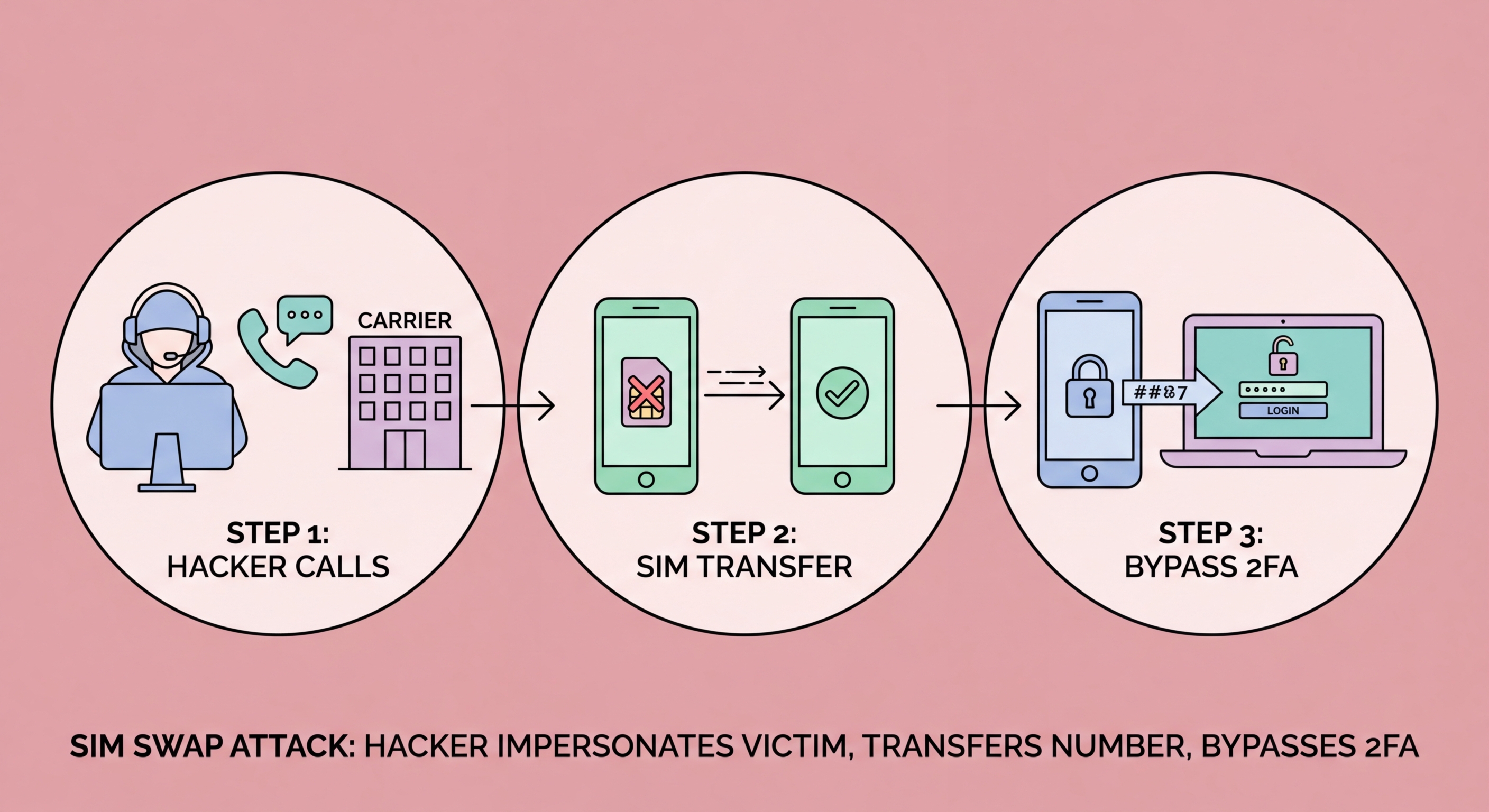
SIM swap attack phases from reconnaissance to account takeover
2Hong Kong Context

SIM Swap Risks in Hong Kong: What You Need to Know

Hong Kong's mobile carrier market is served primarily by SmarTone, CMHK (China Mobile Hong Kong), 3HK (Hutchison Telephone), and CSL. Each carrier has its own customer verification procedures for SIM-related changes, and the security of these procedures varies. In general, in-person requests at carrier stores require HKID presentation, which provides a meaningful barrier against remote social engineering attacks. Phone and online channels present more risk because verification relies on information that can potentially be researched or obtained from other sources.

SIM swap fraud has been reported in Hong Kong, though it is less prevalent than in regions where carriers have very weak verification procedures (such as the United States). The most commonly reported cases in HK involve cryptocurrency holders and business owners. HKCERT (Hong Kong Computer Emergency Response Team Coordination Centre) has issued advisories noting that SMS-based authentication represents a meaningful vulnerability for Hong Kong internet users, particularly those who hold significant digital assets or have accounts attracting attacker interest.

An important distinction in Hong Kong: legitimate number portability between carriers (MNP — Mobile Number Portability) also involves transferring your number, but through a formal process that requires signing at the new carrier and typically sends notifications to your registered contact details. This is different from SIM swap fraud, which impersonates you to your existing carrier. Be alert to any unexpected MNP notifications or carrier communications you did not initiate — these may indicate someone is attempting to port your number to a different carrier entirely.

  • In-person protection: HK carrier stores require HKID for in-person SIM changes — harder to attack
  • Phone/online risk: Remote verification channels are the primary attack vector
  • HKCERT advisory: Official guidance recommends upgrading from SMS to app-based 2FA
  • Crypto holders at highest risk: Most HK SIM swap cases target cryptocurrency accounts
  • MNP alert: Unexpected number portability notifications are a red flag — act immediately
  • Carrier PINs: SmarTone, CMHK, and 3HK all support account security PINs — request one
Switch to an authenticator app to remove SMS as a vulnerability →
Hong Kong carrier SIM swap protection — SmarTone CMHK 3HK carrier stores
3How to Protect Yourself

Concrete Steps to Protect Your Number from SIM Swapping

The most impactful step is calling your mobile carrier and requesting a customer account PIN or verbal password that must be provided before any changes to your account — SIM replacement, number porting, account changes, or customer service queries. For SmarTone, you can do this by calling 2880 2688 or visiting a store. For CMHK, call 3121 8888. For 3HK, call 3162 3380. Ask specifically for a "security code" or "account PIN" that prevents changes without your authorisation. Also ask whether your account can be locked against SIM swaps and number ports without in-person verification.

Move all your important 2FA away from SMS. Your email, banking-accessible accounts, and social media should use an authenticator app rather than SMS codes where possible. While this does not prevent someone from stealing your number, it removes the value of doing so — if your email 2FA is an authenticator app rather than SMS, the SIM swap does not unlock your email, and the cascade attack is blocked. This combination — carrier PIN plus authenticator app 2FA — is the recommended defence for most Hong Kong users.

Reduce your online information footprint. The reconnaissance phase of SIM swap attacks relies on publicly available personal information. Review your social media privacy settings: avoid posting your phone number publicly, remove or restrict birthdate visibility, and be cautious about posting location information that reveals your home neighbourhood. Be alert to suspicious emails or calls asking you to confirm your carrier account details, HKID number, or billing information — these may be reconnaissance for a planned SIM swap.

  • Add a carrier PIN: Call your carrier and request a security code for all account changes
  • In-person only: Ask your carrier to restrict SIM changes to in-person verification with HKID
  • Move to authenticator app: Remove SMS as a 2FA method on email and key accounts
  • Reduce public info: Review social media privacy settings — limit birthdate, address, and phone number visibility
  • Alert contacts: If your phone loses signal unexpectedly, immediately use WiFi calling to contact your carrier
  • Recovery planning: Know your carrier's emergency line and have an alternative contact method ready
Avoid the most common mistakes that leave your 2FA vulnerable →
Steps to protect against SIM swap attacks in Hong Kong
4Emergency Response

What to Do Immediately if You Are SIM Swapped

The first sign of a SIM swap is usually your phone dropping to "No Signal" or showing "SOS Only" unexpectedly. If this happens, do not assume it is a temporary network issue — act immediately. Connect to WiFi and use a WiFi-based communication method (FaceTime Audio, WhatsApp via WiFi, or a different device) to call your carrier's customer service immediately. Report that you believe you are a victim of SIM swap fraud and request that the SIM swap be reversed and your account frozen against further changes. Most carriers can reverse a fraudulent SIM swap if contacted quickly.

While on the phone with your carrier, use a different device (laptop, tablet, or a family member's phone) to log in to your most critical accounts — email, banking, social media — while you still have access. Change passwords on these accounts immediately, and if they are currently using SMS 2FA, disable it and set up an authenticator app. If you have been completely locked out of an account, initiate account recovery using backup codes or the service's identity verification process. Banks should be called immediately to freeze accounts if you suspect financial fraud.

After securing your accounts, file a report with Hong Kong Police (Crime Wing, cybercrime hotline 2860 5012) and HKCERT. Report the incident to your carrier's fraud department (separate from customer service). Check your bank accounts and credit cards for unauthorised transactions, and file disputes immediately for any fraudulent charges. Review your email's sent folder and recent activity for signs of what the attacker may have done with email access. The more quickly and systematically you respond, the better your chance of limiting the damage.

  • Immediate: Connect to WiFi and call your carrier using WiFi calling or another device
  • Request reversal: Report SIM swap fraud and ask for immediate reversal and account freeze
  • Change passwords: Use another device to change email, banking, and social media passwords now
  • Disable SMS 2FA: Switch to authenticator app while you have access
  • Contact banks: Call your HK banks immediately to alert them and freeze if necessary
  • File a report: HK Police cybercrime hotline 2860 5012 and HKCERT at hkcert.org
Full guide to recovering accounts after a SIM swap attack →
Emergency response to SIM swap attack — steps to take immediately

Protect Your Number Before It's Too Late

Call your carrier today and add a SIM account PIN. Then switch your important accounts from SMS to an authenticator app. It takes 30 minutes and dramatically reduces your risk.

Related VPN Articles