Why SMS Two-Factor Authentication Is Risky

SMS codes are better than no 2FA — but they're the weakest form available. SIM swapping and SS7 attacks can defeat them in minutes. Here's what you need to know and what to use instead.

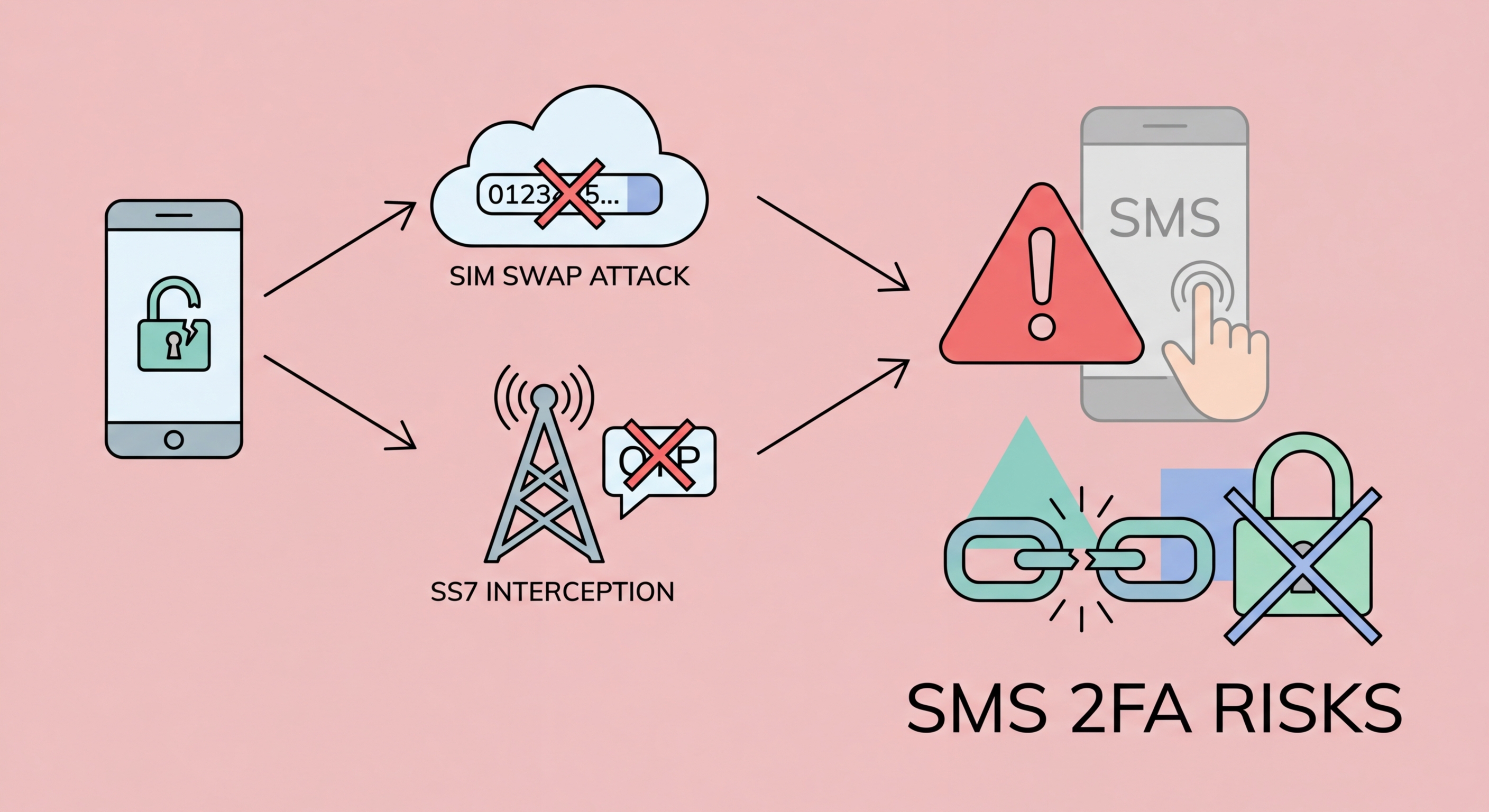
SMS 2FA vulnerabilities — SIM swap and SS7 attack illustration
1SS7 Attacks

SS7 Protocol Flaws: How Your SMS Can Be Intercepted

The SS7 (Signalling System Number 7) protocol is the set of standards that telecommunications networks worldwide use to exchange information and route calls and messages. Developed in the 1970s, SS7 was designed for a closed network of trusted telecom operators — security was not a design consideration because only carriers were expected to access it. Today, that assumption no longer holds, and SS7's fundamental lack of authentication creates serious security vulnerabilities that can be exploited to intercept your SMS messages.

An attacker with access to the SS7 network — which can be obtained by compromising a telecoms operator, purchasing access through criminal channels, or exploiting vulnerabilities in smaller international carriers — can send a location update request that tricks the network into believing your to Spot and Avoid Attacks on Your Phone">Your Phone Number">phone number has moved to a new location. Subsequent calls and text messages are then routed to wherever the attacker specifies. This happens silently; your phone continues to show normal signal, and you receive no indication that your messages are being diverted.

SS7 attacks are not theoretical. Security researchers and investigative journalists have demonstrated them live on camera against cooperating subjects. Intelligence agencies have exploited SS7 capabilities for surveillance for years. Criminal groups have used SS7-based SMS interception to defeat the 2FA protecting online banking accounts, resulting in documented theft from bank accounts in Germany, the UK, and the United States. While most ordinary users are not individually targeted via SS7, high-value targets — executives, politicians, and wealthy individuals — face genuine risk from this vector in Hong Kong as much as anywhere.

  • SS7 origin: 1970s protocol designed for trusted carrier-only networks — now globally exploited
  • How interception works: Attacker reroutes your SMS to their device via fraudulent SS7 location update
  • Silent attack: Your phone shows normal operation — no notification that messages are diverted
  • Criminal access: SS7 access is available for purchase on dark web markets
  • Real-world theft: Banking account drains documented in Germany, UK, and USA using SS7 SMS interception
  • High-value targets: Most relevant risk to executives, politicians, and cryptocurrency holders
Learn how to protect your number from SIM swap and SS7 attacks →
SS7 protocol vulnerability diagram showing SMS interception route
2SIM Swapping

SIM Swap Attacks: Social Engineering Against Your Carrier

SIM swapping is a more accessible attack that does not require telecommunications infrastructure access. Instead, the attacker calls or visits your mobile carrier's customer service and impersonates you. Using information gathered from social media profiles, data breach databases, or simple OSINT research, they provide enough details to convince the carrier representative to transfer your phone number to a new SIM card the attacker controls. From that moment, all calls and text messages go to the attacker — including your SMS 2FA codes.

In Hong Kong, the three major carriers — SmarTone, CMHK (China Mobile Hong Kong), and 3HK (Hutchison) — each have their own customer service verification processes. These processes are generally identity verification steps designed to be convenient enough for legitimate customers to use, which means they must be simple enough for a motivated attacker to defeat with collected personal information. High-profile SIM swap cases have occurred globally targeting cryptocurrency investors, social media influencers, and executives.

The consequences are severe and rapid. Once the attacker controls your number, they immediately request password resets for your email accounts via SMS verification. With your email compromised, they systematically reset passwords across every account linked to that email. They drain cryptocurrency wallets, reverse-engineer banking passwords, take over social media accounts, and potentially cause financial and reputational damage that can take years to fully resolve. The entire attack from successful SIM swap to multiple account compromises can happen in under 30 minutes.

  • Social engineering: Attacker convinces carrier representative to transfer your number to their SIM
  • Information gathering: Birthdate, address, and account PINs sourced from social media and data breaches
  • Cascade effect: Email access leads to password resets for all linked accounts
  • Speed: Account compromise can happen within 30 minutes of a successful SIM swap
  • HK carriers: SmarTone, CMHK, 3HK — all have known SIM swap vulnerabilities in customer service
  • Mitigation: Add a carrier account PIN and request port-out protection from your carrier
Follow the complete SIM swap protection guide →
SIM swap attack process showing criminal at phone carrier store
3Phishing and Malware

Real-Time Phishing and Malware: Two More SMS Weaknesses

Even without SS7 access or SIM swapping, SMS 2FA can be defeated by real-time phishing. In this attack, the criminal creates a phishing page that mimics a login form and immediately relays both the victim's password and the SMS code to the real service. When you enter your credentials on the fake page, the attacker's server simultaneously uses them to log in to the real service. The real service sends you an SMS code — which you enter on the fake page, which the attacker's server forwards to complete the login. The entire relay happens in seconds, within the SMS code's validity window.

Malware on your device presents another vector that SMS 2FA cannot defend against. If a malicious app or browser extension has access to your SMS messages — which Android apps have historically been able to request — it can silently read and forward your 2FA codes to an attacker. SIM-jacking malware has targeted banking customers globally, reading SMS codes as they arrive and transmitting them before the user can enter them. Even on iOS, malicious apps have exploited notification preview features to read SMS content without full SMS permissions.

By contrast, authenticator app codes cannot be relayed by phishing (well, technically they can by the same real-time relay technique, but the attack window is only 30 seconds and requires precise timing). Hardware security keys are completely immune to phishing relay because the domain verification step is performed cryptographically — there is no code to relay. If you're using SMS 2FA on high-value accounts like banking or email, upgrading to an authenticator app, and eventually to a hardware key for the most critical accounts, is a concrete improvement in your actual security posture.

  • Real-time phishing: Attacker relays your SMS code to the real service within the 5-minute validity window
  • Automated relay: Modern phishing toolkits automate the relay process — no manual attacker required
  • Malware reading SMS: Malicious Android apps can request SMS permissions and read codes silently
  • Banking trojans: Mobile banking malware specifically designed to intercept SMS 2FA codes
  • Authenticator app advantage: TOTP codes have only a 30-second window and no network transit to intercept
  • Hardware key advantage: Domain binding makes phishing relay impossible regardless of code timing
Switch to an authenticator app — see which one is best →
Real-time phishing attack relaying SMS codes to attacker
4Better Alternatives

What to Use Instead of SMS 2FA

The primary replacement for SMS 2FA is an authenticator app using the TOTP standard. Apps like Authy, Google Authenticator, and Microsoft Authenticator generate codes offline on your device without any network transmission. The codes are tied to a shared secret established at setup time and cannot be extracted by intercepting network traffic. Moving your accounts from SMS to authenticator apps is straightforward — most services offer the option in their security settings and it takes only a few minutes per account.

For accounts where you cannot switch away from SMS — some HK banking apps and government services offer no alternative — you should minimise the risk of SIM swapping by adding a PIN lock to your carrier account and being cautious about what personal information you post publicly on social media. If asked by any caller claiming to be your carrier to confirm account details, hang up and call the carrier's official number directly. Treat requests to change your SIM with the same scepticism you would apply to a phishing email.

The hierarchy of 2FA security, from weakest to strongest, is: SMS codes at the bottom, then email codes, then authenticator app TOTP codes, then push notifications with context, and hardware security keys with FIDO2 at the top. Passkeys sit alongside hardware keys in terms of phishing resistance. For everyday Hong Kong users, the most practical and significant upgrade is simply moving from SMS to an authenticator app — this single change eliminates the majority of real-world 2FA bypass attacks that affect consumers.

  • Step 1 — Switch to TOTP: Move all accounts from SMS to an authenticator app where available
  • Step 2 — Carrier PIN: Add a PIN to your SIM account at SmarTone, CMHK, or 3HK to block SIM swaps
  • Step 3 — Protect email: Use authenticator app (not SMS) on your primary email account
  • Step 4 — High-value accounts: Consider a hardware key for email, crypto, and business accounts
  • Still use SMS where necessary: Some HK government and banking services leave no choice
  • Social media hygiene: Limit public personal information that can be used in SIM swap social engineering
Compare the best authenticator apps and upgrade today →
Better 2FA alternatives to SMS codes

Time to Upgrade from SMS to an Authenticator App

SMS 2FA is better than nothing — but an authenticator app is significantly more secure. Make the switch today.

Related VPN Articles