How Does Two-Factor Authentication Work?
From TOTP algorithms to FIDO2 cryptography — a clear explanation of how each type of 2FA generates codes, authenticates users, and protects accounts from attackers.
From TOTP algorithms to FIDO2 cryptography — a clear explanation of how each type of 2FA generates codes, authenticates users, and protects accounts from attackers.
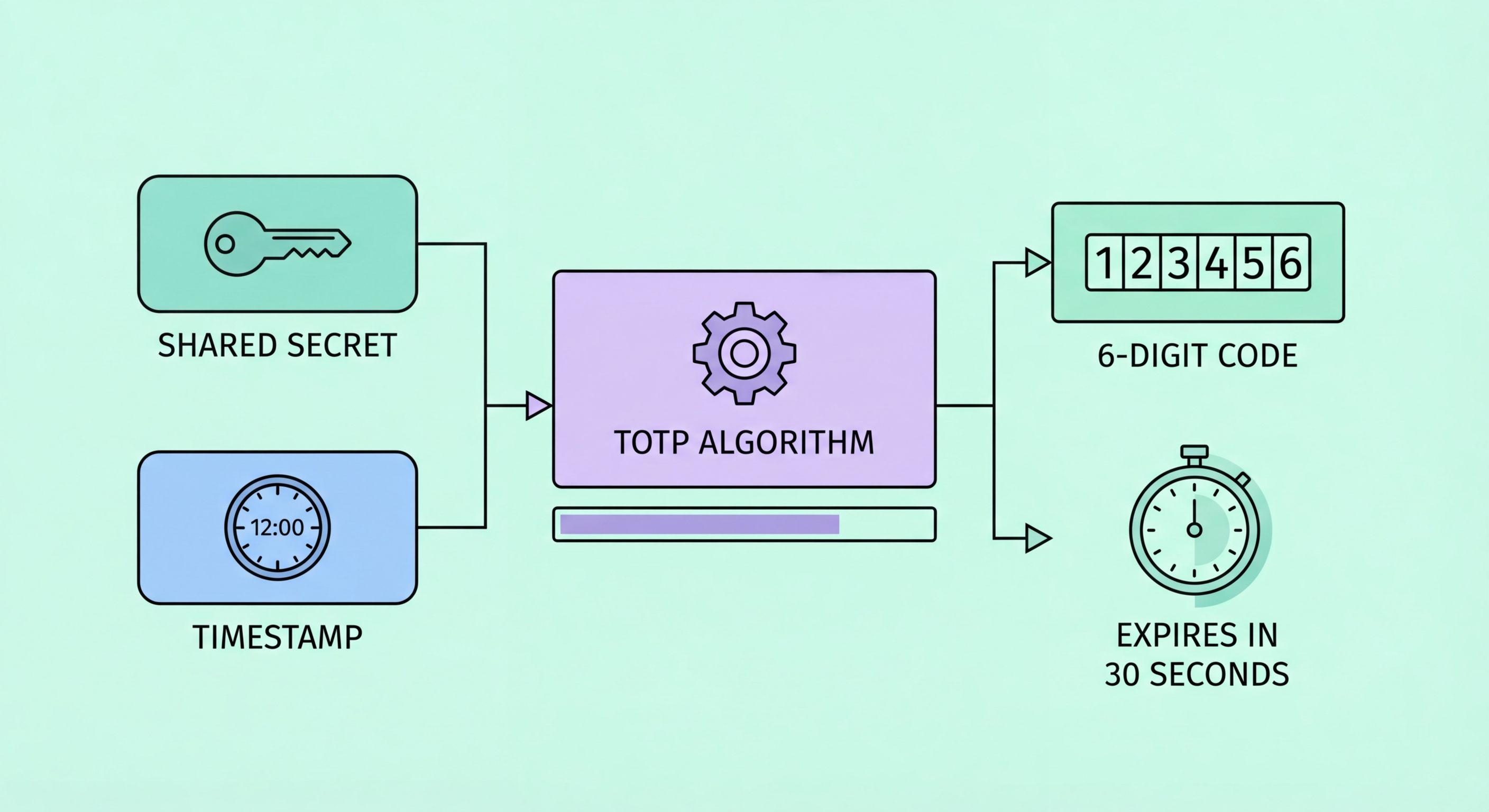
Authenticator apps use the Time-based One-Time Password (TOTP) algorithm, defined in RFC 6238. The process begins when you scan a QR code during 2FA setup. That QR code encodes a secret key — a random string of bytes that is shared between the service (like Google or Facebook) and your authenticator app. This shared secret is stored securely on both sides and never transmitted again after the initial setup.
Every 30 seconds, your authenticator app performs an HMAC-SHA1 cryptographic operation combining the shared secret with the current Unix timestamp (divided into 30-second intervals). The result is hashed and truncated to produce the six-digit code you see. Simultaneously, the server performs the exact same calculation. When you submit the code, the server compares what you entered with what it calculated — if they match, authentication succeeds. Because the codes are derived from time and a secret, they are different every 30 seconds and cannot be reused.
This design has a critical security property: the secret key never leaves the initial setup process. Your authenticator app generates codes entirely offline — it doesn't need an internet connection, and it doesn't communicate with the server until you submit the code at login. This is why authenticator apps work even in airplane mode, and why intercepting your network traffic cannot expose the underlying secret or future codes.

SMS-based 2FA takes a fundamentally different approach. When you try to log in, the service generates a random code on its server and sends it to your registered to Spot and Avoid Attacks on Your Phone">Your Phone Number">phone number via the phone network's Short Message Service. You receive the text, read the code, and enter it into the login form. The server verifies the code matches what it sent and that it hasn't expired (usually within 5–10 minutes).
The weakness of SMS 2FA lies in the phone network itself. The SS7 protocol used by telecommunications networks was designed for an era before widespread security concerns, and its trust model allows any carrier in the global network to request call and SMS forwarding for any number. Sophisticated attackers with access to telecommunications infrastructure can intercept SMS messages silently. More commonly, SIM swap attacks exploit carrier customer service processes to transfer a victim's number to a new SIM card the attacker controls, after which all calls and texts are delivered to the attacker instead.
Push notification 2FA, used by services like Duo Security and some bank apps, sends a login approval request to your registered device as a push notification. You see the request details (login time, location, device) and tap Approve or Deny. This is more resistant than SMS because it relies on the push notification infrastructure of iOS or Android rather than the phone network. However, it requires an internet connection and is vulnerable to "push fatigue" attacks where criminals repeatedly send approval requests hoping the user will accidentally approve one.

Hardware security keys use public-key cryptography through the FIDO2 standard and its browser integration protocol, WebAuthn. When you register a hardware key with a service, the key generates a unique cryptographic key pair: a public key that is shared with the service and a private key that never leaves the hardware device. The private key is stored in a secure element — a tamper-resistant chip inside the key that makes extraction virtually impossible even with physical access to the device.
At login, the server sends a challenge — a random piece of data — to your browser, which forwards it to the hardware key. The key prompts you to touch it (or tap it via NFC), then signs the challenge with the private key. The browser sends the signature back to the server, which verifies it using your registered public key. Crucially, the key also verifies the website's domain before signing. This domain binding means that even if a phishing site perfectly mimics a real login page, the key will not authenticate you — the domain won't match the registered service.
This phishing resistance is what distinguishes hardware keys from all other forms of 2FA. TOTP codes and push notifications can be relayed in real-time by a sophisticated phishing proxy, but a hardware key's domain verification cannot be fooled. This is why security-conscious organisations, including Google (which issued keys to all employees and reported zero successful phishing attacks afterward), treat hardware keys as essential for protecting high-value accounts.

Passkeys implement the same FIDO2 public-key cryptography as hardware security keys, but using your device's built-in security hardware — the Secure Enclave on iPhones and Macs, or the Trusted Platform Module (TPM) on Windows devices. The private key is bound to your device and protected by your biometric (Face ID, Touch ID, or fingerprint). When you log in to a passkey-enabled service, your device verifies your biometric and then signs the server's challenge, completing authentication without you ever typing a password.
From a technical standpoint, passkeys are even more elegant than traditional 2FA because they collapse the two-factor requirement into a single gesture that internally satisfies two factors: something you have (the device containing the cryptographic key) and something you are (the biometric that unlocks it). The user experience feels like one step, but the security architecture enforces two-factor authentication automatically.
Passkeys also solve the synchronisation challenge. Unlike hardware keys, passkeys can be synced across your devices through iCloud Keychain (Apple devices) or Google Password Manager (Android/Chrome). This means your passkey for Google is available on your iPhone, your MacBook, and your iPad simultaneously. However, synchronisation also means that compromising your cloud account could theoretically expose your passkeys — making your Apple ID or Google account security critically important when using synced passkeys.
