AI-generated phishing emails are now grammatically perfect and highly personalised. The old advice of "look for spelling mistakes" is no longer enough. Here are the red flags that still work.
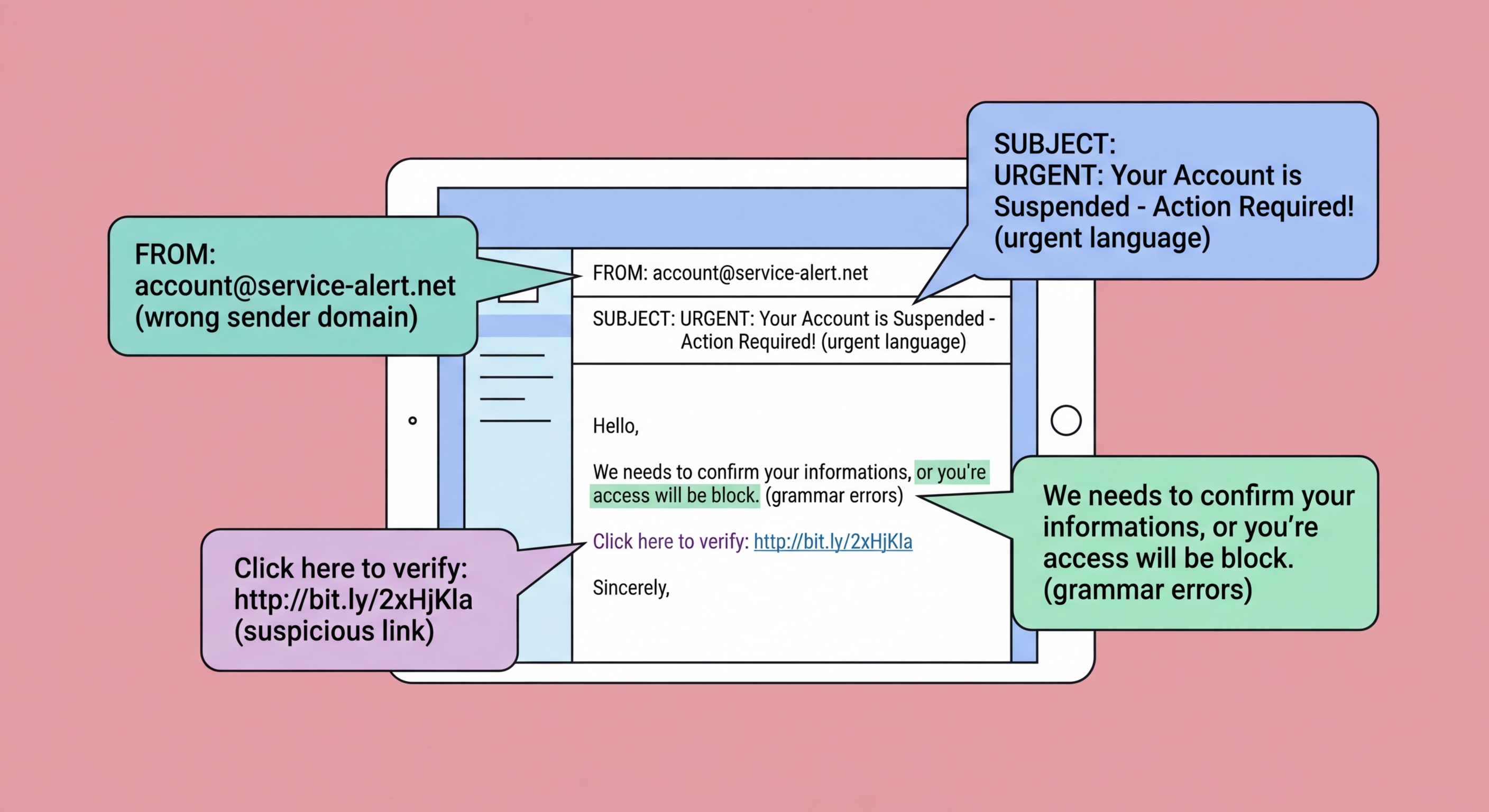
The sender's email address is the most reliable single indicator of a phishing email, but it requires careful inspection rather than a glance at the display name. Attackers frequently set the display name to a trusted organisation's name while using a completely different underlying address — "HSBC Security Team" <[email protected]> looks convincing at a glance but reveals its fraudulent nature when the actual address is examined. In email clients on both desktop and mobile, tap or hover on the sender name to reveal the actual sending address.
Even when attackers use a domain that looks similar to the legitimate one, careful inspection reveals the difference. Common techniques include: typosquatting (hsbc.com vs. hsbcc.com or hsdc.com); lookalike characters using Unicode homoglyphs that appear identical to standard letters but are different characters; adding words to legitimate domains (hsbc-security.com, verify-hsbc.com); using legitimate-looking subdomains on fraudulent domains (hsbc.com.attacker.net — the authoritative domain here is attacker.net, not hsbc.com); and using top-level domain variations (hsbc.hk vs. hsbc.com).
For emails claiming to be from local Hong Kong organisations, check against the official domain. HSBC HK uses @hsbc.com.hk and @hsbc.hk. The Hong Kong government uses @[department].gov.hk. Legitimate Octopus communications come from @octopuscards.com. Any variation from these official domains should be treated as suspicious. When in doubt, go directly to the organisation's official website (typed directly into the browser, not clicked from the email) and check for any notifications in your account portal.
Urgency and threats are the most consistent psychological hallmarks of phishing emails. Legitimate organisations rarely threaten immediate severe consequences in emails and do not demand that you take action within hours or face account suspension, arrest, or financial loss. Messages claiming "Your account will be permanently deleted in 24 hours unless you verify your details", "You are under investigation — act now Hong Kong: Types and How to Avoid">to avoid arrest", or "Unclaimed package will be returned — update delivery information immediately" are all using urgency to short-circuit careful thinking.
Requests for sensitive information are another major red flag. Legitimate banks, government departments, and reputable services do not ask you to provide your full password, PIN, HKID number, complete credit card details, or two-factor authentication codes via email. No legitimate organisation sends a link to a page asking you to enter your current password. If an email asks you to confirm, verify, or update your credentials by clicking a link and entering details on the linked page, treat it as highly suspicious regardless of how official it appears.
Link inspection is critical. Hover over any link in an email before clicking — on desktop, the actual URL appears in the browser's status bar; on mobile, hold the link to see the actual URL in a preview. The URL shown in the email text (the link's visible text) can be completely different from the actual destination URL. Look for the actual domain in the URL — subdomain tricks, long URLs with legitimate-looking text before the actual domain, and URL shorteners are all tactics used to disguise phishing destinations. When in doubt, do not click: navigate to the site directly.
The traditional advice to look for spelling mistakes and poor grammar as phishing indicators has become significantly less reliable. AI language models including ChatGPT and its successors can generate native-quality text in any language on demand, at essentially zero cost. Phishing campaigns now routinely use AI-generated content that is grammatically perfect, contextually appropriate, and stylistically similar to genuine communications from the impersonated organisation. The days when a poorly worded email was a reliable red flag are largely over.
AI also enables personalisation at scale. Attackers can combine AI writing with data scraped from social media and breach databases to generate personalised phishing emails that reference your name, your employer, your recent purchases, your bank, and even your colleagues — information that previously required significant manual research to compile. This collapses the distinction between mass phishing and spear phishing, making high-quality personalised attacks available to lower-sophistication attackers at minimal cost.
Voice cloning technology adds another dimension to vishing attacks. AI voice cloning can create convincing audio impersonations of known individuals — including CEOs, senior managers, and family members — from a few minutes of publicly available audio. These cloned voices are now being used in vishing attacks where a fake voice call from an apparent superior or trusted contact directs the victim to authorise a payment or share credentials. The technical barrier for these attacks has fallen dramatically, and they are increasingly reported in Hong Kong business environments.
When you receive an email that triggers suspicion — whether through a recognised red flag or simply a gut feeling that something is wrong — the correct response is to pause and verify rather than dismiss or act immediately. Do not click any links, download any attachments, or provide any information. Take a moment to examine the sender address carefully, then independently verify the communication's legitimacy through an official channel you locate yourself rather than one provided in the email.
If the email claims to be from your bank, call the number on the back of your card or navigate directly to the bank's official website by typing the URL yourself. If it claims to be from a government department, look up the official contact information on a government website you navigate to directly. If it claims to be from a colleague or supplier, call them on a known number. In no case should you use any contact information (phone number, website link, email address) provided within the suspicious email itself — these will be controlled by the attacker.
Report the phishing email to help protect others. Forward suspected phishing emails to your email provider's abuse address ([email protected] for Gmail, [email protected] for Outlook). Report to HKCERT via hkcert.org/report. If the email impersonates a specific Hong Kong organisation, forward it to that organisation's security or fraud team so they can warn their customers and get the phishing infrastructure taken down. Even if you were not fooled, reporting ensures others have a better chance of recognising the same attack.