Man-in-the-Middle Attacks on WiFi: How They Work

A man-in-the-middle attack intercepts your network traffic without you knowing it. On a public WiFi network in Hong Kong, this is technically straightforward. Understanding how these attacks work helps you understand why certain protections matter.

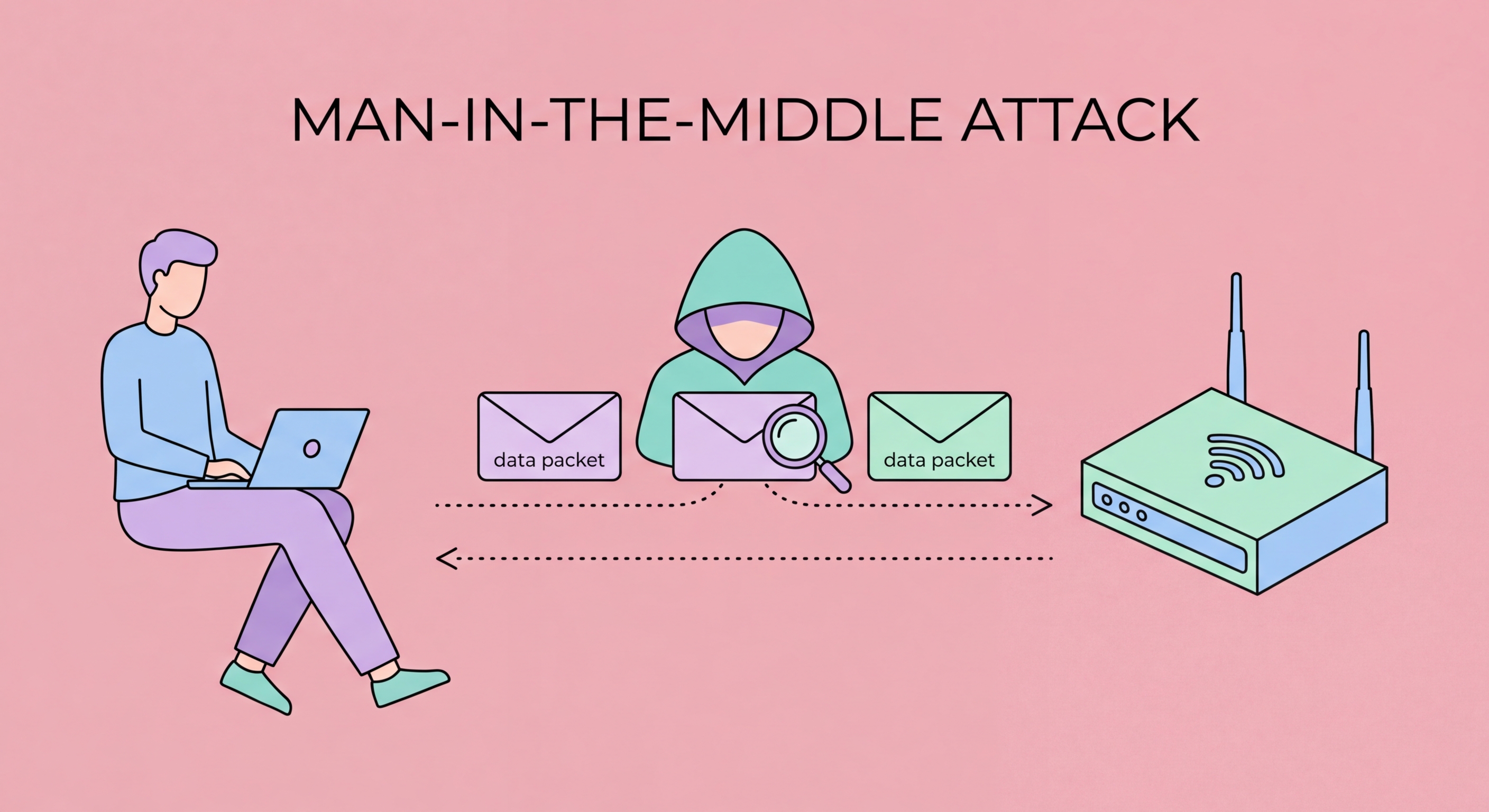
Man-in-the-middle attack diagram showing attacker intercepting WiFi traffic between user and internet
1What MITM Is

What Is a Man-in-the-Middle Attack?

A man-in-the-middle (MITM) attack occurs when an attacker secretly positions themselves in the communication path between two parties — typically a user's device and a website or server — and intercepts or modifies the communication without either party being aware of the intrusion. The name comes from the physical analogy of someone standing between two people having a conversation and listening to both sides, relaying messages while reading all content and potentially altering messages before passing them along.

In a WiFi context, MITM attacks exploit the protocols used to route data on a local network. When you connect to a public WiFi network, your device communicates with the network router (the gateway) to access the internet. The router knows your device's address and routes your internet traffic accordingly. A MITM attacker on the same network poisons the network's routing information — using techniques like ARP spoofing — to convince your device that the attacker's machine is the router, and convince the router that the attacker's machine is your device. Once positioned in the middle, all data flows through the attacker.

The consequences of a successful MITM attack are extensive. The attacker can read all unencrypted traffic in both directions, including usernames, passwords, email content, and any form data you submit. They can inject malicious content — advertisements, malware download prompts, or phishing redirects — into websites you visit. They can steal session cookies from your authenticated sessions to take over your accounts. And they can perform targeted manipulation of specific services, replacing legitimate download links with malicious files or intercepting and modifying API calls made by your apps.

  • Core mechanism: Attacker positions between device and internet, routing all traffic through themselves
  • Silent operation: Victim sees no signs of interception during a successful attack
  • Read capability: All unencrypted traffic is readable — passwords, emails, form submissions
  • Inject capability: Attacker can insert malicious content into web pages and API responses
  • Steal session cookies: Captured cookies used to hijack accounts without knowing the password
  • Modify downloads: Replace legitimate software downloads with malware-infected versions
See the full range of risks on public WiFi networks →
MITM attack positioning diagram showing traffic interception
2ARP Spoofing

ARP Spoofing: The Primary MITM Technique on WiFi

ARP (Address Resolution Protocol) is used on local networks to map IP addresses (logical addresses like 192.168.1.1) to MAC addresses (physical hardware addresses like 00:1A:2B:3C:4D:5E). When your device wants to communicate with the network gateway, it sends an ARP request asking "Who has IP address 192.168.1.1?" The gateway responds with its MAC address, your device caches this mapping, and future traffic destined for that IP goes to that MAC address.

ARP has a fundamental design flaw: it is stateless and unauthenticated. Any device on the network can send an ARP "reply" at any time, even without an outstanding request, and other devices on the network will typically accept and cache the information. An attacker exploits this by sending unsolicited ARP replies to victim devices claiming "IP 192.168.1.1 is at MAC AA:BB:CC:DD:EE:FF" (the attacker's MAC address). The victim device updates its ARP cache and subsequently sends all traffic destined for the gateway to the attacker's device instead. The attacker's software then forwards this traffic to the real gateway while capturing and reading everything in between.

ARP spoofing attacks are executed using freely available tools. Ettercap, arpspoof, and Bettercap are widely documented tools that automate the entire ARP poisoning, traffic capture, and analysis process. A skilled attacker can have a fully functional MITM position on a target in less than two minutes. The attack requires only that the attacker be on the same local network as the victim — satisfied automatically when both connect to the same public WiFi hotspot at an MTR station, hotel, or café in for Business Travellers: Protecting Corporate Data in Hong Kong">Hong Kong.

  • ARP function: Maps IP addresses to MAC (hardware) addresses on local networks
  • ARP vulnerability: Stateless and unauthenticated — any device can send ARP replies to any other
  • Spoofing mechanism: Attacker claims gateway's IP is mapped to attacker's MAC address
  • Result: Victim sends all internet-bound traffic to attacker's device
  • Tools: Ettercap, arpspoof, Bettercap — freely available and well-documented
  • Speed: MITM position achievable in under two minutes on any public WiFi network
Read the detailed guide to ARP spoofing attacks →
ARP spoofing attack on local network — ARP cache poisoning process
3SSL Stripping

SSL Stripping: Defeating HTTPS on Public WiFi

Once positioned as a man-in-the-middle, attackers frequently employ SSL stripping to defeat HTTPS protection. SSL stripping exploits the way many web browsers initially connect to websites. When you type "bank.com" into your browser, the initial connection often begins as HTTP (unencrypted) before redirecting to HTTPS. In an SSL stripping attack, the MITM intercepts the initial HTTP connection, establishes an HTTPS connection to the real server on your behalf, but serves you the website over HTTP — stripping away the encryption layer that would normally protect your connection.

From your perspective, the website functions normally — you can see all the content, log in, and interact with the site. But you are communicating with the attacker's proxy over HTTP, while the proxy communicates with the real server over HTTPS. Everything you type — including your username, password, credit card number, or any other sensitive data — is visible to the attacker in plaintext before being forwarded to the real server. Your browser may show "http://" instead of "https://" in the address bar, which is why security-conscious users always verify the protocol indicator, but many users do not check this habitually.

Modern browsers implement HSTS (HTTP Strict Transport Security), which helps mitigate SSL stripping. HSTS tells browsers to always use HTTPS for a specific domain — once a browser has visited a site with HSTS enabled, it will refuse to connect over HTTP and will not load the site if the HTTPS connection fails. Most major websites implement HSTS with long max-age periods. However, HSTS protection only works if you have previously visited the site over HTTPS with a clean connection — your first-ever visit to a site is still vulnerable to SSL stripping if it happens on a compromised network.

  • Mechanism: Attacker intercepts initial HTTP connection, serves website over HTTP while connecting to server via HTTPS
  • Victim experience: Website works normally — victim cannot tell the attack is happening
  • Address bar tells: URL shows "http://" not "https://" — check the address bar carefully
  • HSTS mitigation: Browsers refuse HTTP connections to HSTS-enabled domains after first HTTPS visit
  • First-visit gap: HSTS cannot protect your first visit to a site if it occurs on a compromised network
  • VPN eliminates: End-to-end encryption from device means SSL stripping cannot work
Understand what HTTPS actually protects on public WiFi →
SSL stripping attack removing HTTPS encryption on public WiFi
4Defence

How to Defend Against MITM Attacks on Public WiFi

A VPN is the most complete defence against MITM attacks on public WiFi. When a VPN is active, all traffic from your device is encrypted before it reaches the public WiFi network. An attacker who successfully performs ARP spoofing to position themselves as a MITM will capture only encrypted VPN traffic — they see packets going to your VPN server, but the contents are encrypted with AES-256 and are computationally infeasible to decrypt without the VPN server's private key. SSL stripping cannot work against VPN traffic because there is no HTTP-to-HTTPS upgrade process to exploit — the VPN encapsulates everything in its own encryption tunnel.

Beyond a VPN, configure your browser to enforce HTTPS everywhere. The HTTPS Everywhere browser extension (by the EFF) is deprecated in favour of browser-native options. In Chrome, enable "Always use secure connections" in Settings → Privacy and security → Security. In Firefox, enable "HTTPS-Only Mode" in Settings → Privacy & Security. These settings instruct the browser to always use HTTPS and warn you before loading any HTTP page, providing an additional layer of protection on top of your VPN.

Enable Dynamic ARP Inspection (DAI) if you manage a network, and use VPN at the endpoint level if you are a business IT administrator. For individual users, the most practical additional measure after enabling a VPN is to check the URL in your browser's address bar when logging in to any sensitive service — confirm "https://" is present and that there are no extra characters or misspellings in the domain name. These visual checks complement your VPN and provide a human-level verification that your connection is legitimate even in an environment where network-level attacks may be in progress.

  • VPN is the primary defence: AES-256 encryption from device makes MITM interception useless
  • VPN against SSL strip: No HTTP-to-HTTPS upgrade means nothing for SSL strip to attack
  • Browser HTTPS enforcement: Chrome's "always secure" mode and Firefox HTTPS-only mode add protection
  • Address bar verification: Always check https:// and correct domain before entering credentials
  • Certificate warnings: Never ignore browser SSL certificate warnings on any network
  • Network admin: Enable Dynamic ARP Inspection on managed networks to prevent ARP spoofing
Set up a VPN to defeat MITM attacks on public WiFi →
VPN and HSTS protection against MITM attacks on public WiFi

Stop MITM Attacks Before They Start

A VPN encrypts all on Public WiFi: How Attackers Intercept Your Traffic">your traffic before it reaches the public network — making ARP spoofing and SSL stripping completely ineffective against your data.

Related VPN Articles