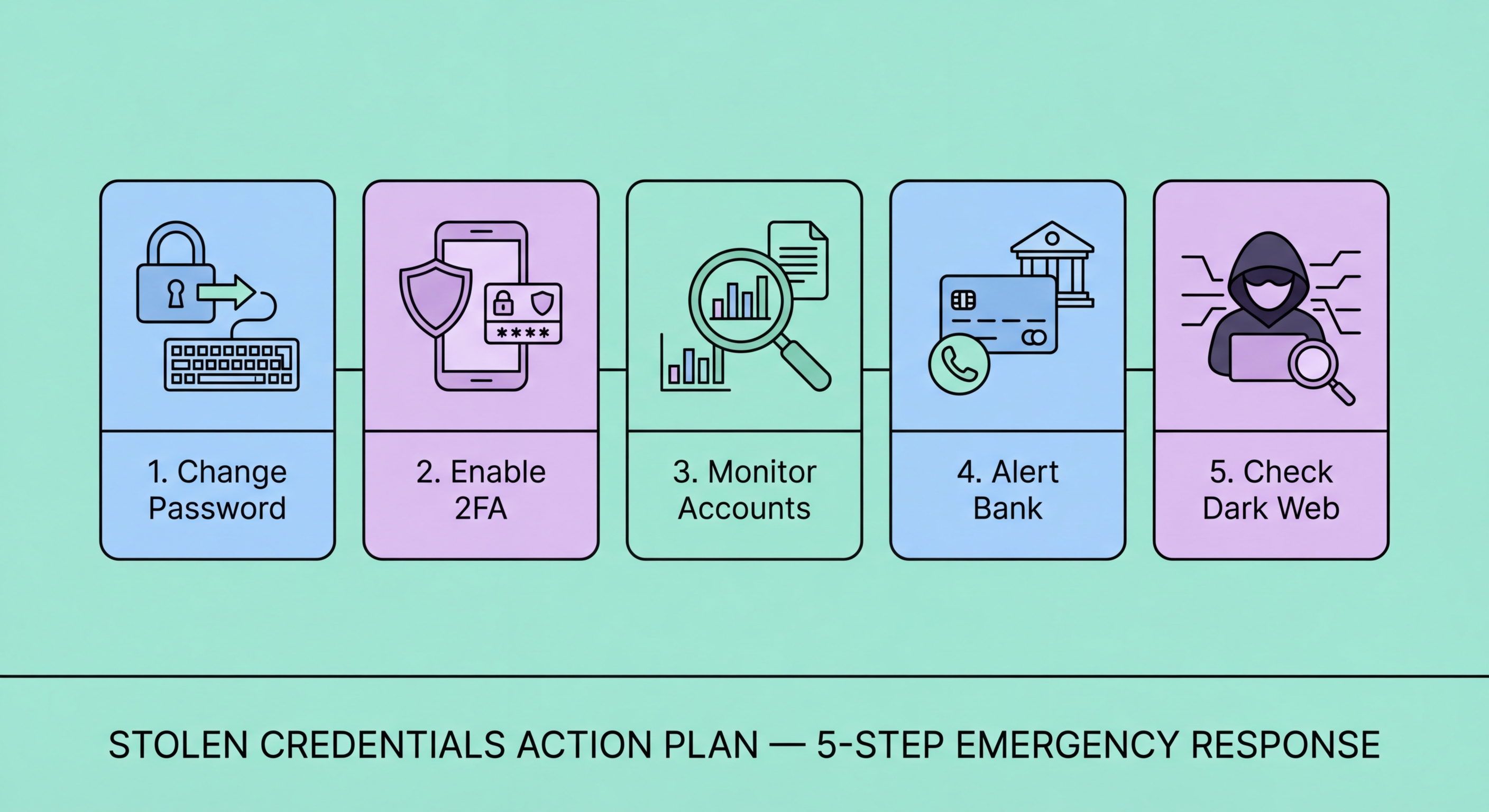
Receiving a breach notification or discovering your credentials on the dark web is alarming — but acting quickly and systematically limits the damage dramatically. This step-by-step action plan prioritises the right responses for Hong Kong residents.
When you discover your credentials have been stolen — whether through a HIBP notification, a breach notification from a company, your password manager flagging a compromised password, or any other means — the first two hours are the most important. Credential stuffing attacks begin within minutes of breach data being available; attackers use automated tools to test stolen credentials against banking portals, email services, and other high-value targets simultaneously. Your goal in the first two hours is to change compromised passwords before automated attacks succeed, and to verify that no unauthorised access has already occurred to high-value accounts.
Start with your email account — not the service that was breached, but your primary email account. Your email is the master key: if criminals gain access to your email, they can reset passwords for every other service. Change your email password immediately to a new, unique, high-entropy password (use your password manager to generate this — a 20+ character random password is appropriate). While changing the email password, check recent sign-in activity and connected devices to verify the account hasn't already been compromised. In Gmail, this is found at myaccount.google.com → Security → Your devices. In Apple iCloud, check Settings → [Your Name] → scroll down to see all signed-in devices. Remove any device or sign-in session you don't recognise. Confirm your email recovery details (backup email, to Spot and Avoid Attacks on Your Phone">Your Phone Number">phone number) haven't been changed.
After securing email, change the password for the specific service that was breached, then immediately check whether you used the same or similar password on any other service. If you do not use a password manager, this mental audit is important — common patterns like using the same base password with different numbers or symbols (password1 for one service, password2 for another) do not prevent credential stuffing attacks since criminals test common variations automatically. For any service where you reused the compromised password, change the password immediately. If you have a password manager, run its breach report (1Password Watchtower, Bitwarden Reports, iOS Security Recommendations) to identify all accounts using the exposed password and change each one systematically before any automated attacks can exploit them.
Once the immediate password crisis is managed, the next priority within 24 hours is enabling two-factor authentication (2FA) on all high-value accounts that don't already have it. 2FA fundamentally changes the attacker's position: a stolen password alone is no longer sufficient to access your account. For banking accounts in Hong Kong, check your bank's app settings for additional authentication options — many HK banks now support authenticator apps or hardware tokens alongside SMS OTP. While SMS 2FA is better than nothing, it is vulnerable to SIM swap attacks. For email accounts, enable an authenticator app (Google Authenticator, Authy, 1Password) or hardware security key (YubiKey). For password managers, enable 2FA on the password manager account itself — losing your password manager credentials would be catastrophic.
Conduct a complete audit of your connected apps and third-party services. Modern accounts accumulate authorisations: apps that use "Login with Google" or "Login with Facebook," services with ongoing API access to your email or calendar, and older integrations you may have forgotten about. In Google, review third-party app access at myaccount.google.com → Security → Third-party apps with account access. In Apple, review at appleid.apple.com → Security → Apps & Websites. Revoke access for any service you no longer use, don't recognise, or that seems unnecessary. A breached email credential can give attackers access to all services connected via OAuth — cleaning up these connections as part of your breach response reduces your exposure to cascading account takeovers.
Check your email account filters and forwarding rules — attackers who briefly access an email account often set up silent forwarding to an external address before being kicked out, allowing them to continue monitoring your emails (including future security notifications and password reset links) even after you change the email password. In Gmail, check Settings → See all settings → Filters and Blocked Addresses, and Settings → Forwarding and POP/IMAP. In Outlook, check Settings → Mail → Forwarding. Delete any forwarding rules or filters you didn't create. This check is frequently overlooked but is important — an attacker with email forwarding access can effectively maintain visibility into your accounts indefinitely despite a password change.
Within the first week of discovering stolen credentials, review all your financial accounts in detail. Log into each banking account (HSBC, Hang Seng, Bank of China, DBS, or wherever you bank) and review the full transaction history for the past 30-90 days — not just the most recent few transactions. Look specifically for: small test transactions (criminals often make small test purchases to verify card validity before larger fraud); unfamiliar direct debit or standing order setups; new FPS beneficiaries added; or changes to account details you didn't initiate. Contact your bank's fraud line immediately if anything looks suspicious. Enable per-transaction SMS or push notification alerts if you haven't already — these provide real-time visibility into account activity going forward.
Order your TransUnion credit report to check for fraudulent credit applications. After a credential breach, particularly one involving significant personal data (HKID number, date of birth, physical address), criminals may attempt to use your identity to apply for credit at banks, licensed money lenders, or utility companies. Your TransUnion report will show any credit applications made in your name in the recent period — an unfamiliar application is a strong indicator of attempted identity fraud. If you find unfamiliar enquiries, contact the institution that made the enquiry, report it to HKPF CSTCB (18222), and file a dispute with TransUnion. Add a fraud alert note to your credit file requesting that prospective lenders take additional verification steps for any new applications.
Consider whether formal reporting is appropriate for your situation. Not every credential breach warrants a police report, but certain circumstances do: if you have experienced actual financial loss (unauthorised transactions, fraudulent credit obtained in your name), if the breach involves sensitive identity data (HKID, passport number), or if you have reason to believe you are being specifically targeted rather than being a random victim of mass credential theft. For HK residents, the HKPF CSTCB cybercrime reporting line is 18222 — available around the clock. The HKPF website (cstcb.police.gov.hk) also provides an online reporting mechanism. A police report number is valuable not as evidence of wrongdoing but as a documentary record that strengthens your position in dispute resolution with banks, credit bureaus, and the PCPD.
A credential breach is a strong signal that your overall security posture needs strengthening. Use the incident as a forcing function to implement security practices that should have been in place already. The most impactful change — by far — is to use a password manager with unique passwords for every account. If you are not currently using a password manager, install 1Password, Bitwarden, or iOS Passwords immediately and begin migrating all accounts to unique, manager-generated passwords. The password manager subscription (for paid options like 1Password, approximately HK$130-200/year) is one of the highest-return security investments available — a single credential breach exposing a reused password can cause losses of HK$50,000 or more from a banking account takeover.
Set up an ongoing dark web monitoring system if you haven't already. The minimum viable setup takes 15 minutes: register all email addresses at haveibeenpwned.com/NotifyMe for automatic breach notifications, enable breach monitoring in your password manager, and activate iOS or Google dark web monitoring for your primary email. For individuals who have experienced identity data (not just email/password) exposure, evaluate paid monitoring services that cover HKID numbers and phone numbers — both of which are primary identifiers in Hong Kong's identity system and both of which appear frequently in HK-targeted breach data. The investment in paid monitoring is much smaller than the cost of recovering from identity theft if early detection fails.
Strengthen your 2FA implementation systematically after the breach. Conduct a complete audit of all accounts where 2FA is available and not yet enabled — prioritising banking and investment accounts, email, cloud storage (Google Drive, iCloud, OneDrive), social media, and password manager. Where possible, upgrade from SMS-based 2FA to authenticator app 2FA or hardware security keys. SMS 2FA, while better than no 2FA, is vulnerable to SIM swap attacks — a growing fraud vector in Hong Kong. For the most critical accounts (primary email, banking, password manager), a hardware security key (YubiKey, Titan Key) provides the strongest available 2FA protection and is resistant to phishing, SIM swap, and remote attacks. After implementing comprehensive 2FA, your account security posture becomes substantially more resilient to credential theft even if future breaches expose passwords.