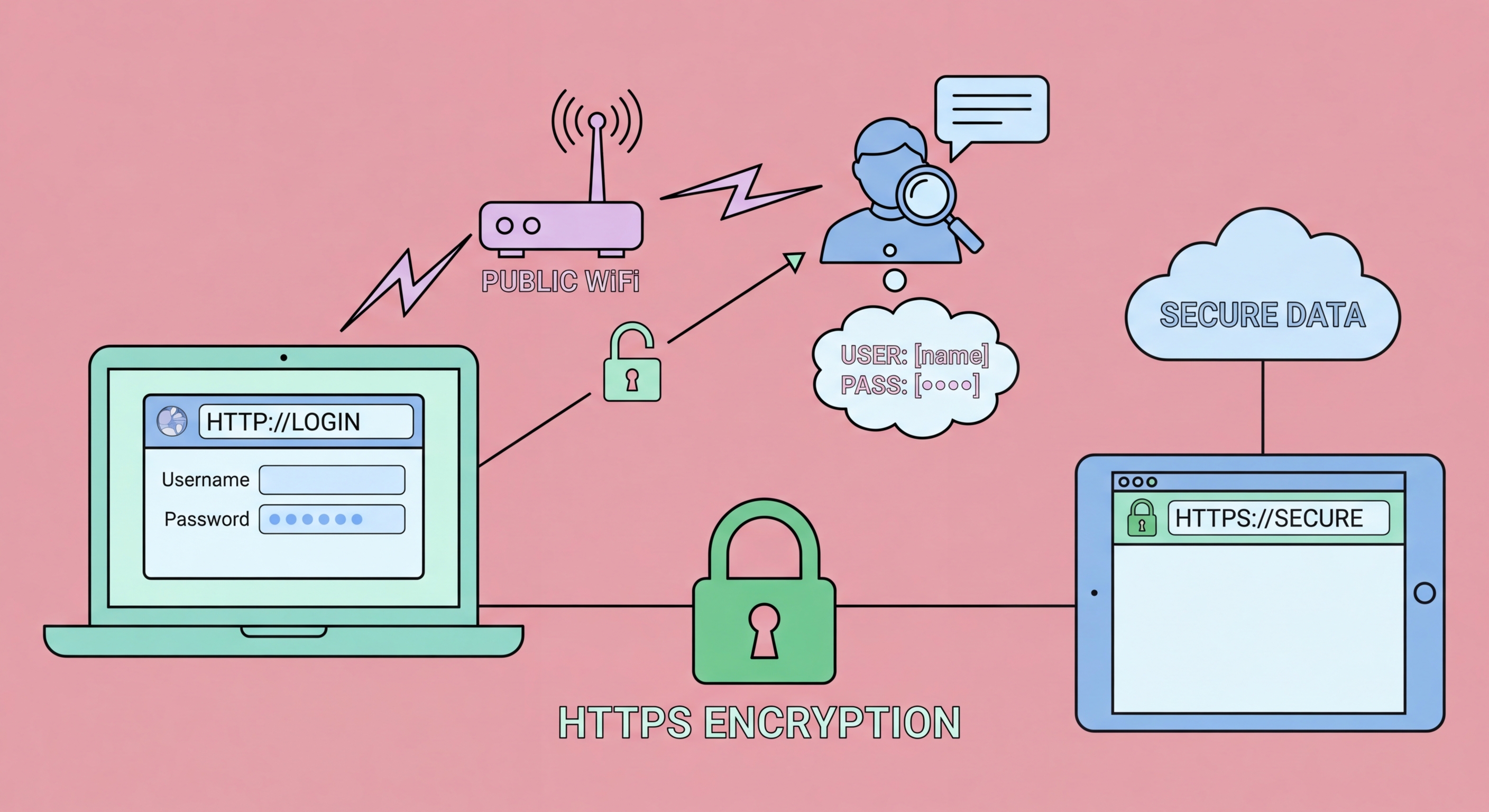
Passwords are the primary target for attackers on public WiFi. Whether through traffic interception, fake login portals, or SSL stripping, compromising your passwords is the goal of most network-level WiFi attacks. Here's exactly how passwords are at risk on public WiFi and the specific protections that keep them safe.
The first and most straightforward method is direct capture from unencrypted traffic. If you log into a website that uses HTTP (not HTTPS), your username and password are transmitted in plaintext over the network. Any device capturing WiFi packets on the same open network can read these credentials directly. While most major websites now use HTTPS by default, HTTP-only sites still exist — older forums, less professional services, and some internal tools accessed remotely may use HTTP. Additionally, some apps and services transmit credentials in HTTP even when their web interface uses HTTPS. On open public WiFi networks, any unencrypted credential transmission is immediately readable to passive network monitors.
The second method is SSL stripping combined with man-in-the-middle attack. An attacker who has established a MITM position (typically via ARP spoofing) can intercept your HTTP-to-HTTPS redirect requests and serve you the HTTP version of a site instead, while maintaining an HTTPS connection to the real site themselves. When you submit your login credentials on what appears to be the correct website but is actually being served over HTTP through the attacker's device, your credentials are captured in plaintext. The site might look identical to the legitimate site — the only visible indicator is the absence of the HTTPS padlock and the presence of "Not secure" in your browser's address bar. SSL stripping is defeated by HSTS preloading on sites that support it, and by your vigilance in checking for HTTPS before logging in.
The third method is evil twin captive portal credential collection. When you connect to an evil twin network, the attacker often presents a convincing fake captive portal that mimics the login page of the legitimate venue network. You submit whatever information the portal requests — potentially your email address, to Spot and Avoid Attacks on Your Phone">Your Phone Number">phone number, and in some cases credentials for a specific service. More sophisticated attacks present fake login pages for specific services: a fake "Sign in with Google" or "Sign in with your HSBC account" prompt through the captive portal collects actual service credentials. The captive portal phishing attack does not require HTTPS to be broken — you are voluntarily submitting credentials to the attacker's server through a portal that looks legitimate.
A VPN is the most effective single tool for password protection on public WiFi because it encrypts all traffic — including credential submissions — before it reaches the network. An attacker capturing your traffic on an open WiFi network captures only encrypted ciphertext. Even if the site you're logging into uses HTTP (not HTTPS), and even if the attacker has an active MITM position, your credentials are encrypted inside the VPN tunnel before reaching the network and cannot be read. This is why VPN protection is described as defending against the full range of network-level password theft methods — the encryption operates at a layer below the application protocol (HTTP vs HTTPS), making it irrelevant to the attacker what protocol the destination site uses.
Two-factor authentication (2FA) provides critical protection when a password is successfully stolen. If an attacker captures your email or banking password from a public WiFi session, 2FA prevents them from using it — they also need access to your second factor (your phone's authenticator app, hardware security key, or SMS OTP). For accounts on which you access on public WiFi — email, social media, banking, work systems — 2FA should be enabled on all of them without exception. Even if your VPN fails, has a DNS leak, or you inadvertently submit credentials to an SSL-stripped HTTP site, 2FA significantly limits the damage from credential theft. The attacker has your password but cannot access your account without your second factor, giving you time to detect the incident and change your password.
Password managers contribute to public WiFi password safety in two ways. First, they prevent you from entering passwords on phishing sites that mimic legitimate services: password managers match the saved credential to the exact domain URL and will not auto-fill on a fake site (e.g., they will not fill your HSBC credentials on "hsbc-secure-login.com" that does not match "hsbc.com.hk"). Second, if a password is compromised, password managers make it fast to change — you can update one account's password without having to remember many others, enabling rapid response to a credential theft incident. Using unique passwords for every account (which password managers make practical) ensures that a compromised password from a café WiFi session cannot be used in credential stuffing attacks against your other accounts.
Hong Kong banking apps and online banking portals are a primary target for credential theft on public WiFi. HSBC, Hang Seng, Bank of China (Hong Kong), Standard Chartered, and the major Hong Kong digital banks all use HTTPS for their login processes and have HSTS implemented, providing significant protection against SSL stripping. However, using banking services on public WiFi without a VPN still exposes DNS metadata (revealing that you accessed banking sites) and is vulnerable to evil twin portal attacks if you inadvertently connect to a fake network. The consistent recommendation — supported by HKMA's cybersecurity guidance — is to use banking apps on mobile data rather than on public WiFi, regardless of VPN status. The specific risk of financial credential theft justifies the minor inconvenience of switching to 4G.
Work email login on public WiFi is a documented pathway for business email compromise fraud targeting Hong Kong companies. When an employee logs into Microsoft 365, Google Workspace, or a company's webmail portal from a café or hotel WiFi session without adequate protection, compromised credentials can enable an attacker to access corporate communications. Business email compromise (BEC) is Hong Kong's highest-value cybercrime category by financial loss, and the Hong Kong Police Force's Cyber Security and Technology Crime Bureau regularly publishes warnings about BEC incidents. The combination of predictable credentials (work email format is often guessable from company domain) and high financial value of corporate email access makes this a specifically targeted scenario at premium café locations in Central and Admiralty frequented by finance sector employees.
iAM Smart — Hong Kong's government digital identity platform — and the associated government online services (TaxEasy, eBenefit, and various department portals) contain highly sensitive personal and financial information. If an iAM Smart login occurs over a compromised public WiFi connection, the attacker gains access to an extremely comprehensive personal data profile. Similarly, AlipayHK and other Hong Kong digital wallets linked to bank accounts should never be accessed on public WiFi without a VPN. The common thread across all high-risk Hong Kong scenarios is that the target accounts either contain valuable financial resources directly or serve as stepping stones to accessing them — making them priority targets for dedicated attackers operating in Hong Kong's public WiFi environments.
If you suspect a password may have been stolen on a public WiFi session — perhaps you noticed suspicious network behaviour, received an unexpected login notification, or accessed a sensitive account without VPN protection in a high-risk environment — act promptly and systematically. Change the compromised password immediately from a trusted network (your home WiFi or mobile data). Do not wait — if an attacker has the password, every hour of delay is an opportunity for them to use it. After changing the password, review the account's login history and active sessions: most major services (Google, Apple, Microsoft, Facebook) show recent login activity including device type, location, and time. Look for any sessions you do not recognise and terminate them.
Check connected applications and OAuth authorisations for the compromised account. Many accounts allow third-party applications to connect via OAuth — if an attacker accessed your account, they may have authorised a malicious application that maintains access even after you change your password. In Google Account: Security → Third-party apps with account access. In Microsoft/Outlook: myaccount.microsoft.com → Privacy → Apps and services. In each case, revoke any application you do not recognise. Enable or verify 2FA is active after changing the password — this is the most important step to prevent the stolen password from being used again in the future. If you have 2FA enabled already, changing the password alone should be sufficient to lock out an attacker who does not have your second factor.
For potential corporate email compromise, escalate to your organisation's IT security team immediately rather than attempting to resolve it personally. The IT security team can review access logs, identify whether any data was exfiltrated, check whether any email rules were created (attackers commonly create rules to forward copies of email to external addresses), and initiate formal incident response procedures. If your company is in a regulated industry (financial services, legal, medical), data breach notification requirements may apply even to suspected incidents. Report suspected BEC to the Hong Kong Police Force's Cyber Security and Technology Crime Bureau at [email protected] and file a report through the HKPF CyberDefender portal. For banking credential compromise, contact your bank's fraud helpline immediately — HSBC, Hang Seng, and other major HK banks have 24-hour fraud hotlines for exactly this scenario.