ARP Spoofing on Public WiFi: How Attackers Intercept Your Traffic

ARP spoofing is the foundational technique behind most man-in-the-middle attacks on public WiFi. By exploiting a design weakness in the ARP protocol, an attacker on the same network inserts their device between your traffic and the router — seeing everything you send and receive. Here's how it works and why a VPN stops it completely.

ARP spoofing attack on public WiFi — attacker intercepting traffic between device and router
1ARP Explained

How ARP Works and Why It's Vulnerable to Spoofing

ARP (Address Resolution Protocol) is a network protocol that maps IP addresses to MAC (hardware) addresses on a local network. When your device wants to send data to another device on the same network — such as the WiFi router — it needs to know that device's MAC address. It sends an ARP broadcast asking "Who has IP address X? Tell me your MAC address." The device with that IP address responds with its MAC address, and your device caches this mapping in its ARP table for future use. This ARP table tells your device which MAC address to use when sending packets to a given IP address.

ARP was designed in 1982 with no authentication mechanism — any device on the network can send an ARP response claiming to be any IP address, without any verification. This is the fundamental vulnerability that ARP spoofing exploits. An attacker sends forged ARP response messages to your device, claiming that the router's IP address corresponds to the attacker's MAC address. Simultaneously, the attacker sends forged ARP responses to the router, claiming that your device's IP address corresponds to the attacker's MAC address. Once both your device and the router have updated their ARP caches with the attacker's MAC address, all traffic between your device and the router flows through the attacker's device instead of directly between the two endpoints. This is a classic man-in-the-middle position.

ARP spoofing is entirely passive to the victim — no action is required from you, no warning appears on your device, and internet connectivity continues working normally. The attack exploits a protocol-level weakness rather than any action or vulnerability on your part. The attacker simply needs to be on the same network segment as you — which on any public WiFi network anyone can join, they trivially are. Free tools like Arpspoof, Ettercap, and Cain and Abel automate ARP spoofing with minimal technical skill required. Bettercap, a modern, actively maintained framework, provides ARP spoofing combined with SSL stripping, HTTPS downgrade attacks, and credential capture in a single tool that runs on a laptop in any café or hotel.

  • ARP function: Maps IP addresses to hardware MAC addresses on local networks
  • Design weakness: ARP has no authentication — any device can claim to be any IP address
  • ARP poisoning: Forged ARP responses update victim's and router's ARP caches with attacker's MAC
  • MITM position: All victim-router traffic routes through attacker's device transparently
  • No victim action needed: Attack is entirely passive — internet continues working normally
  • Easy tooling: Bettercap, Arpspoof, Ettercap automate the attack with minimal skill required
What attackers do with a MITM position established via ARP spoofing →
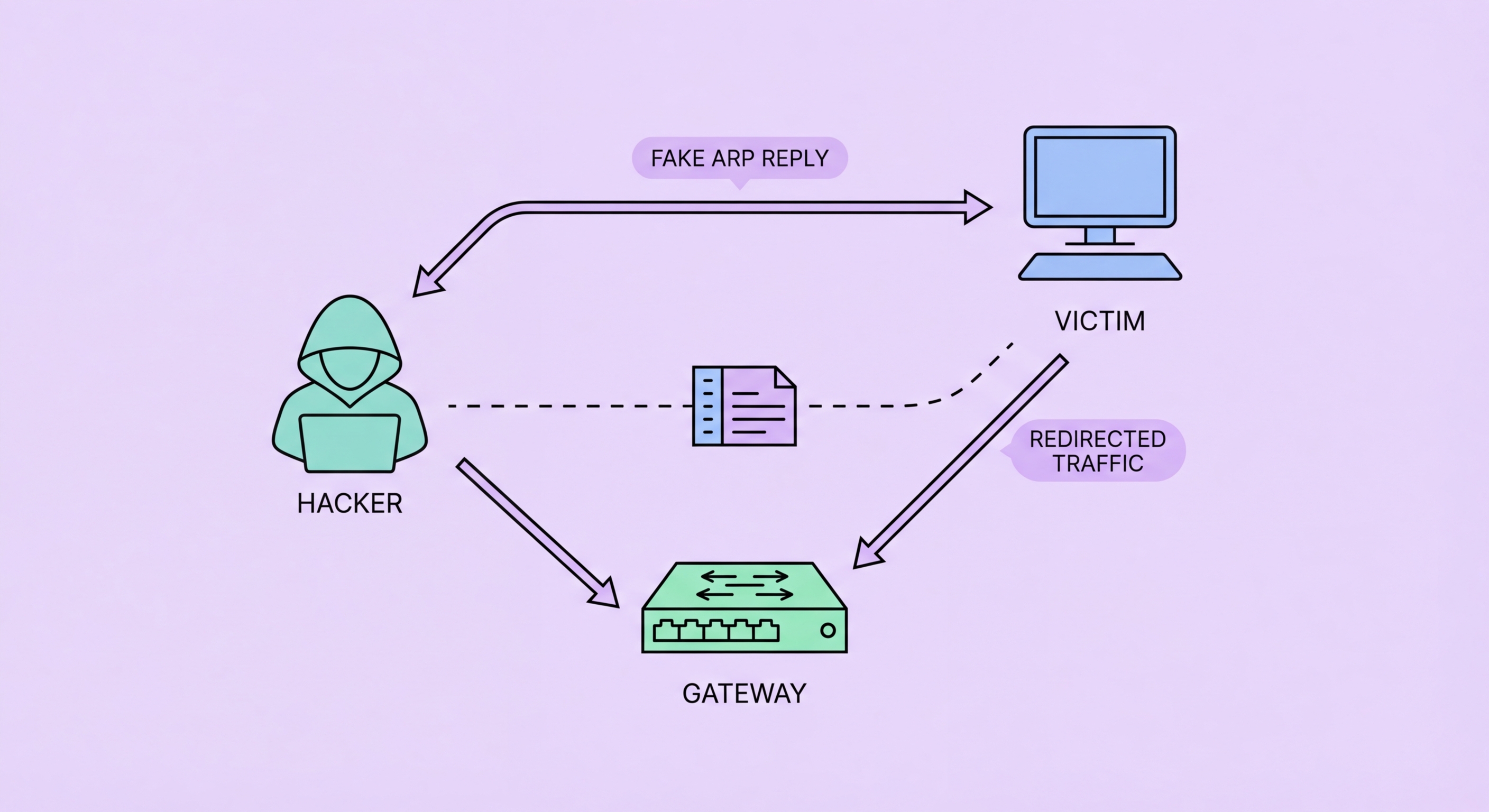
ARP spoofing mechanism — forged ARP responses poisoning victim and router ARP caches
2What Attackers Capture

What Attackers Can Do Once They Have an ARP Spoofing MITM Position

Once in a MITM position via ARP spoofing, the attacker can perform passive packet capture to record all traffic flowing between your device and the router. Unencrypted HTTP traffic is immediately readable — the attacker captures everything in plaintext, including any credentials, form submissions, cookies, and page content. Encrypted HTTPS traffic is not immediately readable in its encrypted form, but the MITM position enables active attacks to defeat the encryption. SSL stripping — using tools like Bettercap's SSL strip module — intercepts your HTTP-to-HTTPS redirects and serves HTTP versions of pages to your browser while maintaining an HTTPS connection to the real server. If successful, the attacker reads all your traffic in plaintext despite the site nominally using HTTPS.

Session hijacking is another powerful attack enabled by a MITM position. Even if an attacker cannot read your login credentials (because the login happened over HTTPS that wasn't stripped), they can steal session cookies from subsequent HTTP requests on the same session. A session cookie authenticates your browser as already logged in — stealing it allows the attacker to impersonate your authenticated session without knowing your password. This is particularly effective against services that use HTTPS for login but HTTP for subsequent authenticated browsing (though this is increasingly rare as HTTPS adoption has grown). It can also affect services that mix HTTPS and HTTP content on the same domain.

DNS hijacking is easily combined with ARP spoofing. Once in a MITM position, the attacker is positioned to intercept your DNS queries (which travel in plaintext) and return forged DNS responses pointing to attacker-controlled servers. Combined with fake login pages that mimic legitimate services, this creates a highly convincing attack chain: ARP spoofing establishes MITM position → DNS hijacking redirects your domain queries → fake HTTPS site (with self-signed certificate) captures credentials. The attacker then forwards your login to the real site, so you access your account normally while your credentials have been captured. The only visible indication is an SSL certificate warning — which the attacker's phishing page may try to explain away with a convincing message.

  • Packet capture: All traffic in MITM position recorded — HTTP immediately readable
  • SSL stripping: Downgrades HTTPS to HTTP — enables reading of "secure" traffic
  • Session hijacking: Steals session cookies from HTTP requests — authenticates as victim
  • DNS hijacking: Intercepts DNS queries and returns forged responses
  • Credential capture: Full attack chain: ARP spoof → DNS hijack → fake login page
  • Certificate warning: The one visible signal of the attack — never dismiss on public WiFi
How SSL stripping defeats HTTPS and what HSTS does to stop it →
Attacker using ARP spoofing MITM position for SSL stripping and credential capture
3Detecting ARP Attacks

Signs That ARP Spoofing May Be Active on Your Network

ARP spoofing is designed to be transparent, but several technical indicators can suggest an attack is occurring. The most accessible check is to view your device's ARP cache and look for multiple entries sharing the same MAC address — a sign that ARP cache poisoning has occurred. On macOS, open Terminal and run "arp -a" to view your ARP cache. If two different IP addresses show the same MAC address (e.g., the router's IP and another device's IP both show the same MAC), this is a strong indicator of ARP spoofing. On Windows, run "arp -a" in Command Prompt for the same information. The command output shows IP address to MAC address mappings — the router's gateway IP should have a unique MAC address not shared by any other entry.

Network performance indicators can also suggest ARP spoofing. If your connection is slower than expected (because traffic is routing through an extra device), or if you experience intermittent connectivity drops and reconnections (as the ARP attack restabilises), this warrants suspicion combined with other indicators. Browser-level signals are more accessible for non-technical users: unexpected HTTP on normally-HTTPS sites, SSL certificate warnings on familiar services, or being prompted to re-login to services where you have an active session, are all signals that your connection may have been interfered with. None of these is definitive, but in a high-risk environment (hotel network, airport, conference venue) they should trigger disconnection and switch to mobile data.

Tools that detect ARP spoofing in real time are available for both consumers and enterprise environments. XArp is a Windows application that monitors your ARP cache in real time and alerts on suspicious changes consistent with ARP spoofing. ARPwatch is a Unix/macOS tool that monitors ARP traffic and alerts on anomalies. For enterprise networks, switches with Dynamic ARP Inspection (DAI) enabled detect and block ARP spoofing attacks at the switch level — DAI validates ARP responses against a DHCP snooping table before allowing them to propagate. DAI effectively eliminates ARP spoofing as a risk on properly configured enterprise networks, which is one reason corporate networks are significantly more secure than public WiFi even when both carry sensitive traffic. Home and public networks rarely have DAI configured.

  • ARP cache check: "arp -a" in Terminal (macOS) or Command Prompt (Windows) — duplicate MACs = suspicious
  • Duplicate MAC warning: Two IPs sharing one MAC address = probable ARP cache poisoning
  • Performance indicators: Slow connection, repeated reconnections may indicate extra device in path
  • Browser signals: HTTP on HTTPS sites, certificate errors, unexpected logouts
  • XArp (Windows): Real-time ARP monitoring tool with attack alerts
  • Enterprise DAI: Dynamic ARP Inspection on managed switches prevents ARP spoofing at network level
Overview of all attack types enabled by ARP spoofing on public WiFi →
ARP spoofing detection — arp -a command showing duplicate MAC addresses indicating attack
4Defence

How to Defend Against ARP Spoofing Attacks on Public WiFi

The most effective defence against ARP spoofing on public WiFi is a VPN with full-tunnel routing. A VPN does not prevent ARP spoofing from occurring — the ARP cache poisoning still happens, and the attacker still intercepts your traffic — but it renders the attack ineffective. All traffic from your device is encrypted before it reaches the local network, so the intercepted traffic that passes through the attacker's device contains only ciphertext. The attacker can capture all the packets they want, but without the VPN encryption keys (which they do not have), the captured data is useless. This is why VPN protection on public WiFi is described as defending against MITM attacks: the attacker's position in the traffic path does not matter if all the traffic is encrypted before reaching them.

Static ARP entries are a technical countermeasure for users comfortable with command-line configuration. A static ARP entry manually sets the MAC address for a specific IP address (such as the router's gateway IP) and prevents ARP cache updates for that entry — the operating system will not accept ARP responses that change the mapping. On macOS: run "sudo arp -s [gateway_IP] [gateway_MAC]" in Terminal, where you first look up the legitimate gateway MAC with "arp -a" before connecting to a potentially hostile network. On Windows: "netsh interface ipv4 set neighbors [interface] [gateway_IP] [gateway_MAC]" achieves the same result. This approach is practical for technically proficient users who frequently use a specific café or hotel network, but it requires knowing the legitimate MAC address before the attacker has poisoned your ARP cache.

Client isolation is the network-level defence — when a WiFi access point has client isolation (also called station isolation or AP isolation) enabled, devices connected to the same access point cannot communicate directly with each other. ARP spoofing requires the attacker's device to communicate directly with other client devices on the same network to send forged ARP responses. With client isolation enabled, the attacker cannot send ARP responses to other clients, eliminating the attack. You cannot enable client isolation as a user — it must be configured by the network administrator. However, knowing whether a network has client isolation helps calibrate risk: most enterprise WiFi systems support and enable client isolation; most consumer-grade routers (including those in many hotels and cafés) do not have it configured.

  • VPN primary defence: Encrypts traffic before it reaches the local network — intercepted packets are useless ciphertext
  • VPN doesn't prevent: ARP poisoning still occurs — VPN makes it irrelevant by encrypting all traffic
  • Static ARP: Manually set gateway MAC to prevent poisoning — requires knowing legitimate MAC in advance
  • macOS static ARP: "sudo arp -s [IP] [MAC]" prevents ARP cache updates for gateway
  • Client isolation: Network-level protection prevents ARP frames reaching other clients — depends on AP configuration
  • Network selection: Prefer WPA2/WPA3 enterprise networks with client isolation over open consumer-grade networks
Configure a VPN to defend against ARP spoofing and all MITM attacks →
Defence against ARP spoofing — VPN encryption making intercepted traffic unreadable

VPN: The One Defence That Works Against ARP Spoofing

A VPN encrypts all traffic before it reaches the local network. Even when an attacker has a MITM position via ARP spoofing, they capture only useless ciphertext. Configure VPN auto-connect and you're always protected.

Related VPN Articles