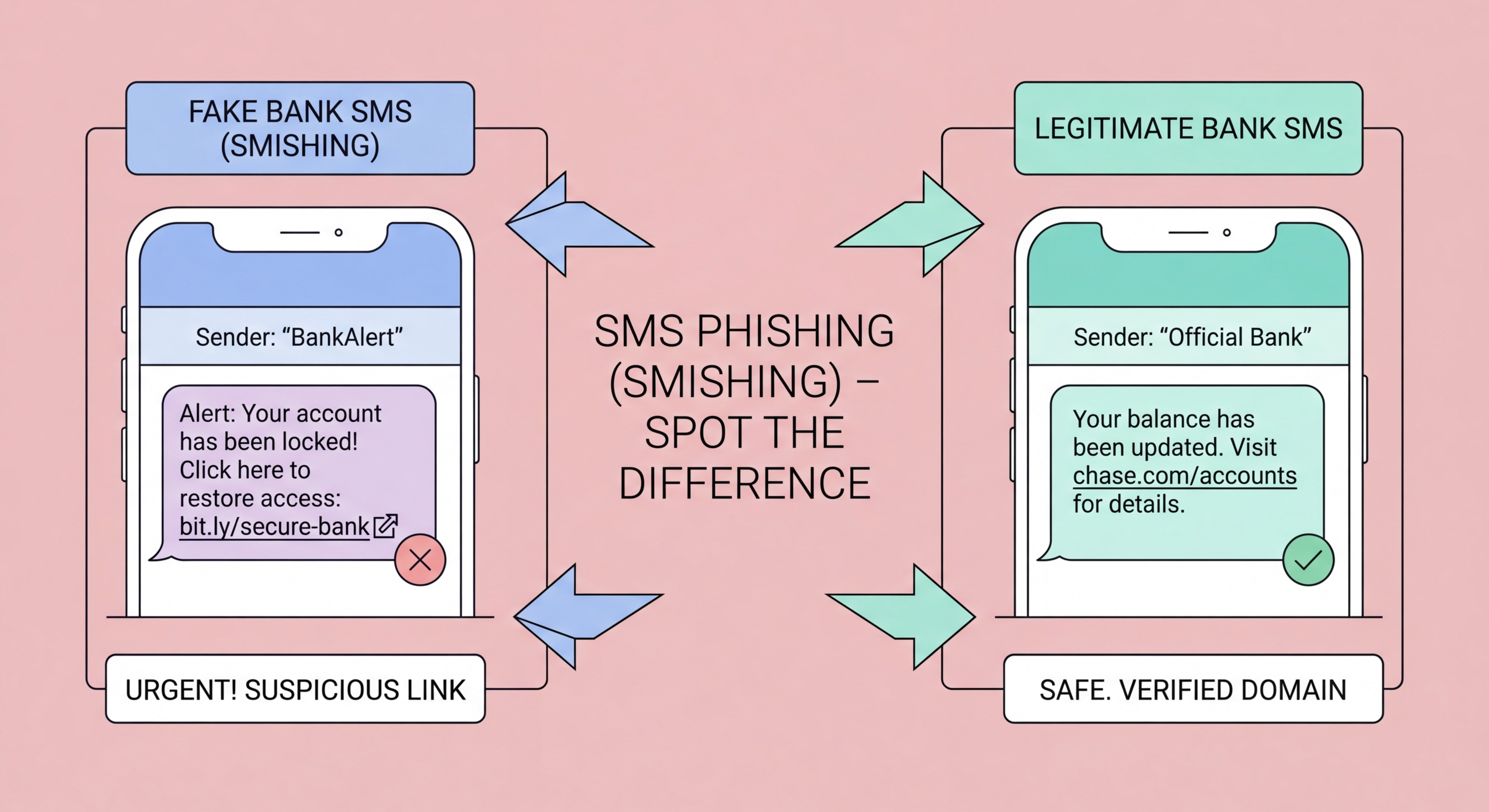
Fake Octopus refund alerts, bank security warnings, and government fine notices via SMS are among the most prevalent scams targeting Hong Kong residents. Learn to recognise and resist them.
Smishing — SMS phishing — uses text messages to deceive recipients into clicking malicious links or calling fraudulent numbers. It is particularly effective in Hong Kong for several reasons: the city's high smartphone penetration means almost everyone receives and acts on SMS notifications; critical services like banking, Octopus, and government communications do use SMS legitimately, making fraudulent messages plausible; and SMS messages are more trusted than email by many users, who are less accustomed to scrutinising them as carefully as emails.
Smishing messages typically create urgency around financial, delivery, or official matters. Common themes in Hong Kong include: suspicious banking transaction requiring immediate confirmation; Octopus card balance refund or suspicious usage; package unable to be delivered requiring re-scheduling; government fine or tax underpayment requiring immediate settlement; reward points about to expire; and account suspension requiring identity verification. Each theme exploits a common Hong Kong service and creates a reason to click without thinking.
The technical mechanism is similar to email phishing: a link in the SMS leads to a fraudulent website that mimics a legitimate service and harvests credentials or payment information. Some smishing links install malware on the device when clicked, even without further user interaction — a technique prevalent in campaigns targeting Android devices where malicious APK files can be downloaded. iOS devices are somewhat more protected due to App Store restrictions, but phishing site credential harvesting affects both platforms equally.
Understanding the specific message patterns used in HK smishing campaigns dramatically improves detection. Octopus card smishing typically claims a refund is available — "Your Octopus card HK$XXX refund is ready — verify your card at [fraudulent link]" — or that suspicious usage has been detected. The link leads to a site mimicking the Octopus website that asks for card number, HKID, and PIN — information the real Octopus service would never request via an SMS link.
Bank smishing messages impersonate HSBC, Hang Seng, Bank of China, Standard Chartered, and Citibank. Common scenarios include: unusual transaction requiring confirmation, account security lockout requiring identity verification, and credit limit increase requiring linked card details. These messages typically include a partial account number to appear credible — often just four digits that could apply to millions of accounts. The links lead to pixel-perfect bank website clones that capture full credentials.
Package delivery smishing impersonates SF Express, DHL, FedEx, and HK Post. Messages claim a package cannot be delivered due to an unpaid customs duty or an address error, directing recipients to a fake site requesting payment card details. Government smishing impersonates IRD (tax department), Immigration Department, and Hong Kong Police, using threatening language about overdue tax payments, warrants for arrest, or immigration violations requiring immediate attention.
The most reliable detection technique for smishing is to examine the link URL before tapping it. Hold the link with a long-press on mobile to preview the actual URL without following it. Compare this URL to the official domain of the purported sender — the Octopus official site is octopuscards.com, not octopus-hk.com or octopuscard.com.verification-portal.net. Any URL that does not match the organisation's well-known official domain should be treated as suspicious.
Consider whether the communication channel makes sense. Banks and government departments do send SMS notifications, but they do not send SMS links asking you to enter credentials, payment card details, or HKID numbers. Octopus does not refund money through SMS links — refunds are handled through the Octopus app or at service points. If an SMS is asking you to do something you would not normally do through that channel, that mismatch is itself a red flag worth investigating before acting.
Cross-reference with your account activity. If a smishing message claims there is a suspicious transaction on your bank account, log in to your bank's official app directly (opened from your home screen, not through any SMS link) and check whether any such transaction actually exists. Most smishing messages reference generic scenarios that apply to millions of people — when you check your actual account, there is no corresponding transaction, confirming the message is fraudulent.
If you tapped a smishing link but did not enter any information on the landing page, close the browser immediately and run a security scan on your device. On Android, run Google Play Protect and check for any recently installed apps you do not recognise. On iPhone, the risk from simply visiting a phishing site without entering information is lower due to iOS sandboxing, but still close the browser and clear your browsing history. Change credentials for the service the message claimed to be from as a precaution.
If you entered credentials or payment information on a smishing site, act immediately. Call your bank on the number on the back of your card and report that you may have been phished — ask them to monitor for fraudulent transactions and consider temporarily locking your card and online banking access. Change the password for the affected service through the official app or website immediately. If you entered your HKID number, be alert for identity fraud attempts — this information can be used for fraudulent credit applications and other financial crimes.
Report the smishing message and link to help protect others. Forward the original SMS to your mobile carrier's spam reporting service. Report to HKCERT at hkcert.org/report. If it impersonated a bank, report to that bank's fraud team directly. If it impersonated a government agency, report to the relevant agency and to the HKPF Cyber Security and Technology Crime Bureau at 182 388. Quick reporting helps get smishing infrastructure taken down faster, protecting other potential victims in Hong Kong.