How to Share Passwords Securely
Sharing passwords via WhatsApp, SMS, or email creates serious security risks. Learn the right way to share credentials with family members and colleagues without compromising your security.
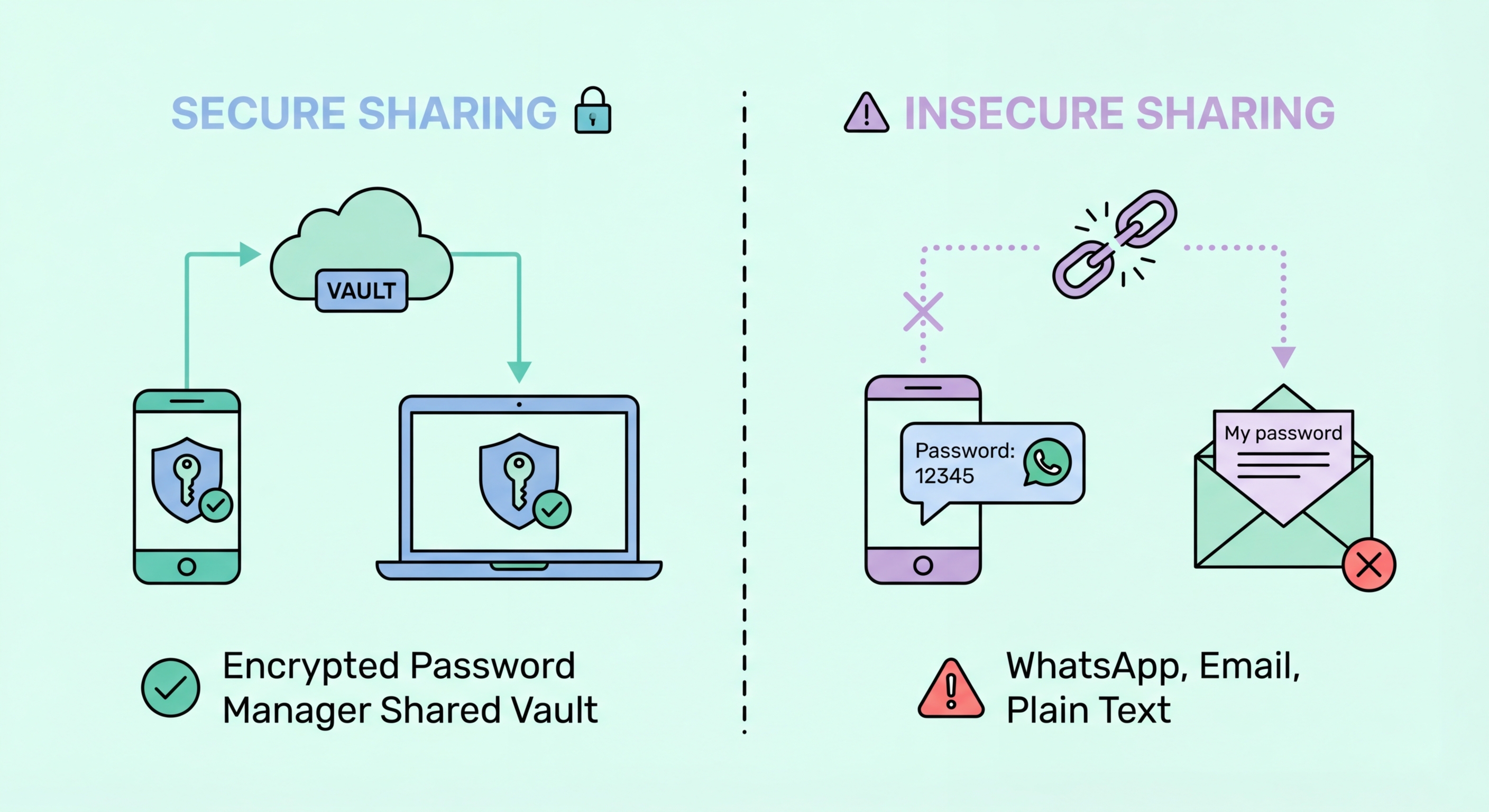
Sharing passwords via WhatsApp, SMS, or email creates serious security risks. Learn the right way to share credentials with family members and colleagues without compromising your security.
The most common way people share passwords in Hong Kong is via WhatsApp, SMS, or email — and all three methods create significant Security Risks">security risks. Messages sent via these channels are stored indefinitely in chat histories and email archives, meaning a password shared once remains accessible in multiple places for years. If any of the devices or accounts involved in the conversation are ever compromised, the shared password is immediately exposed to the attacker.
WhatsApp does use end-to-end encryption in transit, which means the message cannot be intercepted while being sent. However, this protection does not extend to the stored message history on your device or your recipient's device. WhatsApp backups to Google Drive or iCloud are often not end-to-end encrypted by default, meaning these backups could potentially be accessed by Google or Apple or, in a law enforcement scenario, compelled to be handed over. Email offers even less protection — most email content is stored on servers in readable form and is vulnerable to account compromise.
There is also the fundamental problem that once a password is shared in plaintext — in a message, an email, or a note — you have completely lost control over it. The recipient may store it insecurely, screenshot it, forward it inadvertently, or have their device seen by a third party. Even if they handle it carefully, the act of displaying a password in plaintext creates multiple new potential exposure points that a proper sharing mechanism eliminates entirely.

Password managers with family plans provide the ideal solution for sharing credentials within a household. Both 1Password Families and Bitwarden Families allow you to create shared vaults that multiple family members can access — perfect for household shared accounts like Netflix, Spotify, home WiFi passwords, banking apps used by couples, and utility service logins. Each family member also retains their own private vault for personal accounts, ensuring that sharing the family plan does not mean sharing everything.
The key security advantage of manager-based sharing is that recipients receive access to the credential, not the plaintext password itself. When you share a password through 1Password or Bitwarden, the recipient sees the filled-in login form without necessarily seeing the password as visible text — and crucially, the shared item remains centrally managed. If someone leaves the family plan, if you change the shared password, or if you revoke access, the change takes effect for all shared users immediately. There is no need to track down who has a copy of which password and update everyone individually.
For couples managing joint finances, shared vaults containing banking login information, insurance portals, government service logins (like HK eTax accounts), and utility logins provide a practical solution to a genuine household management problem. Rather than one partner knowing all the critical account credentials, both have equal access, which is also important for emergency access if one partner is incapacitated or unavailable.

Workplace credential sharing presents different challenges to household sharing. In a business context, multiple employees may need access to shared service accounts — social media management tools, SaaS platforms, shared email inboxes, or vendor portals. The traditional approach of maintaining a shared spreadsheet of passwords, emailing credentials to new starters, or verbally communicating passwords is both operationally inefficient and a significant security risk.
Business password managers like Keeper Business, 1Password Teams, and Bitwarden for Business provide the infrastructure to manage shared credentials securely at the organisational level. Features include role-based access control (RBAC), which allows administrators to provision access based on role rather than individuals; audit logs that record exactly who accessed which credential and when; and the ability to revoke access immediately when an employee leaves. This last capability is particularly important — a study of access credentials found that a significant proportion of corporate account compromises involve former employees whose access was not promptly revoked.
For small businesses in Hong Kong that have not yet implemented a formal password management solution, even a shared family-tier password manager is significantly better than shared spreadsheets. The critical first step is moving shared credentials from documents and email chains into an encrypted vault with proper access controls, then gradually implementing the more sophisticated governance features as the organisation's security maturity grows.

Sometimes you need to share a password with someone who does not use the same password manager, or with someone outside your organisation for temporary access. In these cases, tools designed specifically for secure one-time sharing are the appropriate solution. Services like 1Password's shareable links, Bitwarden's Send feature, or dedicated tools like OneTimeSecret generate an encrypted link containing the credential that expires after a set time or after the first view. Once the link expires, the data is permanently deleted from the server.
The key properties of a secure one-time sharing tool are: end-to-end encryption so the service cannot read the credential being shared; automatic expiry (by time or by number of views) to limit exposure window; and no persistent storage on the provider's servers after delivery. This approach is far superior to messaging or email because even if someone gains access to the link after it has been viewed and expired, there is nothing to retrieve.
For situations where you absolutely must communicate a password via a non-secure channel — such as to a less technically sophisticated family member who only communicates by SMS — a practical mitigation is to split the communication: send the username in one message on one channel, and the password via a different channel (such as a separate phone call or in-person). This limits exposure even if one communication channel is compromised, as the attacker would need both pieces of information.
