What Incognito Mode Really Does (And What It Doesn't)
The truth about private browsing mode — the narrow privacy it provides on your own device, and the much wider surveillance it does nothing to prevent.
Published: March 29, 2026
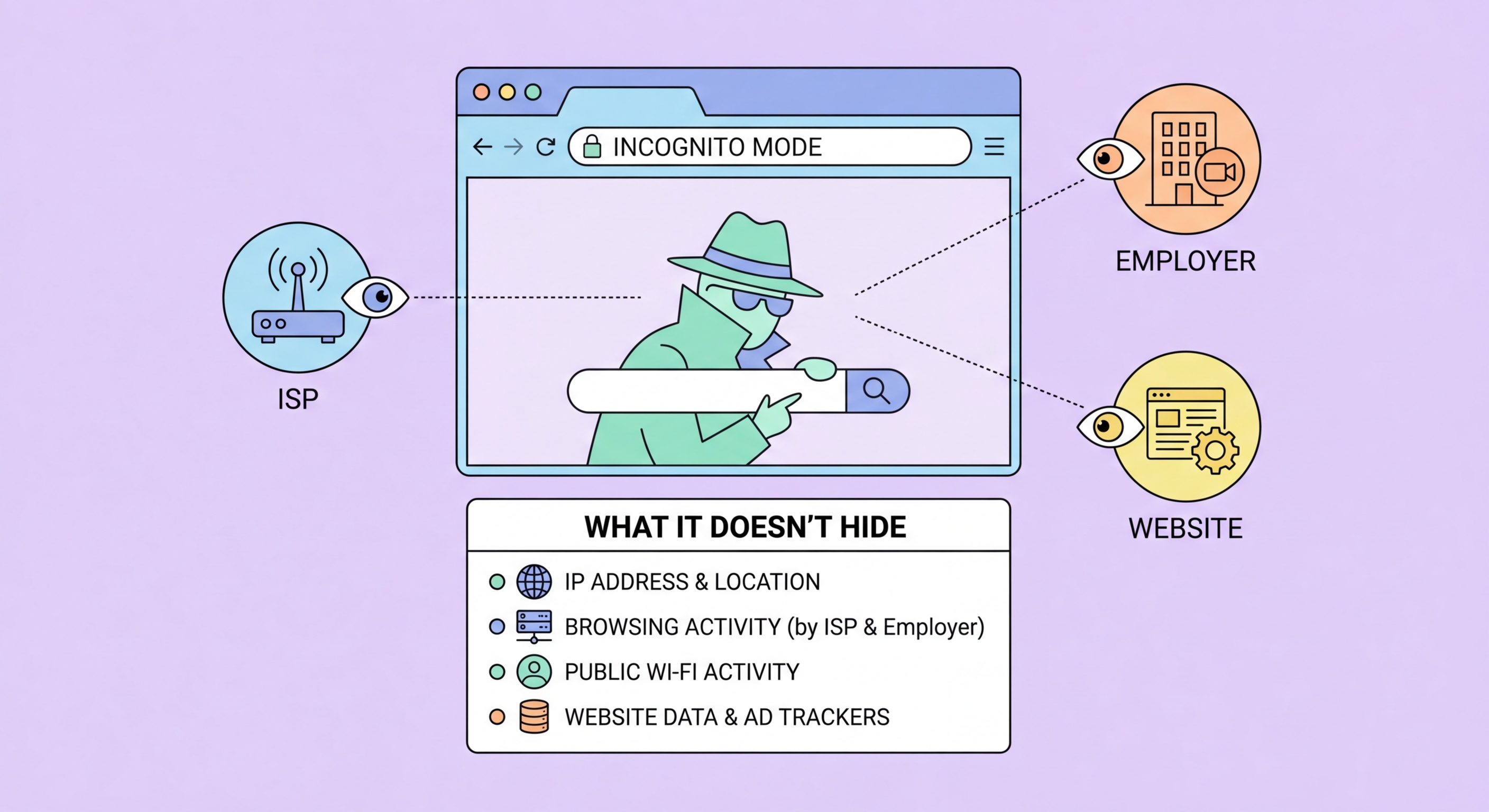
The truth about private browsing mode — the narrow privacy it provides on your own device, and the much wider surveillance it does nothing to prevent.
Published: March 29, 2026
Incognito mode (Chrome), Private Browsing (Firefox and Safari), and InPrivate (Edge) all do essentially the same thing: they prevent your browser from saving your browsing history, cookies, site data, and form inputs to your local device after the session ends. When you close an incognito window, the browser deletes all the cookies accumulated during that session and removes the visited URLs from your local history. This is genuinely useful in specific, narrow circumstances — specifically, when you want to ensure that other people who use the same device cannot see what you browsed.
Incognito mode is particularly valuable for checking prices on travel booking sites, where many sites set cookies that allow them to show you higher prices on return visits (a practice called dynamic pricing based on demonstrated interest). By browsing in incognito, you appear as a fresh visitor each time and often see lower initial prices. It is also useful for accessing a second Google, Facebook, or email account in the same browser without needing to log out of your primary account, since incognito windows do not share cookies with normal browser windows.
In a work or school environment where your browsing is monitored through the browser's sync features, incognito mode prevents your browsing from being synced to your Google or Microsoft account. This means your employer or school cannot see your incognito browsing through account sync logs. However, this is a narrow protection — it only addresses account sync data, not network-level monitoring. If your employer or school monitors traffic through a network proxy or firewall, incognito mode provides zero protection against that monitoring.

Incognito mode provides zero protection against network-level surveillance. Your ISP, your employer's network, your school's WiFi system, your home router, and any government monitoring system on the network path between your device and the websites you visit can all see exactly which sites you are connecting to. The incognito status of your browser window has no eff ↗ect on the network packets your device sends and receives — they look identical to normal browsing traffic and carry your real IP address.
Websites you visit while in incognito mode can still identify you through your IP address, browser fingerprint, and behaviour. Your IP address is transmitted with every network request, regardless of incognito status. Browser fingerprinting — the combination of your screen resolution, installed fonts, timezone, browser version, and dozens of other data points — creates a highly unique identifier that persists across sessions. Google's own research has shown that browser fingerprints can identify users with over 90% accuracy, meaning a website that served you before can likely recognise you in a new incognito session if you have not changed networks.
Malware and keyloggers on your device are completely unaffected by incognito mode. If your device has been compromised, everything you type, every site you visit, and every credential you enter in incognito mode is just as visible to the malware as normal browsing. Similarly, screen recording software, employer monitoring agents, and parental control software that operates at the OS level can capture all incognito browsing. Chrome was successfully sued by Google users in 2024 over misleading privacy representations about incognito mode — the settlement required Google to update its disclosures and delete billions of records collected from incognito sessions.

For protection against ISP and network-level surveillance, a VPN is the appropriate tool. A VPN encrypts all your network traffic and routes it through a server in another location, preventing your ISP from seeing which sites you connect to. When combined with DNS-over-HTTPS, a VPN creates a comprehensive screen between your browsing activity and network-level observers. This is the kind of protection most people think they are getting from incognito mode — but which actually requires a VPN to achieve.
For protection against website tracking and fingerprinting, a privacy-focused browser with built-in protections (Brave) or Firefox with the right extensions (uBlock Origin, Privacy Badger) provides far more eff ↗ective protection than incognito mode in any browser. Brave's fingerprinting randomisation actively disrupts cross-session tracking in ways that incognito mode — which does nothing to modify your fingerprint — cannot. Firefox's Multi-Account Containers provides session isolation without deleting your data, giving you the benefits of incognito mode (separated cookie jars) without its limitations.
For the strongest anonymity for specific high-sensitivity tasks, the Tor Browser routes your traffic through the Tor anonymity network, making it very difficult for any single observer to correlate your browsing with your identity. Tor Browser also standardises the fingerprint presented to all websites, making it far more resistant to identification than incognito mode. The tradeoff is significantly reduced browsing speed. For everyday Hong Hong Kong Users">Kong users, the practical combination is: use Brave or Firefox for daily browsing, use a reputable VPN for network-level privacy, and reserve Tor Browser for specific high-sensitivity tasks where anonymity is the primary concern.

Incognito mode is genuinely the right tool for its intended purpose: preventing other users of the same physical device from seeing your browsing history. If you share a computer at home, use a library computer, or want to check something on a colleague's machine without leaving a trace on their device, incognito mode does exactly what you need. Similarly, for quick price checks on travel or shopping sites where you want to avoid cookie-based dynamic pricing, incognito mode's cookie isolation is effective and appropriate.
For Hong Kong users worried about their ISP collecting browsing data, concerned about privacy on public WiFi, trying to prevent websites from building profiles about their interests and behaviour, or wanting to protect their identity from network-level surveillance — incognito mode is not the right tool and should not be relied upon. These are legitimate and important privacy concerns, but they require different tools: specifically, a VPN for network-level privacy and a privacy browser with anti-tracking tools for website-level privacy.
The most important mindset shift is understanding that privacy is a layered concern — different threats require different tools, and no single feature addresses all of them. Incognito mode addresses exactly one threat: local device history. A VPN addresses network surveillance. A privacy browser with extensions addresses website tracking. DNS-over-HTTPS addresses ISP DNS logging. Understanding which tool does what allows you to make informed choices about your privacy setup rather than relying on the false comfort of a feature that is significantly more limited than most people assume.
