WiFi Security Protocols: WPA2 vs WPA3 Explained

WPA2 and WPA3 are the encryption protocols that protect WiFi traffic — but they only apply to password-protected networks. Hong Kong's public WiFi networks, including WiFi.HK, are open networks with no protocol-level encryption at all. Here's what the protocols do, what they protect against, and what they don't.

WiFi security protocol comparison — WPA2 vs WPA3 encryption for public networks
1WEP to WPA2

From WEP to WPA2: How WiFi Security Evolved

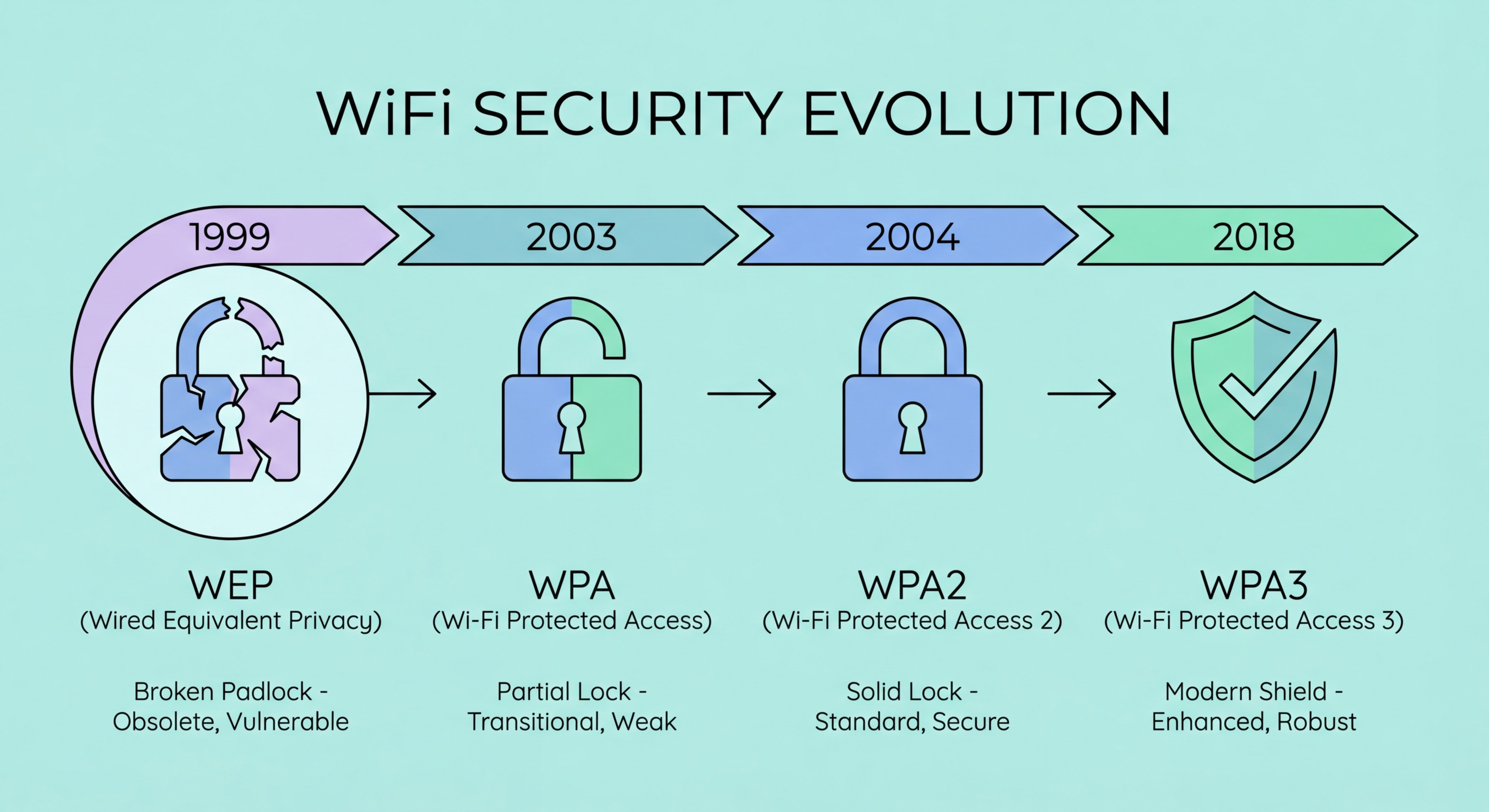
WiFi security protocols define how data is encrypted between your device and the access point. The first WiFi security protocol, WEP (Wired Equivalent Privacy), was introduced in 1997 and was broken within a few years of widespread deployment. WEP used static encryption keys that could be cracked by collecting enough network traffic — with modern hardware, a WEP network can be compromised in minutes. WEP was deprecated in 2004 but is still used on some very old access points. If you ever see a WEP network, treat it as completely open.

WPA (WiFi Protected Access) replaced WEP in 2003 as an interim standard, using TKIP (Temporal Key Integrity Protocol) which was stronger than WEP but still contained exploitable vulnerabilities. WPA2, introduced in 2004 and based on the IEEE 802.11i standard, brought the AES-CCMP encryption algorithm, which remains cryptographically strong today. WPA2 Personal (also called WPA2-PSK) is what most home and small business networks use — all devices connect using the same shared password. WPA2 Enterprise, used in corporate and institutional networks, requires individual credentials for each user (via RADIUS authentication) and provides per-user encryption keys, making it significantly more secure.

WPA2's main vulnerability on public networks is not in the AES encryption itself, but in how shared-key networks work. On a WPA2 Personal network where everyone uses the same password, any user who knows the password can potentially decrypt other users' traffic if they capture it. This is known as the KRACK (Key Reinstallation Attack) vulnerability class and was widely publicised in 2017. KRACK has been patched in modern devices, but it illustrated that WPA2 Personal does not provide true per-user session encryption on shared networks. WPA2 Enterprise with per-user credentials does provide true isolation, but public WiFi networks almost never use Enterprise authentication.

  • WEP (1997): Broken — crackable in minutes — treat any WEP network as completely open
  • WPA (2003): Interim standard with TKIP — also vulnerable — avoid if possible
  • WPA2 Personal (2004): AES-CCMP encryption — strong cipher but shared key limits per-user isolation
  • WPA2 Enterprise: Per-user authentication via RADIUS — true user isolation but rare on public networks
  • KRACK (2017): Demonstrated WPA2 Personal shared-key sessions could be attacked — patched in modern devices
  • Open networks: No WPA2 at all — WiFi.HK and most public HK WiFi are completely unencrypted at protocol level
See how open WiFi networks are vulnerable to eavesdropping →
WiFi protocol evolution from WEP to WPA to WPA2 security standards
2WPA3 Improvements

WPA3: What It Improves and Where It Still Falls Short

WPA3 was introduced in 2018 and has two main variants: WPA3 Personal and WPA3 Enterprise. WPA3 Personal replaces the PSK (Pre-Shared Key) handshake with SAE (Simultaneous Authentication of Equals), also known as the Dragonfly handshake. SAE's key advantage is that it provides forward secrecy — even if an attacker captures all traffic from a WPA3 Personal network and later obtains the network password, they cannot decrypt the previously captured traffic. With WPA2 Personal, capturing traffic and then obtaining the password later allows offline decryption of all captured sessions. Forward secrecy means past sessions remain protected even if the password is compromised.

WPA3 also introduces "Opportunistic Wireless Encryption" (OWE) for open networks — this is the most relevant improvement for public WiFi. OWE encrypts traffic between each device and the access point individually, even without a password or authentication. This means that on an OWE-enabled "open" public network, other users on the same network cannot read on Public WiFi: How Attackers Intercept Your Traffic">your traffic even though there is no password. OWE addresses the fundamental problem of open public WiFi: that anyone on the same network can read all unencrypted traffic. However, OWE does not prevent attackers from setting up their own OWE-enabled access point with the same SSID (an evil twin), and it does not protect against MITM attacks from the access point itself.

WPA3 adoption in Hong Kong's public WiFi infrastructure is slow. WiFi.HK hotspots, MTR station access points, and most commercial venue networks still use older hardware that supports only WPA2 or open WiFi. WPA3 is now standard on all new consumer routers and devices manufactured after 2020, and modern iPhones and Android phones support WPA3. However, the network infrastructure must also support WPA3 for your device to use it. You can check your current connection's security protocol: on iPhone, go to Settings → WiFi → tap the "i" next to the connected network. On macOS, hold Option and click the WiFi menu bar icon to see detailed connection information including the security type. Most public WiFi connections in for Business Travellers: Protecting Corporate Data in Hong Kong">Hong Kong will show "WPA2" or "Open" — very few will show "WPA3" until infrastructure is upgraded.

  • SAE handshake: WPA3 Personal prevents offline dictionary attacks against the network password
  • Forward secrecy: Captured traffic cannot be decrypted retroactively even with password
  • OWE: Opportunistic encryption on open networks protects against peer-to-peer snooping
  • OWE limitation: Does not prevent evil twin attacks or MITM from the AP itself
  • HK adoption: Most public WiFi in HK still uses WPA2 or open networks — WPA3 rare
  • Check your connection: iPhone Settings → WiFi → "i" shows security protocol of current connection
Why WPA3 OWE still doesn't stop evil twin attacks →
WPA3 security improvements — SAE handshake and forward secrecy for WiFi
3Open Networks in HK

Open Networks: Why Most Hong Kong Public WiFi Has No Protocol Encryption

The overwhelming majority of public WiFi in Hong Kong — WiFi.HK, coffee shop networks, shopping mall networks, many hotel lobby networks — operates as open WiFi with no WPA2 or WPA3 encryption at all. Open networks are defined as networks with no authentication requirement: you connect without entering any password. The lack of a password means there is no encryption key to establish a protected session between your device and the access point. All traffic on an open network travels in plaintext at the WiFi protocol layer, visible to any device that can capture WiFi radio signals — no special hardware or expertise required, just widely available packet capture software.

The captive portal that many public networks use — the login page that asks for your email address or room number — is not a security mechanism. Captive portals authenticate your right to use the network for billing or usage tracking purposes, but they do not establish encrypted sessions. Your traffic before, during, and after captive portal authentication is equally unencrypted at the WiFi layer on an open network. The captive portal itself may even be served over HTTP (not HTTPS), meaning the data you submit to it — email address, phone number — transits the open network in plaintext. You can verify this by checking whether the captive portal URL starts with "https://" before submitting any information.

This reality means that for open public networks, the security of your traffic depends entirely on application-layer encryption — HTTPS for web browsing, and a VPN for comprehensive protection. HTTPS encrypts the content of individual web sessions but does not encrypt DNS queries or traffic metadata (which sites you visit, when, and how much data you transfer). A VPN encrypts everything at the network level, providing comprehensive protection regardless of the underlying WiFi protocol. When you connect to an open public network in Hong Kong, assume no protocol-level protection and rely entirely on your VPN and HTTPS to protect your data.

  • Open = no encryption: WiFi.HK and most HK public networks transmit all traffic in plaintext at the radio layer
  • Captive portals: Authentication portals do not provide encryption — they are access control only
  • HTTP portals: Some captive portals are HTTP themselves — verify HTTPS before submitting any data
  • Application-layer protection: HTTPS and VPN are your only protection on open networks
  • HTTPS gaps: DNS queries and traffic metadata visible even with HTTPS — VPN closes this gap
  • Default assumption: Treat all HK public WiFi as open and unencrypted unless you verify WPA3
How HTTPS protects your content on open WiFi networks →
Open WiFi network with no encryption — plaintext traffic visible to all users on network
4Practical Guidance

How to Check WiFi Security Protocol and What to Do With That Information

Knowing which protocol a network uses helps you calibrate your security response. On iPhone, you can view the security protocol of your current WiFi connection by going to Settings → WiFi and tapping the "i" icon next to the connected network. The "Security" field will show WPA2, WPA3, WPA2/WPA3 (transition mode), or "None" (open network). On macOS, hold the Option key and click the WiFi icon in the menu bar — a detailed panel shows RSSI, channel, country code, network type, and security information for the connected network. On Android, the information available varies by manufacturer but most recent versions show security protocol in the WiFi settings detail view for the connected network.

The appropriate response to each protocol tier: for open networks (None/no security), use a VPN for all traffic and avoid submitting any sensitive information without the VPN active. For WPA2 Personal networks, use a VPN — WPA2 Personal shared-key networks still allow other network users to potentially access your traffic. For WPA3 networks with OWE, the WiFi layer provides per-session encryption against other users, but a VPN remains recommended for privacy against the network operator and for protection against evil twin attacks. For WPA2 Enterprise or WPA3 Enterprise networks (corporate, institutional), traffic is isolated per-user at the WiFi layer, but VPN adds additional protection against compromised corporate infrastructure. There is no public network protocol configuration where a VPN provides zero benefit.

Your home network should use WPA3 or WPA2 if WPA3 is not supported by your router. Check your home router's security settings in its admin panel (typically accessed at 192.168.1.1 or 192.168.0.1) and update from WPA2 to WPA3 if your router supports it. Most routers sold in Hong Kong after 2021 support WPA3. Enabling WPA3 on your home router improves protection against offline dictionary attacks on your WiFi password and ensures that guests connecting to your network cannot monitor each other's traffic. For routers that support both, the "WPA2/WPA3 transition mode" allows both WPA2 and WPA3 clients to connect while gradually migrating to the more secure protocol.

  • iPhone check: Settings → WiFi → tap "i" → Security field shows WPA2, WPA3, or None
  • macOS check: Option-click WiFi menu bar icon → shows security protocol in detail panel
  • Open network response: Use VPN for all traffic — no protocol protection exists
  • WPA2 Personal response: VPN still recommended — shared key limits per-user isolation
  • WPA3 response: Better protection from peers but VPN still adds value against operator and evil twins
  • Home router: Upgrade to WPA3 in router admin panel if hardware supports it
Set up a VPN to protect yourself regardless of WiFi protocol →
WiFi security protocol check on iPhone and Android — WPA2 vs WPA3 display

Protocol Matters — But a VPN Covers Every Protocol Gap

Whether the network is open, WPA2, or WPA3, a VPN provides the consistent encryption that public WiFi protocols alone do not guarantee. Set up auto-connect and you're always protected.

Related VPN Articles