Clone Phishing Explained: How Attackers Duplicate Legitimate Emails

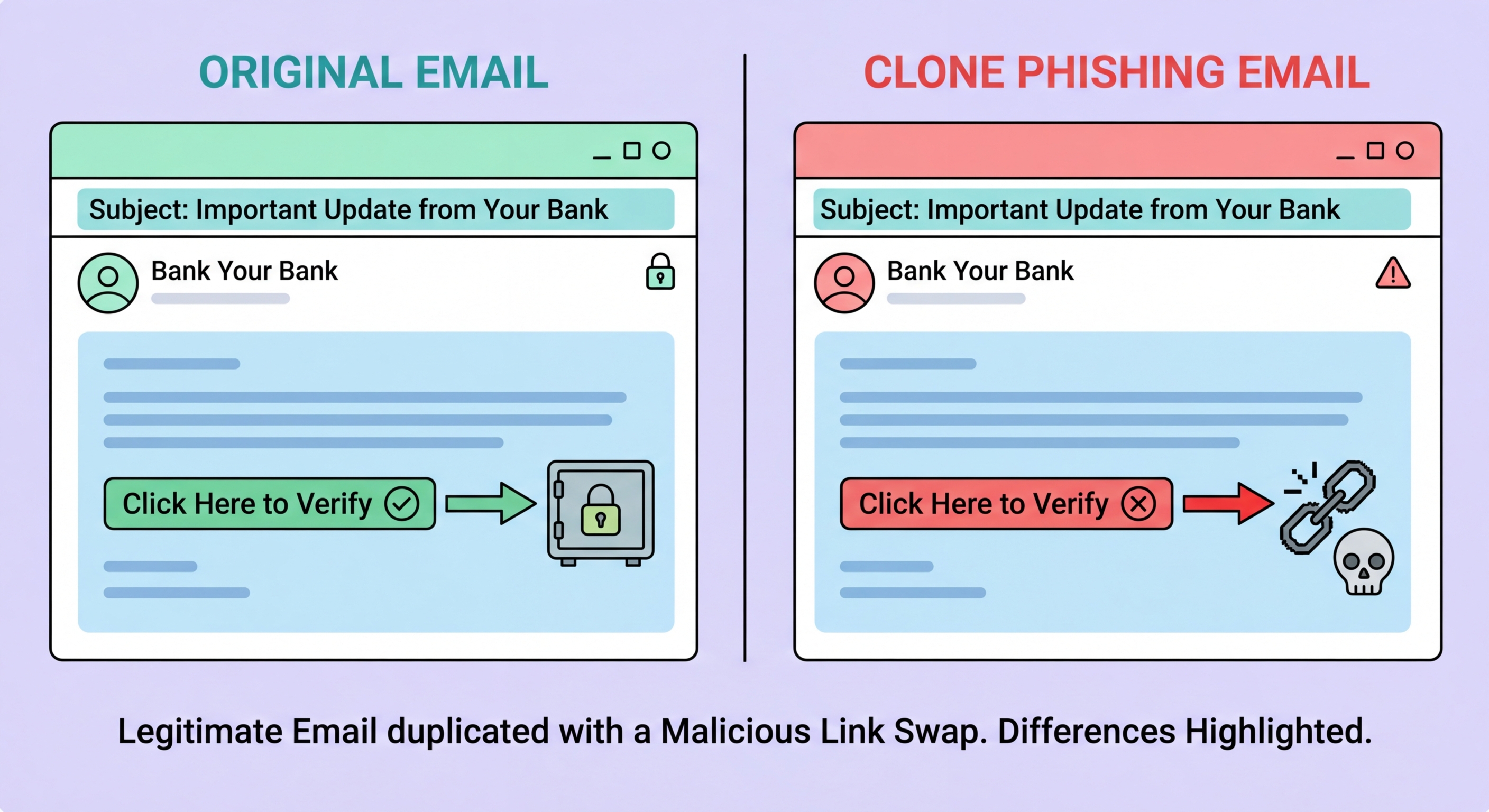
Clone phishing takes a real email you previously received, duplicates it almost perfectly, and replaces its legitimate links or attachments with malicious ones. It is harder to detect than generic phishing precisely because the content is mostly genuine.

Clone phishing duplicate email attack illustration
1What Is Clone Phishing

What Is Clone Phishing and How Does It Work?

Clone phishing is a specific phishing technique in which an attacker creates a near-perfect duplicate of a legitimate email that the target has previously received. The attacker obtains a copy of the original email — through network interception, a compromised account, or by receiving the original communication themselves if it was a mass email — and then creates a new version that is nearly identical in appearance, content, and formatting. The only differences are that the links or attachments in the cloned message have been replaced with malicious versions, and the sender address is spoofed or uses a lookalike domain. The cloned email is then sent to the target, often with a note suggesting it is a "resend" of the original due to a technical error or to add updated information.

The effectiveness of clone phishing stems from the victim's prior positive experience with the genuine email. When you have previously received a legitimate notification from your bank, a service provider, or a business partner, and you receive what appears to be the same email — same layout, same language, same apparent sender, referencing the same subject matter — the likelihood that you will scrutinise it carefully is lower than it would be for an unfamiliar message. The psychological mechanism is pattern recognition: you recognise the email as something you have seen and trusted before, and the recognition itself suppresses the critical evaluation you would apply to a new communication. This makes clone phishing particularly effective against regular business communications like invoice notifications, delivery confirmations, and software update alerts.

Clone phishing is used both as a standalone attack and as a follow-up to a successful account compromise. In the standalone variant, the attacker intercepts or obtains a copy of a legitimate email and creates a fraudulent clone. In the post-compromise variant, the attacker has access to a victim's compromised inbox and uses the actual email history to create clones precisely tailored to the victim's existing relationships and communication patterns — making the attack significantly more convincing because the email genuinely references real prior conversations and relationships. This latter variant is technically a form of Hong Kong: Prevention Guide">Business Email Compromise and is increasingly common as email account compromise has become more prevalent through credential phishing and password reuse exploitation.

  • Core technique: Duplicate of a real previously received email, with links/attachments replaced with malicious versions
  • Source of original email: Network interception, compromised account, or receipt of the original mass communication
  • Prior trust exploitation: Pattern recognition from previous legitimate email suppresses scrutiny of the clone
  • "Resend" framing: Technical error or updated information explanation for why you are receiving it again
  • Post-compromise variant: Attacker with inbox access creates clones tailored to actual email history and relationships
  • Common targets: Invoice notifications, delivery confirmations, software update alerts, service renewal notices
How clone phishing fits into the broader phishing taxonomy →
Clone phishing technique duplicate email malicious link
2Common Clone Phishing Scenarios

Common Clone Phishing Scenarios in Business and Personal Contexts

Invoice and payment notification cloning is among the most financially damaging clone phishing scenarios. An attacker who has intercepted or obtained a genuine invoice email from a supplier to a business customer creates an identical clone — same supplier branding, same invoice number, same amount — but with the bank account details changed to redirect payment. Because the email appears identical to the legitimate invoice the finance team expects to receive, the payment is processed without the verification that would be triggered by an unsolicited payment instruction. This attack is a variant of Business Email Compromise and has resulted in significant losses to Hong for Hong Kong SMEs: Where to Start">for Hong Kong Businesses">Kong businesses across multiple documented cases.

Software and service update notification cloning is particularly effective in business environments. Employees routinely receive notification emails about software updates, platform access renewals, and service notifications from the software and services their organisation uses. A clone of a Microsoft 365, Google Workspace, Zoom, or Slack security notification — with an identical visual design and a link that appears to lead to the genuine service but actually redirects to a credential-harvesting page — will be processed without significant scrutiny by employees who have seen and actioned similar genuine notifications many times. The malicious link is the only changed element; everything else matches the legitimate communication perfectly.

Package delivery and courier confirmation cloning exploits the frequency with which Hong Kong residents and businesses receive genuine delivery notifications from SF Express, DHL, FedEx, and HK Post. A clone of a genuine delivery notification with a modified tracking link that redirects to a fraudulent site — requesting personal information or card details to "reschedule delivery" or "pay customs fees" — is effectively indistinguishable from a genuine notification at a glance. The use of the actual shipment reference number from a real notification previously received by the target (possible if the attacker has access to intercepted emails) adds additional credibility that defeats casual scrutiny.

  • Invoice cloning: Identical invoice with changed bank account — results in legitimate payment redirected to attacker
  • Software update cloning: Microsoft 365, Google, Zoom notifications — credential harvesting via seemingly routine security notification
  • Delivery notification cloning: SF Express, DHL, HK Post — "pay customs fee" or personal details harvested via cloned notification
  • Real reference numbers: Attackers with prior email access can use actual shipment/invoice references from original emails
  • BEC intersection: Invoice cloning with changed payment details is effectively a BEC payment diversion attack
  • Routine email risk: Most dangerous against email types received frequently — familiarity suppresses scrutiny
How invoice cloning connects to BEC payment fraud →
Clone phishing examples business invoice delivery notifications
3How to Detect Clone Phishing

How to Detect Clone Phishing When the Email Looks Genuine

The central challenge of clone phishing detection is that visual inspection of the email body is insufficient — the content is mostly legitimate, copied from a real email. The reliable detection methods focus on the elements that have been changed: the sender address, the links, and the attachments. Even when the visual design perfectly matches a legitimate email, the actual sender address and the actual URL of embedded links will differ from their legitimate counterparts. Taking a moment to verify these elements — regardless of how familiar the email appears — is the effective counter to clone phishing's exploitation of visual familiarity.

For links, hover over them before clicking (on desktop) or long-press to preview the URL (on mobile) before following them. The displayed link text in a clone phishing email may show the legitimate URL but the actual hyperlink destination will differ — a technique called link text deception. Compare the actual URL with what you expect: a genuine Microsoft email about your Microsoft 365 account will link to login.microsoft.com or microsoft.com, not to a lookalike domain like microsoft.account-verify.com or login-microsoft.services-update.net. Pay attention to the full URL including the domain and path, not just whether the brand name appears somewhere in the URL string.

For unexpected payment-related emails — particularly those involving invoice amounts or bank account details — a brief out-of-band verification call to the supplier or sender is the most reliable defence. If you received an invoice from a supplier and a "corrected" version or a "resend" arrives with different banking details, call the supplier on a number from your own records (not from the email) to confirm before processing payment. This verification step applies even when the email appears completely legitimate — clone phishing is designed precisely to pass all visual checks. The financial cost of a misplaced phone call is negligible; the financial cost of processing a fraudulent payment instruction is not.

  • Do not rely on visual inspection: Clone phishing looks exactly like the legitimate email — visual match is not evidence of legitimacy
  • Check the sender address: Even when content matches, sender domain may differ by one character from the legitimate domain
  • Hover over links: Link text can show the legitimate URL while the actual hyperlink leads elsewhere — check the actual URL
  • Payment change verification: Call the supplier on your own records to confirm before processing any changed banking details
  • Unexpected resend scepticism: "Resend due to technical error" is a common framing — treat unexplained resends with extra scrutiny
  • Check email headers: Sender domain mismatch visible in headers even when display name matches legitimate sender
Using email headers to confirm clone phishing →
How to detect clone phishing link check sender domain
4Organisational Defences

How Organisations Can Defend Against Clone Phishing

Preventing the interception of legitimate emails that attackers use as cloning source material requires securing email accounts and communication channels. Multi-factor authentication on all corporate email accounts significantly reduces the risk of account compromise through which attackers gain access to email history for targeted cloning. Encrypted email (S/MIME or PGP) for sensitive communications prevents interception of emails in transit. Ensuring that corporate email traffic uses TLS encryption in transit (STARTTLS required mode rather than opportunistic) reduces the risk of man-in-the-middle interception that can provide attackers with email content for cloning.

Payment control procedures are the most directly effective defence against the highest-value clone phishing attacks — invoice and payment instruction cloning. Implementing a policy requiring out-of-band verification for any change to supplier banking details, regardless of how the instruction arrives, eliminates the financial impact of even a successfully delivered clone phishing email in the payment context. Dual-authorisation for payments above a threshold provides a second line of defence: even if one team member is deceived by a cloned invoice, the second authoriser provides an additional verification opportunity. Training staff to treat any "resend" or "updated version" of a financial document as requiring verification is directly targeted at the clone phishing methodology.

Email security tools that compare newly arriving emails against the history of prior communications from the same sender can detect clone phishing by flagging sudden changes in link domains or attachment types that differ from prior legitimate emails from the same sender. Some enterprise email security platforms (Proofpoint, Mimecast) offer "email fingerprinting" features that specifically flag emails that are suspiciously similar to previously received legitimate messages but contain changed links or attachments. These tools provide a technical layer of detection that complements the human verification procedures described above, and are particularly valuable for high-volume environments where staff process many emails quickly and may not notice subtle deviations.

  • MFA on email accounts: Prevents account compromise used as intelligence source for targeted cloning
  • TLS enforcement: Prevents in-transit email interception — configure required rather than opportunistic TLS
  • Payment instruction verification policy: Out-of-band verification for all banking detail changes — eliminates financial clone phishing risk
  • Dual-authorisation: Second approver provides additional fraud detection opportunity for cloned payment instructions
  • Staff training on "resend" framing: Unexplained resends of financial documents trigger verification, not automatic processing
  • Email fingerprinting tools: Proofpoint, Mimecast detection of emails suspiciously similar to legitimate prior communications
Email security tools that detect clone phishing →
Organisation defence against clone phishing email security

Familiarity Is Not Safety — Always Check the Link, Not Just the Email

Clone phishing looks exactly like the real email. The only reliable detection is checking the actual sender domain and hovering over links before clicking — every time, regardless of how familiar the email appears.

Related VPN Articles