Tor Browser Explained: How It Works and When to Use It

Tor Browser is the primary tool for accessing the dark web. This guide explains how onion routing works, what Tor does and doesn't protect, when it's appropriate to use, and its legal status for Hong Kong residents.

Tor Browser explained how it works
1How Tor Works

How Tor's Onion Routing Provides Anonymity

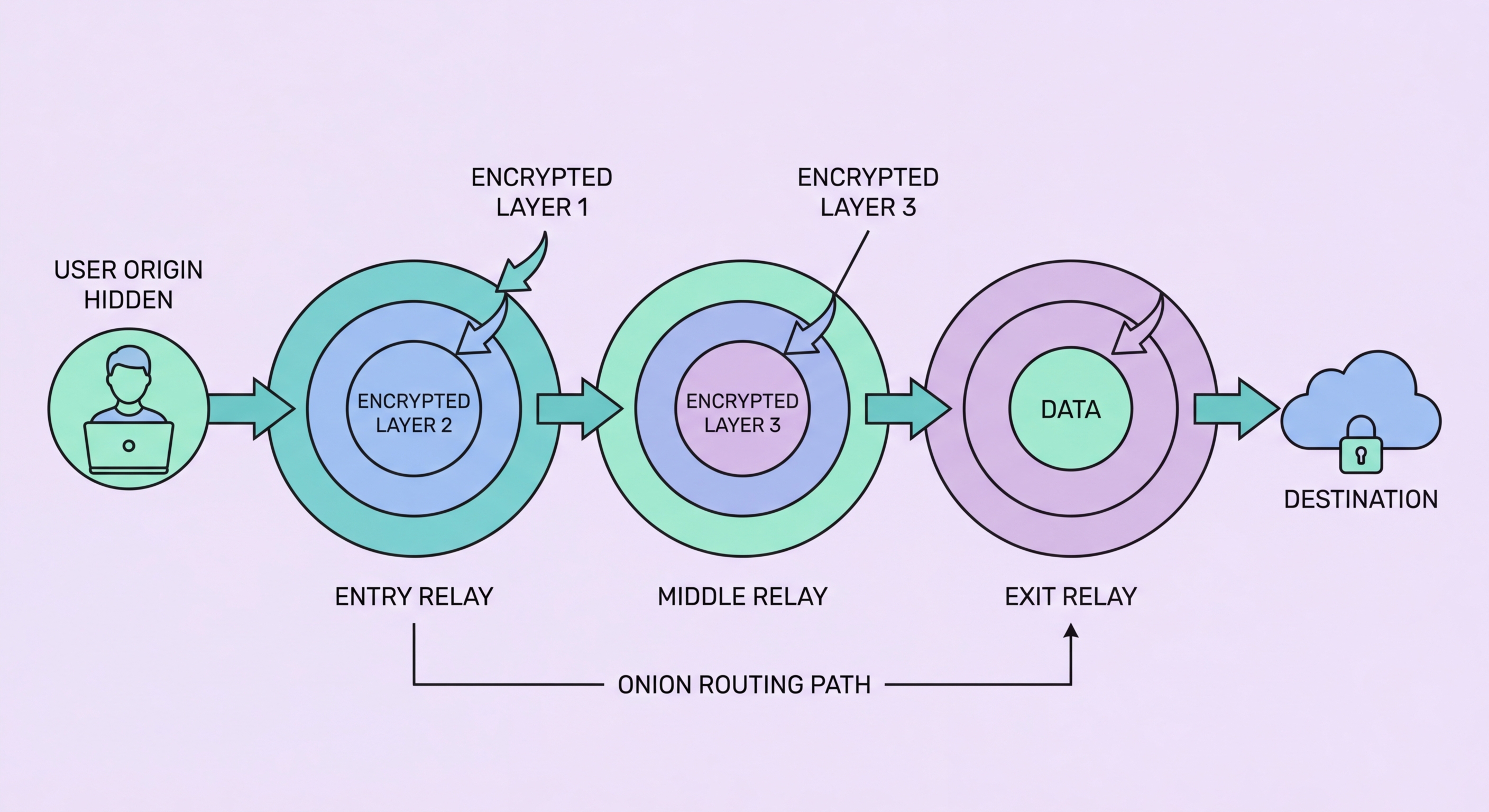
Tor (The Onion Router) is a network of volunteer-operated servers (called relays or nodes) that provides anonymity by routing internet traffic through multiple encrypted layers. The name "onion routing" comes from this layered encryption: when you send a request through Tor, your Tor client encrypts the data multiple times — once for each relay in the path — creating concentric encryption layers like an onion. Each relay decrypts only one layer (its own), revealing the address of the next relay to forward the data to, but not the original sender or the final destination. This means no single relay knows both who sent the data and where it is going — the entry relay knows your IP address but not the destination; the exit relay knows the destination but not your IP address; the middle relay knows neither.

A standard Tor circuit uses three relays: an entry guard (which knows your real IP), a middle relay, and an exit relay (which knows the destination). Your Tor client selects these three relays randomly from the global Tor network of approximately 8,000 volunteer-operated servers. The circuit is rebuilt every 10 minutes for different connections, meaning your exit relay changes regularly, further complicating any attempt to trace communication patterns. For .onion (to Check If Your Data Is on the Dark Web">dark web) sites, the routing is even more complex — both the client and the server use Tor hidden service protocols that create a rendezvous point in the middle of the network, so neither side knows the other's IP address. This bidirectional anonymity is what makes .onion services difficult for law enforcement and ISPs to locate.

Tor Browser is a hardened version of Firefox pre-configured to route all traffic through the Tor network. It disables JavaScript by default (or limits it in standard mode), blocks tracking cookies, prevents browser fingerprinting, and includes additional privacy protections. The Tor Project maintains Tor Browser as free, open-source software available from torproject.org — the only official source. Downloading Tor Browser from any other source risks obtaining a modified version that may contain malware or backdoors. Tor Browser is available for Windows, macOS, Linux, and Android, and is fully functional from Hong Kong without VPN for most use cases (though some configurations may require "bridges" — unlisted relays — if Tor appears to be throttled by local ISPs).

  • Three-relay circuit: Entry relay (knows your IP), middle relay (knows neither), exit relay (knows destination) — no single relay has the complete picture.
  • Circuit rotation: Tor circuits are rebuilt every 10 minutes — different connections get different exit relays, preventing long-term traffic correlation.
  • .onion bidirectional anonymity: Both client and server use hidden service rendezvous points — neither knows the other's IP address.
  • Download only from torproject.org: Third-party sources risk malware-infected or backdoored versions; always verify you're downloading from the official Tor Project website.
  • HK accessibility: Tor is accessible from Hong Kong without VPN on most ISPs; bridges may be needed if your connection appears throttled.
  • Hardened Firefox base: Tor Browser disables JavaScript by default, blocks tracking, and prevents browser fingerprinting — more privacy-protective than standard Firefox with addons.
How Tor and the dark web relate to the broader internet →
Tor onion routing explained diagram
2Protections and Limits

What Tor Does and Does Not Protect Against

Tor provides strong protection against network-level surveillance: your ISP (whether HKT, HK Broadband, or any other) can see that you are using Tor, but cannot see the content of your traffic or which sites you are visiting. Government-level surveillance systems that monitor ISP traffic can similarly identify Tor usage but cannot determine your browsing activity within Tor. This makes Tor effective for circumventing ISP-level content filtering, hiding your internet activity from network-level observers, and preventing websites from identifying your real IP address and location. For journalists, researchers, activists, and whistleblowers, these protections are significant. For ordinary users concerned about commercial tracking, Tor also blocks the IP-based tracking that advertising networks use to follow users across websites.

Tor does not protect against behavioural deanonymisation — where your activity patterns, writing style, or the specific information you share reveals your identity even when your IP is hidden. Law enforcement has successfully identified Tor users by analysing the content of their communications and matching writing patterns, timing correlations, and operational security mistakes. Tor also does not protect against malware on your device: if your computer is compromised by a keylogger, spyware, or a browser vulnerability, Tor provides no protection since the attacker is already inside your device before traffic is encrypted. For HK users in particular, Tor does not protect against active monitoring at the application layer — if you log into your real Google account while using Tor, Google knows your identity regardless of your anonymised IP address.

The exit relay vulnerability is a practical concern for Tor users visiting regular (non-.onion) websites. The exit relay — the last relay before your traffic reaches its destination — must decrypt the outer layer of Tor's encryption to communicate with the destination server. If the connection between the exit relay and the destination is HTTP (not HTTPS), the exit relay operator can read the plaintext content of your traffic. Malicious exit relays have been documented conducting man-in-the-middle attacks on unsecured traffic. For this reason, always ensure connections from Tor Browser show HTTPS (look for the padlock icon) — this encrypts the traffic between the exit relay and the destination, leaving only your general browsing behaviour (domain names, not content) visible to the exit relay operator. This vulnerability does not apply to .onion sites, where the entire connection remains within the Tor network with end-to-end encryption.

  • Protects IP address from websites: Destinations see the exit relay's IP, not yours — strong protection against IP-based identification and tracking.
  • ISP can see Tor usage: Your ISP knows you are using Tor but not what you are doing within it — use bridges if you want to obscure Tor usage from ISP monitoring.
  • Does NOT protect against device malware: If your device is compromised, Tor cannot protect traffic before it is encrypted on your device.
  • Behavioural deanonymisation: Logging into personal accounts, communication patterns, and writing style can reveal identity even with IP anonymisation.
  • Exit relay risk for HTTP sites: Always use HTTPS when visiting regular sites through Tor — HTTP traffic is readable by exit relay operators.
  • .onion sites have no exit relay: All traffic stays within the Tor network — end-to-end encryption with no exit relay vulnerability.
How Tor enables the dark web and what's actually there →
Tor Browser limitations what it protects
3Legal Status in HK

Tor's Legal Status in Hong Kong and Legitimate Uses

Using Tor Browser in Hong Kong is entirely legal. There is no Hong Kong legislation that prohibits using anonymisation software, accessing .onion addresses, or routing internet traffic through the Tor network. What is illegal is not the tool but the activity — the Computer Crimes Ordinance (Cap. 200), the Theft Ordinance, and the Organised and Serious Crimes Ordinance apply to criminal activities whether they are conducted using Tor, a regular browser, or any other means. The same illegal activities (fraud, trafficking, distributing child sexual abuse material, drug sales) are illegal regardless of the technical means used. Conversely, legal activities — journalism, research, privacy-conscious browsing, reading content not available due to geo-restrictions — remain legal regardless of whether you use Tor to access them.

Tor has significant legitimate uses that are relevant to Hong Kong residents and professionals. Journalists and sources communicating sensitive information benefit from Tor's anonymity protections — the Tor Project maintains a SecureDrop directory of news organisations (including international outlets covering Hong Kong) that provide .onion submission channels for whistleblowers and sources. Legal professionals handling sensitive client communications, researchers studying cybersecurity threats (including dark web markets and criminal forums, for the purpose of understanding and defending against them), privacy advocates testing the effectiveness of tracking and surveillance technologies, and ordinary citizens who prefer stronger privacy protections for their general browsing all have legitimate reasons to use Tor. The BBC, ProPublica, New York Times, and many other reputable news organisations maintain .onion versions of their websites specifically to improve accessibility in regions with internet restrictions.

Cybersecurity researchers and dark web monitoring services use Tor professionally to crawl dark web markets and forums for intelligence about stolen data, emerging threats, and criminal tradecraft. This is the legitimate activity that enables the monitoring services discussed throughout this guide — they use Tor to access the same platforms where stolen data is traded, scanning for their clients' information without engaging in any criminal activity themselves. For ordinary Hong Kong residents, the most relevant use case is not accessing the dark web directly but understanding that the monitoring services they use to protect their data do this work on their behalf. You don't need to use Tor yourself to benefit from dark web intelligence — dark web monitoring services handle the technical access while you simply receive the alerts.

  • Legal in Hong Kong: Using Tor Browser is not prohibited by any HK legislation — what matters is what you do with it, not the tool itself.
  • Whistleblower channels: Many media organisations maintain .onion SecureDrop instances for source protection — relevant for journalists and sources in Hong Kong.
  • Research and security: Cybersecurity professionals use Tor to study dark web threats — the same infrastructure that monitoring services use to detect your stolen data.
  • Privacy-conscious browsing: Tor is a legitimate option for everyday browsing if you want stronger privacy protections than a VPN provides, at the cost of slower speeds.
  • Tor is slow: The multi-relay routing adds latency — expect slower page loads; Tor is not appropriate for video streaming, gaming, or high-bandwidth applications.
  • You don't need Tor to benefit from dark web monitoring: Monitoring services access the dark web on your behalf — you receive alerts without needing to use Tor yourself.
Check your dark web exposure without using Tor yourself →
Tor Browser legal status Hong Kong legitimate uses
4Using Tor Safely

Best Practices for Using Tor Browser Safely in Hong Kong

If you have legitimate reasons to use Tor Browser, following best practices maximises the privacy it provides while minimising risks. The most important rule is compartmentalisation: do not mix your Tor-anonymised browsing with your regular identity. Never log into personal accounts (Google, social media, banking) while using Tor — this immediately deanonymises you by providing the service with your real identity, negating Tor's protection. Create separate, dedicated accounts for any services you need to use through Tor (for example, a ProtonMail account accessible only through Tor for sensitive communications). This compartmentalisation principle extends to browser tabs — in Tor Browser, opening a new tab in the same window may use the same circuit; use "New Identity" from the Tor menu for a completely fresh circuit when switching activities.

Keep Tor Browser updated religiously. The Tor Project releases regular security updates, and outdated versions may contain vulnerabilities that can be exploited by malicious .onion sites or exit relays. Tor Browser checks for updates automatically; approve updates immediately when notified. Never install browser extensions in Tor Browser — additional extensions can fingerprint your browser, introduce vulnerabilities, and break Tor's privacy guarantees. The preset Tor Browser configuration with no additional extensions is the recommended setup for privacy. Avoid downloading files through Tor unless absolutely necessary — downloaded files (PDFs, Office documents, videos) may contain tracking elements or make network requests that bypass Tor and reveal your real IP address.

For Hong Kong users considering Tor for their checking of dark web exposure, the practical recommendation is that you do not need to use Tor at all. Dark web monitoring services and HIBP provide the intelligence you need without requiring direct access to dark web markets. If you want to investigate whether a specific .onion URL is legitimate (for example, to verify a journalist submission portal), use Tor Browser in a virtual machine rather than on your primary device — this provides an additional layer of isolation in case the .onion site attempts to exploit browser vulnerabilities. For most Hong Kong residents, the appropriate use of dark web intelligence is passive: set up monitoring services, receive alerts, and take remediation action — without ever needing to access dark web content directly.

  • Never log into personal accounts in Tor: Logging in immediately deanonymises you — use only anonymous or pseudonymous accounts created specifically for Tor use.
  • New Identity for new activities: Use Tor Browser's "New Identity" function to create a new circuit when switching between different activities.
  • Keep Tor Browser updated: Update immediately when notified — security vulnerabilities in Tor Browser have been exploited in the past to deanonymise users.
  • No browser extensions: Additional extensions break Tor's privacy model — use the default Tor Browser configuration without modifications.
  • Avoid downloading files: Downloaded files may make network requests bypassing Tor; use a virtual machine if file downloading is necessary.
  • Most users don't need Tor at all: Dark web monitoring services access dark web content on your behalf — passive monitoring provides the intelligence without the risks of direct access.
Monitor the dark web for your data without using Tor yourself →
Using Tor Browser safely best practices
You Don't Need Tor to Know If Your Data Is on the Dark Web

You Don't Need Tor to Know If Your Data Is on the Dark Web

Dark web monitoring services scan dark web markets and forums on your behalf. Set up free monitoring through HIBP and your password manager today — no Tor required.

Related VPN Articles