What Is a Transparent Proxy?
A transparent proxy intercepts your internet traffic without requiring any configuration on your device — and without your knowledge. Understanding how they work helps you detect them and protect your privacy.
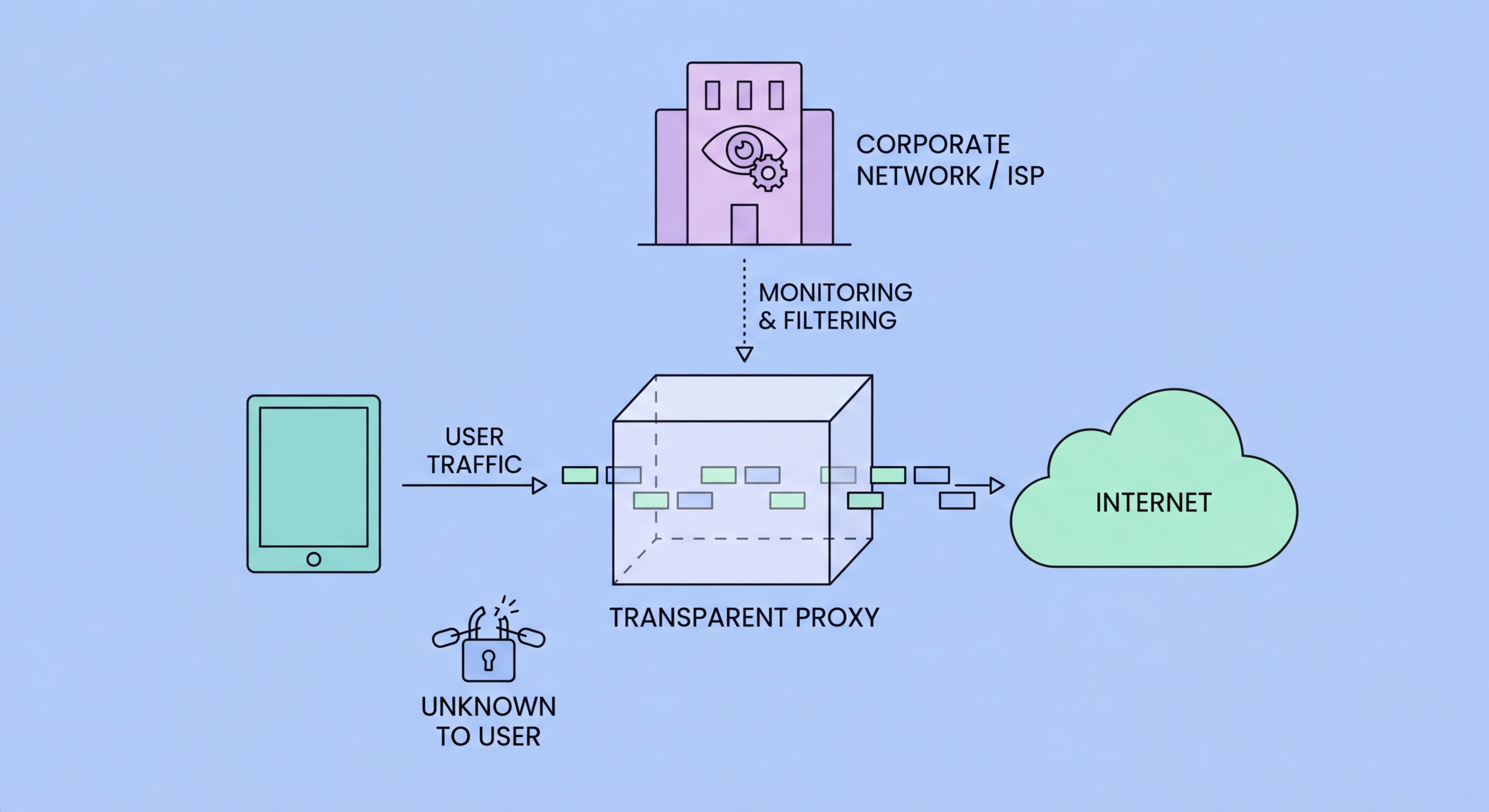
A transparent proxy intercepts your internet traffic without requiring any configuration on your device — and without your knowledge. Understanding how they work helps you detect them and protect your privacy.
A transparent proxy (also called an intercepting proxy, inline proxy, or forced proxy) is a proxy server deployed at the network level that intercepts internet traffic from devices on the network without requiring any configuration on those devices. Unlike a regular (explicit) proxy that you configure in your browser or OS settings, a transparent proxy works by having the network infrastructure redirect your outbound HTTP requests to the proxy before they reach the internet. Your device has no knowledge of the proxy's existence — from your browser's perspective, it made a direct connection to the destination.
The mechanism relies on network-layer traffic redirection. A transparent proxy is deployed on the same network path as your internet traffic — typically at a corporate gateway, school network router, hotel WiFi access point, or ISP infrastructure. When you make an HTTP request, the network hardware redirects the TCP connection to the transparent proxy's IP and port using firewall rules or policy-based routing. The proxy processes the request and forwards it to the intended destination, collecting connection logs and optionally filtering content along the way. The term "transparent" refers to the fact that the proxy is invisible to the end user, not that it doesn't inspect traffic — it absolutely does.
For HTTPS traffic, transparent proxies face the same challenge as any proxy: they cannot decrypt TLS-encrypted content without performing SSL inspection (which requires installing a trusted root certificate on client devices). Many corporate transparent proxies do implement SSL inspection, particularly on managed devices where the enterprise CA is pre-installed. Consumer-facing transparent proxies deployed by ISPs or hotel networks typically cannot decrypt HTTPS traffic and instead see only that you connected to a specific IP address and domain via the TLS SNI field.

ISPs (Internet Service Providers) deploy transparent proxies for several purposes, including bandwidth management, content caching to reduce upstream traffic costs, and in some countries, legally mandated content filtering. In Hong Kong, ISPs are subject to the Control of Obscene and Indecent Articles Ordinance and may receive court orders to block specific websites. Transparent proxy deployment allows ISPs to implement these blocks without requiring subscribers to change their device settings — the blocking happens invisibly at the network level.
Schools and universities are among the most widespread deployers of transparent proxies for content filtering. Educational institution networks commonly filter social media, adult content, gaming websites, and other categories deemed inappropriate or non-educational during school hours. The transparent nature of these proxies means students don't need to configure their devices (and can't easily bypass the filter by simply removing a proxy configuration). Many educational institution transparent proxies also log all web activity, providing administrators with complete visibility into what students are accessing.
Corporate networks use transparent proxies as part of their security infrastructure for multiple purposes: content filtering to block malware distribution sites and policy-violating websites, traffic inspection to detect data exfiltration and malware command-and-control communications, bandwidth management to prioritise business-critical traffic, and compliance logging to maintain records of employee internet usage for regulatory requirements. Unlike ISP and school deployments, corporate transparent proxies are typically disclosed to employees in their employment contracts and acceptable use policies.

Several technical approaches can reveal whether your traffic is passing through a transparent proxy. The most reliable method is examining network timing: compare the time-to-first-byte (TTFB) for requests to well-known servers from different connection paths. If your connection to a server in Singapore has unusually low TTFB despite geographic distance, you may be receiving cached responses from a local transparent caching proxy rather than the actual Singapore server. More sophisticated tests use cache-busting URLs with unique parameters to prevent caching and compare responses.
For detecting content filtering proxies, accessing a known-working URL that returns predictable content and checking whether the response matches the expected content is informative. If your request to a website returns an HTML page that's different from what the website normally serves (particularly if it mentions acceptable use policy violations or network filtering), you're behind a content filtering proxy. Many corporate and school proxies return custom block pages with the organisation's branding when access is denied, making identification obvious.
Technical users can use traceroute or MTR to observe the network path their traffic takes and identify unexpected intermediate hops. Comparing traceroute output from inside the potentially-proxied network with traceroute from a mobile data connection (which is more likely to be a direct ISP path) can reveal network-level interceptions. For HTTPS, examining the TLS certificate presented for a well-known domain from inside the network can reveal corporate SSL inspection — if the certificate is signed by an unrecognised internal CA rather than a public CA like DigiCert or Let's Encrypt, SSL inspection is in operation.

The most effective protection against transparent proxy interception is end-to-end encryption combined with traffic tunneling that bypasses the proxy infrastructure. A VPN is the primary tool for this: when you connect to a VPN before any other traffic leaves your device, your traffic is encrypted in the VPN tunnel from your device to the VPN server. The transparent proxy on your network only sees encrypted VPN packets destined for the VPN server's IP — it cannot inspect content, filter URLs, or perform SSL inspection because the traffic it receives is already encrypted and encapsulated.
In corporate environments where you are on a managed device with the enterprise CA installed, even VPNs may be subject to SSL inspection before the VPN connection is established, depending on network configuration. The organisation's endpoint security software may also monitor network activity independently of the transparent proxy. In these environments, the appropriate response is to understand the corporate policy, recognize that monitoring on corporate-managed devices on corporate networks is standard practice and typically disclosed in acceptable use policies, and use personal devices on personal networks for private activity.
For users on hotel, café, or public WiFi who want to prevent transparent proxy monitoring of their traffic, a VPN is straightforward and effective. The VPN tunnel bypasses any transparent proxy layer on the local network, routing your traffic through the VPN server before any local network inspection can occur. This also protects against the security risk of malicious transparent proxies on untrusted networks that might attempt to steal credentials or inject malware — a more practical daily security concern than transparent proxy privacy for most Hong Kong users.
