Network Security for Small Hong Kong Businesses

Practical network security for Hong Kong small businesses — covering firewall configuration, WiFi security, network segmentation, DNS filtering, and basic network monitoring without enterprise budgets.

Network security small business Hong Kong
1Firewall Basics

Firewall Fundamentals for Hong Kong Small Businesses

A firewall is the primary boundary control between your business network and the internet, inspecting traffic and enforcing rules about what is permitted to enter and leave. Every Hong Kong business with a network connection needs a firewall — not the basic NAT router provided by HKT, HKBN, or SmarTone as part of broadband packages, which provide minimal security functionality, but a dedicated security appliance or service capable of stateful packet inspection, application-layer filtering, and intrusion prevention. Consumer-grade routers lack the security controls, update cadence, and management capabilities needed for business use.

Business-grade firewalls appropriate for Hong Kong SMEs include the Sophos XG/XGS series, Fortinet FortiGate, WatchGuard Firebox, and Cisco Meraki MX — all of which provide unified threat management combining firewall, intrusion prevention, web filtering, and VPN in a single appliance with cloud-managed dashboards accessible to non-specialist administrators. For very small businesses, pfSense or OPNsense (open-source firewall platforms running on standard hardware) provide enterprise-class capabilities at hardware cost only, though they require more technical expertise to configure and maintain. Sophos Firewall Home Edition provides a free version limited to home/non-commercial use that allows SME IT administrators to build familiarity before commercial deployment.

Firewall rule configuration requires following the principle of least privilege: block everything by default and explicitly permit only what is required. The default rules in many business firewalls allow substantial outbound traffic that may not be necessary for your business — outbound DNS except to defined resolvers, outbound proxy connections, SMB traffic to the internet, and other traffic patterns that attackers exploit. Engaging an IT security professional for initial firewall rule review and configuration is worthwhile for most HK SMEs, followed by quarterly reviews as business needs change. Firewall logs should be retained and reviewed — particularly connection attempts to the firewall's management interface and unusual outbound connection patterns.

  • Business-grade firewall required: ISP-provided routers are insufficient for business security — deploy a dedicated business firewall from Sophos, Fortinet, WatchGuard, or equivalent
  • Unified threat management: Choose a UTM appliance that combines firewall, IPS, web filtering, and VPN — provides comprehensive protection from a single managed device
  • Default deny outbound: Configure outbound firewall rules on a default-deny basis — explicitly permit only required outbound traffic categories
  • Remote management security: Disable firewall management interface access from the internet entirely — manage only from the internal network or through a VPN
  • Firmware update schedule: Apply firewall firmware updates within 14 days of release — firewall vulnerabilities are directly exploited for network access
  • Firewall log review: Review firewall logs weekly for unusual connection patterns — repeated connection attempts to management ports indicate active scanning
Business firewall for small businesses
2WiFi Security

Securing Business WiFi in Hong Kong Offices

Business WiFi security is frequently underestimated as a network security risk. An unsecured or poorly secured WiFi network in a Hong Kong office building — where hundreds of other businesses share the same building — is a significant exposure. Wireless traffic captured by an attacker in the building or on the street below can expose business communications, credentials, and data. WiFi security configuration should be treated with the same rigour as firewall configuration. WPA3-Enterprise provides the strongest available WiFi security for business environments, authenticating each device individually through an 802.1X RADIUS server rather than sharing a single pre-shared key across all users.

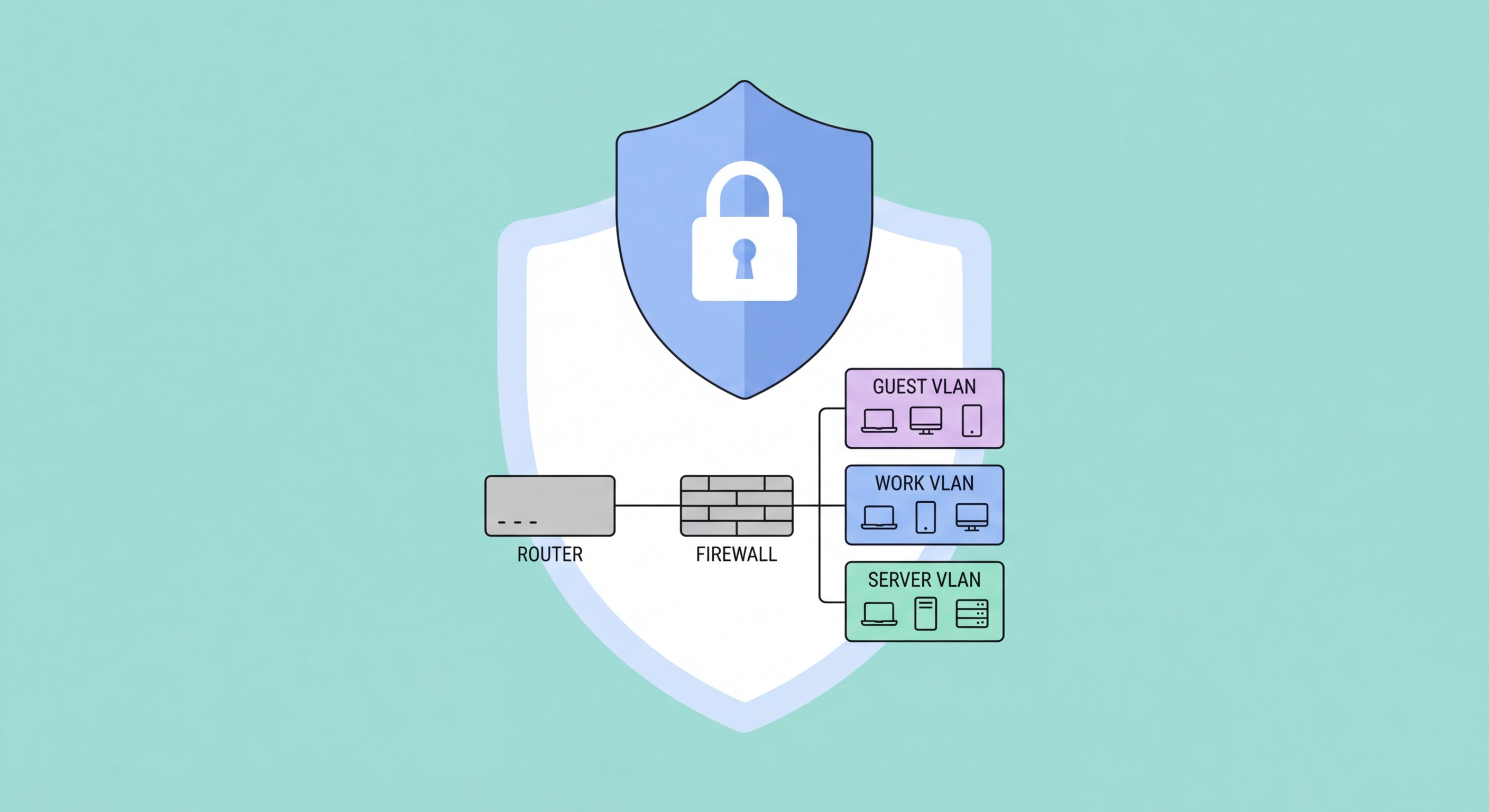
Network segmentation through VLAN separation is essential for business WiFi. Corporate devices — managed laptops and desktops — should connect to a corporate VLAN with access to internal systems and corporate cloud applications. Bring-your-own devices and mobile phones should connect to a separate BYOD VLAN with internet access but no path to internal servers. Guest WiFi for clients and visitors must be on a completely separate guest VLAN with internet-only access and no ability to reach either corporate or BYOD VLANs. Most business-grade wireless access points (Cisco Meraki, Ubiquiti UniFi, Aruba, and others) support this multi-SSID/multi-VLAN configuration and can be centrally managed. This segmentation limits the damage if a personal device or guest laptop on your WiFi is compromised — it cannot reach corporate resources.

WiFi management security — protecting the access point management interface and the wireless controller — prevents attackers who gain access to your network from modifying WiFi settings to create rogue access points or capture credentials. Change default management credentials on all access points immediately upon deployment. Disable remote management access from the internet. Use WPA3-Enterprise with certificate-based client authentication for highest-value corporate networks where pre-shared key compromise is a concern. Review connected devices regularly — IoT devices like printers, smart TVs, and building management systems should be on isolated VLANs rather than the corporate network, as they typically have poor security update histories.

  • WPA3 encryption: Configure all corporate WiFi with WPA3 (or at minimum WPA2-AES) — older WEP and WPA/TKIP encryption are trivially broken
  • Corporate/BYOD/guest VLANs: Separate corporate devices, personal devices, and guests onto different VLANs with appropriate access restrictions
  • 802.1X enterprise authentication: For higher-security environments, use WPA3-Enterprise with 802.1X individual device authentication rather than shared pre-shared keys
  • IoT network isolation: Place printers, smart TVs, and IoT devices on a separate VLAN isolated from corporate systems and the internet
  • Strong WiFi password rotation: Change the WiFi pre-shared key when staff members with access to the password leave — compromise of the PSK provides persistent access
  • Rogue access point detection: Configure wireless management systems to alert on unauthorised access points — rogue APs in the building may attempt to capture corporate device connections
Business WiFi security
3Network Segmentation

Network Segmentation: Limiting Ransomware Spread

Network segmentation divides a single flat network into isolated segments (VLANs or subnets) with controlled traffic paths between them. A flat network — where all devices can communicate with all other devices without restriction — means that a single compromised endpoint (a staff laptop infected with ransomware or a RAT) can immediately begin spreading to all other devices and servers on the network. Network segmentation forces traffic between segments through the firewall, where it can be inspected and controlled, limiting lateral movement and containing the blast radius of a compromise to the segment where it originated.

For Hong Kong SMEs, practical network segmentation typically involves separating: workstations (staff computers) from servers (file servers, application servers, databases) with firewall rules limiting what workstations can reach on the server network; WiFi devices from wired devices; POS systems and payment terminals on an isolated PCI-DSS compliant segment if you process card payments; IoT and building management devices on an isolated segment; and backup infrastructure on a segment inaccessible from workstations. This segmentation does not require expensive infrastructure — VLAN-capable managed switches (Cisco, Netgear, or HP/Aruba switches at SME price points) and a business firewall implementing inter-VLAN routing rules provide the required capability.

DNS filtering provides an additional network-level defence layer that stops malware communication and phishing site access regardless of endpoint security state. When a device on the network makes a DNS query for a known malicious domain — a ransomware command-and-control server, a phishing site, a malware distribution point — a DNS filtering service blocks the query before the connection is established. Cisco Umbrella, Cloudflare Gateway, and Palo Alto DNS Security provide business DNS filtering services. Cloudflare Gateway includes a free tier that provides significant protection for small businesses without cost. Configuring all DNS queries to route through a filtering service — by setting the firewall DHCP server to assign filtered DNS resolvers — provides coverage for all devices on the network without requiring per-device software installation.

  • Workstation/server separation: Place workstations and servers on separate VLANs with firewall rules restricting workstation access to only required server resources
  • Server-to-server restrictions: Limit server-to-server traffic to required communication paths — a compromised server should not be able to freely access all other servers
  • Payment terminal isolation: POS and payment systems must be on an isolated network segment per PCI-DSS requirements — no other devices should share this segment
  • DNS filtering: Route all DNS queries through a filtering service (Cloudflare Gateway, Cisco Umbrella) to block malware C2 communication and phishing sites at the network level
  • Managed switches for VLANs: Deploy VLAN-capable managed switches to implement network segmentation — unmanaged switches cannot support VLANs
  • Network diagram maintenance: Maintain a current network diagram showing all VLANs, devices, and traffic flows — essential for troubleshooting and security review
Network segmentation VLANs
4Network Monitoring

Basic Network Monitoring for Hong Kong SMEs

Network monitoring — visibility into what is happening on your network — is the capability that converts security controls from passive defence into active detection. Without monitoring, a ransomware attacker can spend weeks on your network enumerating systems, stealing data, and destroying backups before deploying the encryption payload, with no indication to you that anything is wrong. With monitoring, unusual traffic patterns — a workstation connecting to dozens of servers it has never contacted before, large volumes of data being exfiltrated, connection attempts to known malicious IP addresses — trigger alerts that allow your team to investigate and contain the threat before it reaches its conclusion.

For SMEs without dedicated security operations, network monitoring does not require a full SIEM (Security Information and Event Management) deployment. Practical network monitoring for smaller HK businesses can be achieved through: firewall traffic logs reviewed weekly or forwarded to a managed security service, NetFlow analysis tools that provide traffic visibility without full packet capture (ManageEngine NetFlow Analyzer, PRTG Network Monitor), cloud-based network monitoring services that identify anomalous traffic patterns, and the security event logs built into Microsoft 365 and Google Workspace that identify unusual sign-in patterns and data access. The goal is not comprehensive monitoring of all traffic, but detection of the specific anomalous patterns that indicate active compromise.

Remote monitoring and management (RMM) tools — used by many IT service providers serving Hong Kong SMEs — provide infrastructure monitoring including device health, patch status, antivirus status, and connectivity monitoring from a centralised dashboard. If your business uses an IT managed service provider, ensure their monitoring scope includes security-relevant monitoring (failed authentication attempts, unusual process execution, new user account creation) in addition to infrastructure availability monitoring. For businesses managing their own IT, Atera, NinjaRMM, and ConnectWise Automate provide cloud-based RMM at SME price points with security monitoring capabilities that go beyond simple availability checks.

  • Firewall log review: Review firewall logs weekly for unusual traffic patterns — high-volume internal scanning, unexpected outbound connections, and repeated access denials are worth investigating
  • NetFlow monitoring: Deploy NetFlow analysis (PRTG, SolarWinds) to identify unusual traffic volume patterns that indicate data exfiltration or lateral movement
  • Cloud platform security alerts: Enable and review Microsoft 365 or Google Workspace security alerts — cloud platforms generate useful security signals that most SMEs ignore
  • Failed authentication alerting: Configure alerts for repeated failed authentication attempts — brute force attacks and credential stuffing generate characteristic failure patterns
  • RMM for managed IT: Ensure your IT MSP's RMM monitoring includes security events, not just availability — specify security monitoring in your managed service agreement
  • New device detection: Configure network monitoring to alert on new devices joining the network — unmanaged devices represent uncontrolled access risk and may indicate unauthorised connections
Network monitoring for small businesses

Secure Your Business Network

Explore our complete Business Cybersecurity guide for all technical security guidance for Hong Kong small businesses.

Related VPN Articles