Business Data Backup Strategy: The 3-2-1 Rule

How to implement a robust data backup strategy for Hong Kong businesses — covering the 3-2-1 rule, backup solutions, cloud backup, offsite storage, and immutable backups that survive ransomware attacks.

Business data backup strategy Hong Kong
1The 3-2-1 Backup Rule

Understanding the 3-2-1 Backup Rule for HK Businesses

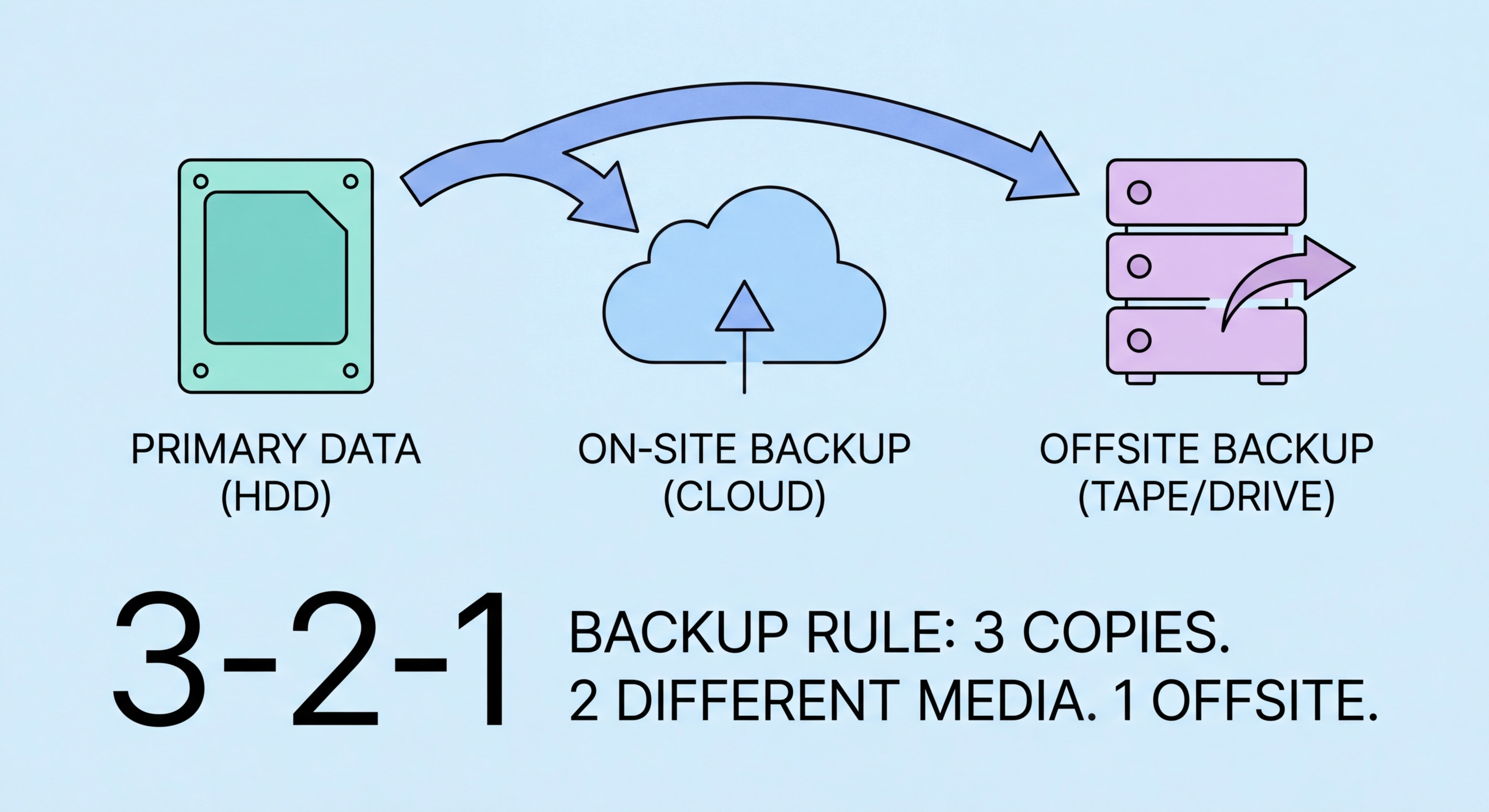
The 3-2-1 backup rule is the foundational principle for resilient data backup: maintain at least 3 copies of your data, on at least 2 different types of storage media, with at least 1 copy stored offsite. This rule emerged from the observation that any single backup strategy has failure modes — a single backup copy can fail, a single storage medium type can have a correlated failure (all drives in a RAID failing from the same firmware bug), and onsite-only backups are wiped out by fire, flood, or ransomware that encrypts everything on the local network. The 3-2-1 rule addresses each failure mode systematically.

For most Hong Kong businesses, implementing 3-2-1 backup means: primary data on production systems (copy 1), a local backup on a NAS device or external drives in the office (copy 2, different media), and a cloud backup to an offsite location (copy 3, offsite). The cloud backup component is particularly practical for HK businesses because Hong Kong has excellent broadband infrastructure that makes cloud backup viable even for large datasets. Major cloud backup services including Backblaze B2, Wasabi, AWS S3, and Azure Blob Storage offer affordable per-gigabyte pricing for business backup with Asia-Pacific data centres that provide low-latency access from Hong Kong.

The 3-2-1 rule has evolved in the ransomware era to 3-2-1-1-0: three copies, two media types, one offsite, one offline or immutable copy, and zero errors verified through tested restoration. The addition of "one offline or immutable" addresses the primary failure mode of modern ransomware attacks, which specifically identify and encrypt all network-accessible backup locations before deploying the main ransomware payload. An offline backup (physically disconnected from all networks) or an immutable backup (stored in a format that prevents modification or deletion) survives ransomware attacks that destroy all other backup copies. Zero errors means backup restoration is tested regularly — untested backups frequently fail when needed.

  • 3 copies of data: Maintain at least three copies — production data plus two independent backups — no single failure should leave you without recoverable data
  • 2 different media types: Use at least two different storage types (e.g., internal SSD + NAS + cloud) — correlated failures can destroy multiple copies on identical media
  • 1 offsite copy: At least one backup must be physically offsite or in cloud storage — onsite-only backups are destroyed by fire, flood, or network-spreading ransomware
  • 1 offline or immutable copy: Modern ransomware targets all accessible backup storage — maintain one copy that ransomware cannot reach or modify
  • Zero untested backups: Test restoration from every backup copy regularly — a backup that has never been tested is a backup of unknown reliability
  • HK cloud options: Wasabi, Backblaze B2, AWS S3 Asia Pacific, and Azure East Asia provide cost-effective cloud backup storage with good performance from Hong Kong
3-2-1 backup rule diagram
2Backup Solutions

Choosing the Right Backup Solution for Your HK Business

Backup solution selection for Hong Kong businesses depends on the type and volume of data, recovery time objectives (how quickly you need systems restored), recovery point objectives (how much data loss is tolerable), and available technical expertise. For Windows Server environments, Windows Server Backup provides basic file and system state backup included with the operating system, but lacks the management features and flexibility of dedicated backup solutions. Veeam Backup and Replication is the industry standard for VMware and Hyper-V virtual machine backup, widely used across Hong Kong enterprises and available at SME-appropriate pricing for smaller deployments.

For businesses primarily operating in Microsoft 365 and Google Workspace cloud environments, dedicated SaaS backup solutions are essential. As detailed in our cloud security guide, Microsoft and Google do not back up your data against deletion, ransomware encryption, or accidental overwrite — they protect infrastructure availability. Products including Veeam Backup for Microsoft 365, Datto SaaS Protection, AvePoint Cloud Backup, and Acronis Cyber Backup provide granular point-in-time recovery for Microsoft 365 mailboxes, SharePoint, OneDrive, Teams, and Google Workspace data. These products are priced per user per month and are accessible to HK SMEs of any size.

For endpoint backup — protecting the data on individual employee laptops and workstations — cloud-based endpoint backup solutions provide automatic protection without requiring users to manually copy data. Acronis Cyber Protect, Backupify, and CrashPlan for Business provide continuous or scheduled backup of endpoint devices to cloud storage, with centralised management that allows IT administrators to verify backup status across all devices and initiate restoration for lost or stolen devices. For remote workers — particularly relevant for Hong Kong businesses with hybrid workforces — endpoint backup ensures that documents stored locally on home-based machines are protected even when the device never connects to the corporate network.

  • Veeam for server/VM backup: Industry standard for virtual machine backup — covers VMware, Hyper-V, and physical Windows/Linux servers with flexible recovery options
  • SaaS backup for Microsoft 365: Veeam, Datto, or AvePoint backup for Microsoft 365 provides granular recovery of mailboxes, SharePoint, OneDrive, and Teams
  • Endpoint backup for remote workers: Cloud-based endpoint backup (Acronis, CrashPlan) protects locally stored data on remote employee devices
  • NAS for local backup: A dedicated NAS device (Synology, QNAP) provides fast local backup and restore while serving as the local copy in a 3-2-1 strategy
  • Backup agent coverage: Verify backup agents are deployed on all systems — unprotected servers and endpoints are common causes of incomplete recovery after incidents
  • Recovery time targets: Define recovery time objectives (RTO) for each system — critical systems may need bare-metal restore capability that restores entire systems, not just files
Business backup solutions
3Ransomware-Resistant Backup

Ransomware-Resistant Backup: Immutable and Offline Copies

Ransomware operators have evolved their tactics specifically to defeat backup-based recovery. Modern ransomware attacks — including variants that have affected Hong Kong businesses — spend days or weeks in the network before deploying the encryption payload, using that dwell time to identify and destroy or encrypt all backup copies. When ransomware deploys, the victim finds that not only are production systems encrypted, but every accessible backup location has been wiped or encrypted as well. This scenario leaves victims with no recovery option except paying the ransom or rebuilding from scratch — exactly the outcome ransomware operators engineer. Immutable and offline backups directly counter this tactic.

Immutable backups use Write Once Read Many (WORM) storage technology to create backup copies that cannot be modified or deleted, even by administrators, for a defined retention period. Cloud object storage services implement immutability through Object Lock policies: AWS S3 Object Lock, Azure Blob immutability policies, and Wasabi's immutable storage provide point-in-time backup copies that ransomware cannot delete or encrypt because the storage service refuses modification requests regardless of the credentials used. Backup software including Veeam supports integration with immutable cloud storage, and purpose-built immutable backup appliances from vendors like Cohesity and Rubrik provide on-premises immutable storage for organisations requiring fast local recovery.

Air-gapped or offline backups provide the strongest ransomware protection by maintaining a physically disconnected backup copy. Tape backup — though perceived as outdated — provides effective air-gapping when tapes are removed from the tape library after backup completion and stored offsite. Rotational external hard drive backup, where drives are disconnected and stored offsite on a regular schedule, achieves similar results at lower cost for smaller environments. Cloud backup providers are increasingly offering logical air-gapping through time-delayed synchronisation — the cloud backup copy is not immediately accessible for overwrite, providing a recovery window even if the primary backup infrastructure is compromised.

  • Ransomware targets backup first: Modern ransomware spends dwell time identifying and destroying backup copies before encrypting production systems — standard network-accessible backups are vulnerable
  • AWS S3 Object Lock: Enable Object Lock on S3 backup buckets with compliance mode — prevents deletion or modification of backup objects for the retention period regardless of credentials
  • Azure Blob immutability: Configure time-based retention policies on Azure Blob storage used for backup — provides immutable cloud backup accessible from Hong Kong
  • Tape or offline rotation: Maintain a tape or external drive backup rotation with copies stored offsite — physically disconnected media is immune to network-propagating ransomware
  • Backup network isolation: Isolate backup infrastructure on a separate network segment inaccessible from general workstations — limits ransomware's ability to reach backup systems
  • Backup account hardening: Use dedicated backup service accounts with minimum required permissions — do not use administrator accounts for backup operations
Immutable backup ransomware protection
4Testing and Recovery

Backup Testing and Recovery Planning for HK Businesses

A backup that has never been tested is a backup of unknown reliability. Backup failures are not rare — they occur due to misconfiguration, storage failures, software bugs, corruption, and permission errors that are invisible until a restoration is attempted. The worst time to discover that your backup has not been running correctly, or that your backup software cannot restore to current hardware, or that your recovery procedure requires expertise you do not have, is during an active ransomware incident with encrypted production systems and business operations halted. Regular, documented restoration tests transform backup from theoretical protection to verified capability.

Recovery testing should cover multiple scenarios: file-level restoration (recovering individual deleted or corrupted files — the most common recovery need), full server restoration (restoring a complete server to new hardware or a virtual machine), and application-level recovery (restoring a specific application and its data to a functional state). File-level restoration should be tested monthly. Full server or system restoration should be tested at least quarterly, and for critical systems, more frequently. SaaS backup restoration — recovering individual emails, calendar items, or SharePoint files from Microsoft 365 backup — should be tested monthly to verify the backup covers the data types you need to recover.

Recovery time and recovery point objectives define what your backup strategy must deliver: RTO (how quickly restored systems must be operational) and RPO (how much data loss is acceptable). Critical systems with low RTO requirements need near-continuous backup and fast restoration capability — cloud-based backup with instant recovery virtualisation (running a server directly from backup storage while permanent restoration proceeds) meets very low RTO targets. Systems with moderate RTO and RPO requirements can tolerate daily backup schedules and recovery times measured in hours rather than minutes. Documenting RTO and RPO per system, aligning backup frequency and retention with those requirements, and testing against those targets creates a backup programme that delivers predictable recovery outcomes.

  • Monthly restoration tests: Test file-level restoration and SaaS data recovery monthly — verify both that data is captured and that restoration procedures work correctly
  • Quarterly full system recovery test: Perform a complete server or system restoration to a test environment quarterly — identifies hardware compatibility and procedural issues before they matter
  • Document recovery procedures: Write step-by-step restoration procedures that a competent IT person unfamiliar with your specific systems can follow — do not rely on the memory of key staff
  • Recovery time measurement: Time your recovery tests and compare against your RTO targets — if recovery takes longer than acceptable, invest in faster recovery solutions
  • Backup monitoring and alerting: Configure backup software to alert on backup failures immediately — silent backup failures leave you unprotected without knowing it
  • Annual backup strategy review: Review backup coverage, retention periods, and recovery targets annually as business data and systems change — a backup strategy appropriate for 2023 may not cover new systems added since
Backup testing and recovery

Protect Your Business Data from Every Threat

Explore our complete Business Cybersecurity guide for comprehensive data protection and security guidance for Hong Kong organisations.

Related VPN Articles