Antivirus and Safe Browsing: Building a Layered Security Defence

No single security tool protects against every threat. A layered defence — combining antivirus, safe browsing practices, DNS filtering, and backup — creates a comprehensive security posture that compensates when any single layer fails.

Layered security defence
1The Layered Defence Principle

Why Defence in Depth Is the Right Security Framework

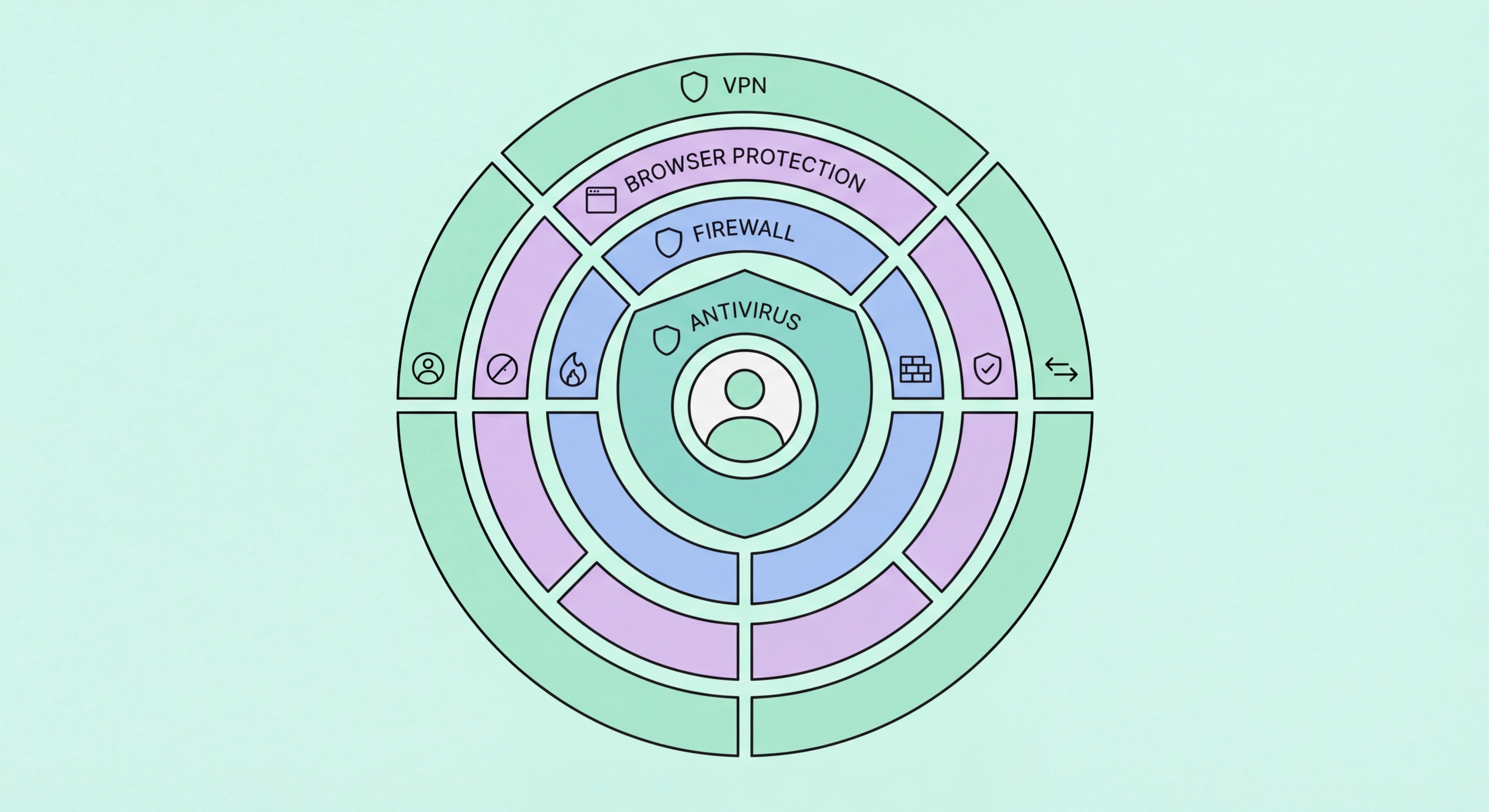
Defence in depth is a security principle borrowed from military strategy: rather than relying on a single strong barrier, deploy multiple independent layers of protection so that an attacker who penetrates one layer faces another. In cybersecurity, this means recognising that no single control is 100% effective — antivirus misses novel threats, firewalls can be bypassed, patches are sometimes delayed, and even careful users occasionally click a convincing phishing link. When each protection layer handles the threats that others miss, the combined effect is dramatically more resilient than any individual component. The practical result is that an attacker must simultaneously defeat multiple independent security measures to achieve their objective, raising both the cost and the complexity of a successful attack.

For individual users and small businesses in Hong Kong, a practical layered security architecture has four primary layers. The prevention layer stops the majority of threats before they reach a device: email filtering, DNS security, antivirus with real-time protection, and browser security. The detection layer identifies threats that penetrate the prevention layer: antivirus behavioural monitoring, EDR telemetry, and browser security alerts. The response layer allows recovery when threats succeed despite prevention and detection: data backup, incident response procedures, and account recovery mechanisms. The education layer — security awareness — reduces the effectiveness of social engineering attacks that technical controls cannot fully prevent. Together, these layers create comprehensive coverage across the attack lifecycle.

The cost of layered security is proportional to the protection achieved. The first layer — antivirus and basic hygiene — provides the majority of protection at modest cost. Each additional layer provides incremental protection but with diminishing returns at the individual/SME level. The appropriate depth of layering scales with the value of what's being protected and the sophistication of likely attackers. A Hong Kong individual user faces predominantly opportunistic criminal threats and benefits primarily from strong prevention layers (good antivirus, safe browsing, strong passwords, 2FA). A regulated financial institution faces sophisticated, targeted threats and needs all four layers operating at high capability levels. Calibrating investment to risk is the practical application of the layered defence principle.

  • Defence in Depth: Multiple independent layers — attacker must defeat all simultaneously for success.
  • No Single Control is Perfect: Antivirus, firewalls, and even careful users fail individually — layers compensate.
  • Four Layers: Prevention, detection, response, and education — each addresses distinct attack phases.
  • Diminishing Returns: First layer provides majority of benefit — additional layers are incremental.
  • Risk-Calibrated: Depth of layering scales with target value and attacker sophistication.
  • Individual Focus: HK individuals primarily need strong prevention layers — education, AV, passwords, 2FA.
Defence in depth security layers
2Layer 1: Antivirus and Browser Security

Building the Foundation: Antivirus and Safe Browsing Practices

A quality antivirus with real-time protection is the foundational layer of a security stack. The combination of signature detection (for known malware), heuristic analysis (for malware variants), behavioural monitoring (for novel threats), and cloud threat intelligence (for newly discovered threats) provides broad-spectrum protection across the most common threat categories. For Hong for Hong Kong Users">Kong users, Bitdefender Total Security, Norton 360, or ESET Internet Security represent strong foundational choices based on independent testing performance. The key configuration requirements are: real-time protection always enabled, automatic definition updates active, and web protection configured to cover all browsers you use.

Safe browsing practices are the human component of the prevention layer and complement what antivirus handles technically. The most impactful safe browsing habits: verify URLs before clicking (particularly in emails and messages — hover over links to see the actual destination, which should match the claimed sender organisation); don't download software from unofficial sources (piracy sites, unofficial download portals, or sites offering "free" versions of paid software); keep browsers and browser plugins updated to the latest version; use a browser extension like uBlock Origin to block advertising networks that deliver malvertising; and treat any unexpected pop-up claiming your computer is infected as itself suspect — legitimate antivirus alerts come from your installed antivirus product, not from web browser pop-ups.

Browser extension hygiene is a frequently overlooked but important security practice. Browser extensions run with significant privileges — access to all page content you visit, the ability to read form inputs including passwords, and sometimes access to all browsing history. Malicious or compromised extensions have been used to steal banking credentials, session cookies, and other sensitive data from victims who installed them believing them to be legitimate productivity tools. Regularly audit installed extensions across every browser: Chrome Extensions (chrome://extensions), Firefox Add-ons (about:addons), Edge Extensions. Remove any extension you don't actively use, any you installed from an unfamiliar source, and any that request more permissions than their stated function requires. A screen capture extension doesn't need access to all browsing data; a weather widget doesn't need to read your browsing history.

  • Foundation AV: Bitdefender, Norton, or ESET — real-time protection with web shield covering all browsers.
  • URL Verification: Hover over links before clicking — actual destination must match claimed organisation.
  • No Unofficial Software: Software from piracy sites is the primary trojan and malware delivery mechanism.
  • uBlock Origin: Browser extension blocking malvertising networks — significant reduction in drive-by exposure.
  • Extension Audit: Review and remove unused or excessive-permission browser extensions regularly.
  • Pop-Up Scepticism: Browser pop-ups claiming infection are themselves scams — legitimate AV alerts come from installed software.
Antivirus and browsing security layer
3Layer 2: DNS, Network, and Account Security

DNS Filtering, Network Security, and Account Protection

DNS filtering adds a pre-connection protection layer that blocks access to known malicious, phishing, and malware-distributing domains before any connection is established. Cloudflare's 1.1.1.1 DNS resolver with Families filtering, Quad9 (9.9.9.9), and NextDNS provide free or low-cost DNS filtering. When your device attempts to connect to a domain on a blocklist, the DNS resolver returns a non-existent domain response rather than the malicious IP, preventing the connection before any malicious content can reach your device. DNS filtering is particularly effective against command-and-control communications by malware that has already infected a device — blocking the C2 domain communication limits what active malware can do even after installation.

Account security through strong, unique passwords and two-factor authentication is as important as antivirus in the overall security stack. Many of the worst outcomes from device compromise — financial fraud, email account takeover enabling further attacks, identity theft — are mediated through account credentials. A password manager (1Password, Bitwarden, or Dashlane) enables genuinely unique, complex passwords for every service without the memorisation burden that leads users to reuse passwords. Password reuse is one of the most common ways accounts are compromised — a breach at any service where you've reused a password immediately exposes accounts at all services using that same password. Two-factor authentication adds a layer that defeats credential theft: even a stolen password alone can't access a 2FA-protected account.

Network security at home and in small offices provides additional defence. A router with current firmware (updated regularly — many home routers receive firmware security updates that users never apply) and changed default admin credentials is the minimum baseline. DNS-based filtering applied at the router level (by configuring the router's DNS resolver to a filtering service) protects all devices on the network simultaneously, including smart TVs, gaming consoles, and IoT devices that can't run antivirus software. Network segmentation through guest networks — keeping IoT devices on a separate network from computers and phones — limits the blast radius if a smart device is compromised. For Hong Kong apartment dwellers using service provider routers, verify whether the router receives automatic firmware updates from the provider, and consider whether the provider's DNS is appropriate for security filtering.

  • DNS Filtering: Cloudflare Families (1.1.1.1), Quad9 (9.9.9.9), or NextDNS — blocks malicious domains pre-connection.
  • C2 Blocking: DNS filtering limits damage from already-installed malware by blocking command-and-control communication.
  • Password Manager: Unique complex passwords for every service — eliminates credential reuse risk.
  • 2FA Everywhere: Two-factor authentication defeats credential theft — enable on email and financial accounts at minimum.
  • Router Firmware: Keep router firmware updated — routers are frequently exploited but rarely patched by users.
  • IoT Segmentation: Guest network for smart devices — limits lateral movement from compromised IoT devices.
DNS and network security layer
4Layer 3: Backup and Recovery

The Recovery Layer: Backup Strategy That Makes Attacks Survivable

The backup and recovery layer accepts that some attacks will succeed and ensures that recovery is possible with minimal data loss and downtime. For ransomware — the threat most dependent on lack of backups — a well-implemented 3-2-1 backup strategy renders the attack effectively non-threatening to data integrity: three copies, two different media types, one off-site or offline. For individual Hong Kong users, a practical implementation is: automatic continuous sync to OneDrive or iCloud (copy 1), supplemented by a regular backup to an external drive (copy 2), with that external drive disconnected from the computer when not actively backing up or stored separately (offline component). The offline separation is critical — connected external drives are encrypted by ransomware along with the computer.

Cloud backup services with version history provide the most convenient ransomware-resilient off-site copy for individuals and small businesses. Backblaze Personal Backup (unlimited storage, US$9/month) and IDrive (multiple device coverage) automatically back up all files continuously with version history that allows restoration of file versions from before an attack. Microsoft OneDrive with 365 Personal/Family includes version history for up to 1 year through OneDrive's ransomware detection and recovery feature — when OneDrive detects unusual file modification patterns, it alerts the user and offers to restore to a pre-attack state. For businesses, Azure Backup with immutable backup policies provides enterprise-grade backup with protection against deletion by ransomware operators.

A complete layered defence summary for individual Hong Kong users: Install quality paid antivirus (Bitdefender/Norton/ESET) with real-time and web protection enabled. Use a password manager with unique passwords for every account. Enable 2FA on email and financial accounts. Configure DNS filtering on your router (Quad9 or Cloudflare Families). Enable automatic OS and software updates. Back up important data to cloud storage with version history plus a disconnected external drive. Practise URL verification before clicking links in messages. Avoid installing software from unofficial sources. Review browser extensions and app permissions periodically. These measures together address the vast majority of threats faced by Hong Kong individuals without requiring security expertise or significant ongoing time investment.

  • 3-2-1 Backup: Three copies, two media types, one offline — ransomware-resilient data protection standard.
  • Offline Requirement: Disconnect external drives when not backing up — prevents ransomware from encrypting them.
  • Backblaze/IDrive: Continuous cloud backup with version history — convenient ransomware recovery option.
  • OneDrive Ransomware Recovery: M365 includes ransomware detection and 1-year version history for file restoration.
  • Individual Summary: AV + password manager + 2FA + DNS filtering + updates + backup + browsing habits.
  • No Expertise Required: The complete layered stack is implementable without security background — one-time setup, low ongoing effort.
Find the best antivirus for Hong Kong 2026 →
Backup and recovery layer

Start Building Your Layered Security Defence

Find the right antivirus as the foundation of your security stack and add the additional layers that make it truly comprehensive.

Related VPN Articles