Virus vs Malware: What's the Difference?
All viruses are malware, but not all malware is a virus. Understanding the full taxonomy of malicious software helps you understand the threats you face and choose the right protections.
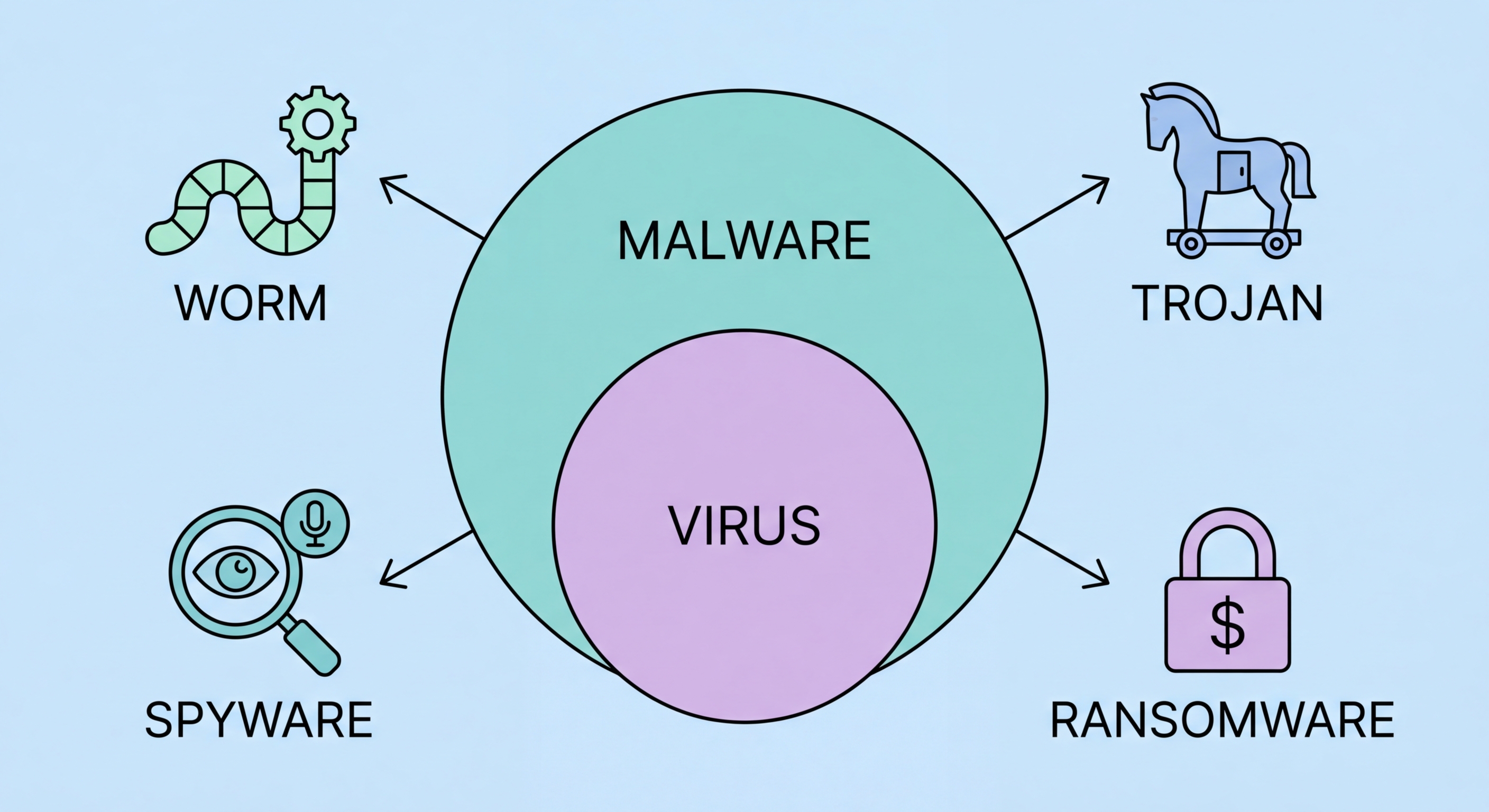
All viruses are malware, but not all malware is a virus. Understanding the full taxonomy of malicious software helps you understand the threats you face and choose the right protections.
Malware (short for malicious software) is the umbrella term for any software intentionally designed to cause harm to a computer system, user, or third party. A computer virus is one specific type of malware, defined by a particular mechanism: self-replication by attaching copies of itself to legitimate files or programs, and spreading to other systems when those files are shared. The defining characteristic of a virus is this self-replicating, file-infecting behaviour — analogous to how biological viruses work by inserting their genetic material into host cells. Other malware categories — ransomware, spyware, trojans, adware, rootkits — don't use this spreading mechanism and are therefore technically not viruses, even though "virus" is colloquially used to mean any malware.
The historical reason "virus" became the default term for all malware is that early malicious software was predominantly of the virus type. In the 1980s and early 1990s, viruses spreading via floppy disks were the dominant threat, and "antivirus" was coined to describe protective software. As the threat landscape diversified into categories that don't replicate like viruses, the term "malware" emerged as the technically correct umbrella term. Today, "antivirus software" protects against all malware categories despite its name. When your antivirus alerts you about a trojan or ransomware, it's detecting malware — specifically, malware that isn't technically a virus. The terminology has historical roots, not technical precision.
Why does the distinction matter practically? Understanding the specific malware category affecting a system helps direct the appropriate response. Ransomware requires an immediate different response (network isolation to prevent spread, backup verification) than adware (browser cleanup, scan). Rootkit detection requires different tools than standard antivirus scans. Banking trojans require notifying financial institutions. Knowing which type of malware is present — not just "I have a virus" — enables a more effective and targeted removal and recovery process. The more precise your vocabulary around malware types, the more effectively you can communicate with IT support, understand threat advisories, and interpret security news relevant to your situation.

Viruses self-replicate by attaching to executable files and infect new systems when infected files are shared. Worms self-replicate and spread autonomously over networks without requiring file sharing — the Morris Worm (1988) and WannaCry (2017) are iconic examples. Trojans masquerade as legitimate software and don't self-replicate — they rely on user deception for installation. Ransomware encrypts victim data and demands payment for the decryption key — the most financially devastating malware category for businesses. Spyware covertly monitors user activity and transmits data to attackers. Adware generates unwanted advertising, often combined with browser hijacking and browsing data collection.
Rootkits operate at the OS kernel level, concealing themselves and other malware from detection tools. Keyloggers specifically capture keyboard input to steal passwords and sensitive text. Bootkits (a rootkit subtype) infect the Master Boot Record or UEFI firmware, executing before the OS loads. Botnets are networks of infected devices (each device called a "bot" or "zombie") controlled by a command-and-control server, used for spam delivery, DDoS attacks, or cryptocurrency mining. Cryptojackers specifically use infected device resources for cryptocurrency mining without the owner's knowledge. Scareware displays fake security warnings to frighten users into paying for fake "solutions." Potentially Unwanted Programs (PUPs) sit in a grey zone — not clearly malicious, but providing unwanted functionality like browser toolbars or aggressive ad injection.
Fileless malware is a significant modern category that doesn't write files to disk, instead operating entirely in memory using legitimate system tools (PowerShell, WMI, mshta.exe) and living-off-the-land (LOL) techniques. Because there's no malicious file to scan, signature-based detection is ineffective against fileless malware — only behavioural monitoring catches it. Fileless attacks are increasingly common in targeted enterprise attacks because they're harder to detect forensically. Advanced Persistent Threats (APTs) are sustained, targeted attack campaigns typically attributed to nation-state actors — they combine multiple malware types, social engineering, and sophisticated techniques in multi-stage attacks designed to maintain long-term access to specific targets. Several APT groups have specifically targeted organisations in Hong Kong and the broader APAC region.

Phishing remains the dominant initial access vector for malware delivery — both email-based phishing and SMS phishing (smishing) are used extensively to deliver malicious attachments or direct victims to download malware. Phishing is effective because it exploits human psychology — urgency, authority, and fear — rather than technical vulnerabilities, making it difficult to prevent through purely technical means. For Hong for Hong Kong SMEs: Where to Start">for Hong Kong Users">Kong users, phishing campaigns impersonating banks (HSBC, Hang Seng, Standard Chartered), government agencies (Immigration Department, Inland Revenue, Customs and Excise), and logistics companies (DHL, SF Express) are particularly common given Hong Kong's high banking penetration and trade volume.
Software vulnerabilities — unpatched security flaws in operating systems, browsers, document readers, and other commonly used software — are the primary technical delivery vector for malware that doesn't require user deception. Drive-by downloads exploit browser vulnerabilities when a user visits a malicious or compromised website, installing malware without any user download action. Exploit kits automate the process of testing and exploiting multiple vulnerabilities simultaneously against visiting browsers. Malvertising injects malicious code into advertising networks, allowing malware delivery through ads on otherwise legitimate, high-traffic websites. This vector is particularly insidious because users generally trust established news and entertainment websites without questioning the safety of ads displayed on them.
Social media and messaging platform-based malware distribution has grown significantly. Malware distributed through WhatsApp, Telegram, Facebook Messenger, and Instagram typically uses social engineering: fake prize notifications, claims that the user appears in a video, job offers that seem too good to be true, or warnings about account security that link to credential phishing pages. In the Hong Kong context, scam messages distributed through WhatsApp group chats — often targeting multiple contacts of a compromised account simultaneously — have been reported by HKCERT and Hong Kong Police. Compromised accounts are used to send credible-seeming messages to the victim's contacts, creating a chain effect. USB and physical media-based distribution is increasingly rare but still relevant in specific contexts — supply chain attacks have involved malware pre-installed on hardware or storage devices.

Modern antivirus suites are designed to protect against all malware categories in a single product — the era when separate tools were needed for viruses, spyware, adware, and ransomware has passed. However, different products have different strengths across categories. For comprehensive protection across the full malware taxonomy, evaluate products against independent tests that specifically test ransomware protection (AV-TEST's performance score and specific ransomware tests), spyware and PUP detection (Malwarebytes has particular strength here), fileless malware detection (behavioural and memory scanning quality), and phishing URL blocking. A product that scores consistently well across all these test categories provides genuine broad-spectrum protection.
Layered defences address malware categories that single-product protection may not fully cover. Email filtering at the gateway level (separate from endpoint antivirus) reduces the volume of phishing and malicious attachment attempts reaching user inboxes. DNS filtering (using Cloudflare 1.1.1.1 with filtering, NextDNS, or enterprise DNS security products) blocks access to known malicious domains before any connection is established. Network monitoring detects unusual outbound connections that may indicate active malware communication. Browser isolation technologies (used in enterprise environments) execute browser sessions in sandboxed cloud environments where even successful exploitation can't reach the user's actual device. These layers are complementary, not redundant — each addresses attack paths that the others don't fully cover.
User education remains a critical protection layer because social engineering — the delivery mechanism behind phishing, fake software distribution, and messaging-based malware — exploits human behaviour rather than technical vulnerabilities. No technical control perfectly prevents a determined user from installing malicious software or clicking a phishing link. Security awareness training that teaches users to identify phishing indicators, understand the risks of pirated software, verify unexpected requests through alternative channels, and report suspicious emails to IT teams significantly reduces the effectiveness of social engineering attacks. For Hong Kong businesses, training that covers Traditional Chinese phishing content and specific HK context (local bank impersonation, government notice phishing) is more effective than generic English-language security training.
